Read the last name Value from the testfile.xml | Community
Skip to main content
New Participant
September 25, 2023

Read the last name Value from the testfile.xml

  • September 25, 2023
  • 2 replies
  • 777 views

Dear All,


I have one requirement that, I have one xml testfile called testfile.xml , as shown in below.
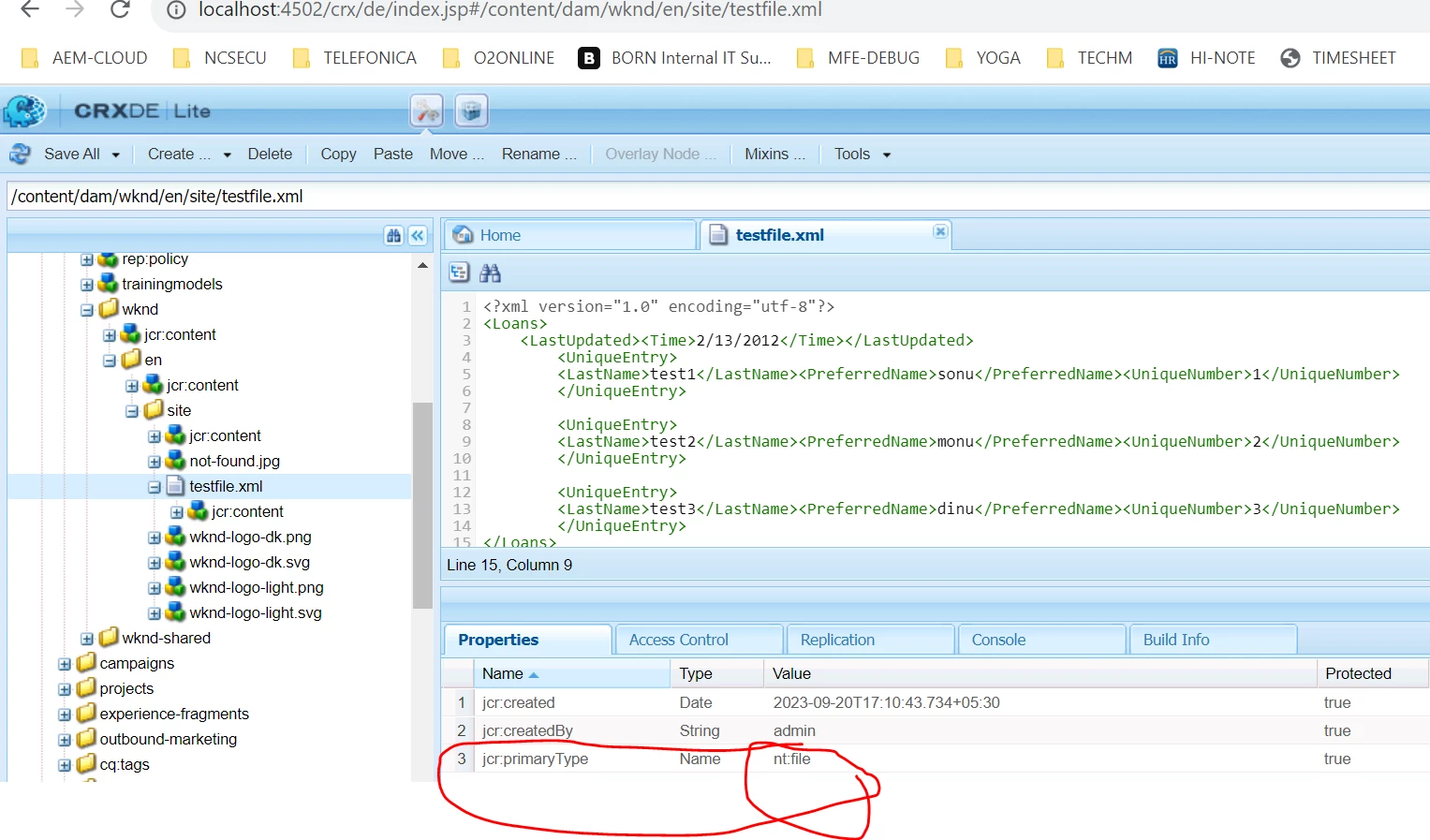


Now , I am calling this firstname , lastname and number inside my servlet, by using below JAVA code.


import java.io.IOException;
 
import javax.jcr.Node;
import javax.servlet.Servlet;
 
import org.apache.http.HttpStatus;
import org.apache.sling.api.SlingHttpServletRequest;
import org.apache.sling.api.SlingHttpServletResponse;
import org.apache.sling.api.resource.Resource;
import org.apache.sling.api.resource.ResourceResolver;
import org.apache.sling.api.resource.ResourceResolverFactory;
import org.apache.sling.api.servlets.HttpConstants;
import org.apache.sling.api.servlets.SlingAllMethodsServlet;
import org.apache.sling.servlets.annotations.SlingServletResourceTypes;
import org.osgi.service.component.annotations.Component;
import org.slf4j.Logger;
import org.slf4j.LoggerFactory;
 
@8220494(service = Servlet.class)
@SlingServletResourceTypes(resourceTypes = { "wknd/components/form/search-unique" }, methods = {
HttpConstants.METHOD_POST }, extensions = "json")
public class SearchUniqueNumberServlet extends SlingAllMethodsServlet {
 
private static final long serialVersionUID = -8864935516234206658L;
 
private final Logger logger = LoggerFactory.getLogger(getClass());
 
ResourceResolverFactory resourceResolverFactory;
ResourceResolver resourceResolver;
 
/**
* @throws IOException
*/
@9944223
public void doPost(SlingHttpServletRequest request, SlingHttpServletResponse response) throws IOException {
logger.info("INSIDE DO POST");
try {
resourceResolver = request.getResourceResolver();
Resource resource = resourceResolver.getResource("/content/dam/wknd/en/site/testfile.xml");
logger.info("resource INSIDE SEARCH ====== " + resource);
Node node = resource.adaptTo(Node.class);
String lastName = node.getProperty("LastName").getString();
logger.info("LastName INSIDE SEARCH  ====== " + lastName);
 
} catch (Exception exception) {
response.setStatus(HttpStatus.SC_INTERNAL_SERVER_ERROR);
response.sendError(HttpStatus.SC_INTERNAL_SERVER_ERROR, exception.getMessage());
}
}
 
}


ISSUE - I am not able to fetch the lastname value from the XML file.

logger.info("LastName INSIDE SEARCH  ====== " + lastName);


Below is my xml file.


************************** testfile.xml ************************

<?xml version="1.0" encoding="utf-8"?>
<Loans>
<LastUpdated><Time>2/13/2012</Time></LastUpdated>
<UniqueEntry>
<LastName>test1</LastName><PreferredName>sonu</PreferredName><UniqueNumber>1</UniqueNumber>
</UniqueEntry>
 
<UniqueEntry>
<LastName>test2</LastName><PreferredName>monu</PreferredName><UniqueNumber>2</UniqueNumber>
</UniqueEntry>
 
<UniqueEntry>
<LastName>test3</LastName><PreferredName>dinu</PreferredName><UniqueNumber>3</UniqueNumber>
</UniqueEntry>
</Loans>
 
Is it something I am not doing correctly ?
This post is no longer active and is closed to new replies. Need help? Start a new post to ask your question.

2 replies

kautuk_sahni
Employee
September 25, 2023

@sunitach Did you find the suggestion from Aanchal helpful? Please let us know if more information is required. Otherwise, please mark the answer as correct for posterity. If you have found out solution yourself, please share it with the community.

Kautuk Sahni
SunitaChAuthor
New Participant
September 26, 2023

@aanchal-sikka and @kautuk_sahni ,


Now all are coming fine, but when I am trying to get only LastName  by using the below code highlighted in red text then I am getting error


@Override
public void doPost(SlingHttpServletRequest request, SlingHttpServletResponse response) throws IOException {
logger.info("INSIDE DO POST");
ObjectMapper objectMapper = new ObjectMapper();
Map<String, Object> responseData = new HashMap<>();
try {
 
String propertyLastNameValue = request.getParameter("lastName");
logger.info("LastName INSIDE SEARCH  ====== " + propertyLastNameValue);
resourceResolver = request.getResourceResolver();
Resource resource = resourceResolver.getResource("/content/dam/wknd/en/site/testfile.xml");
Node fileNode = resource.adaptTo(Node.class);
 
InputStream xmlContent = JcrUtils.readFile(fileNode);
 
DocumentBuilderFactory factory = DocumentBuilderFactory.newInstance();
 
DocumentBuilder builder = factory.newDocumentBuilder();
 
Document doc = builder.parse(xmlContent);
 
Element element = doc.getDocumentElement();
 
logger.info("Root element UniqueEntry : " + element.getElementsByTagName("UniqueEntry"));
 
logger.info("Root element LastName : " + element.getElementsByTagName("LastName"));
 
// get all child nodes
NodeList nodes = element.getChildNodes();
 
for (int i = 0; i < nodes.getLength(); i++) {
logger.info("nodes ==== " + nodes.item(i).getTextContent()); //OUTPUT IS test1sonu1 , test2monu2 and test3dinu3
//logger.info("LASTNAME VALUE from ==== " + element.getElementsByTagName("LastName").item(i).getTextContent());
//responseData.put("LASTNAME :: ", element.getElementsByTagName("LastName").item(i).getTextContent());
}
catch (Exception exception) {
response.setStatus(HttpStatus.SC_INTERNAL_SERVER_ERROR);
response.sendError(HttpStatus.SC_INTERNAL_SERVER_ERROR, exception.getMessage());
}
finally {
response.setContentType("application/json");
response.setHeader("Cache-Control", "nocache");
response.setCharacterEncoding("utf-8");
response.getWriter().println(objectMapper.writeValueAsString(responseData));
}
}
}


aanchal-sikka
New Participant
September 25, 2023

Hello @sunitach 


You would first need to read the XML data from the binary

InputStream xmlContent = fileNode.getProperty(JcrConstants.JCR_DATA).getBinary().getStream();

Reference: https://techrevel.blog/2020/09/19/editing-jcrdata-binary-in-aem/


One the InputStream is available, XML libaries can be used to read the data


// create a new DocumentBuilderFactory DocumentBuilderFactory factory = DocumentBuilderFactory.newInstance(); try { // use the factory to create a documentbuilder DocumentBuilder builder = factory.newDocumentBuilder(); // create a new document from input stream FileInputStream fis = new FileInputStream("Student.xml"); Document doc = builder.parse(fis); // get the first element Element element = doc.getDocumentElement(); // get all child nodes NodeList nodes = element.getChildNodes(); // print the text content of each child for (int i = 0; i < nodes.getLength(); i++) { System.out.println("" + nodes.item(i).getTextContent()); } } catch (Exception ex) { ex.printStackTrace(); }


Aanchal Sikka