Regrding Maven Build Issue In Cloud Pipeline | Community
Skip to main content
New Participant
April 10, 2025
Solved

Regrding Maven Build Issue In Cloud Pipeline

  • April 10, 2025
  • 4 replies
  • 536 views

Dear All,


We are migrating AEM 6.5 to AEM cloud.


We saw below error log in the maven build


Failed to execute goal org.apache.maven.plugins:maven-enforcer-plugin:1.4.1:enforce (enforce-maven) on project


We have updated the java 11 as shown below. Still we are getting build error. 
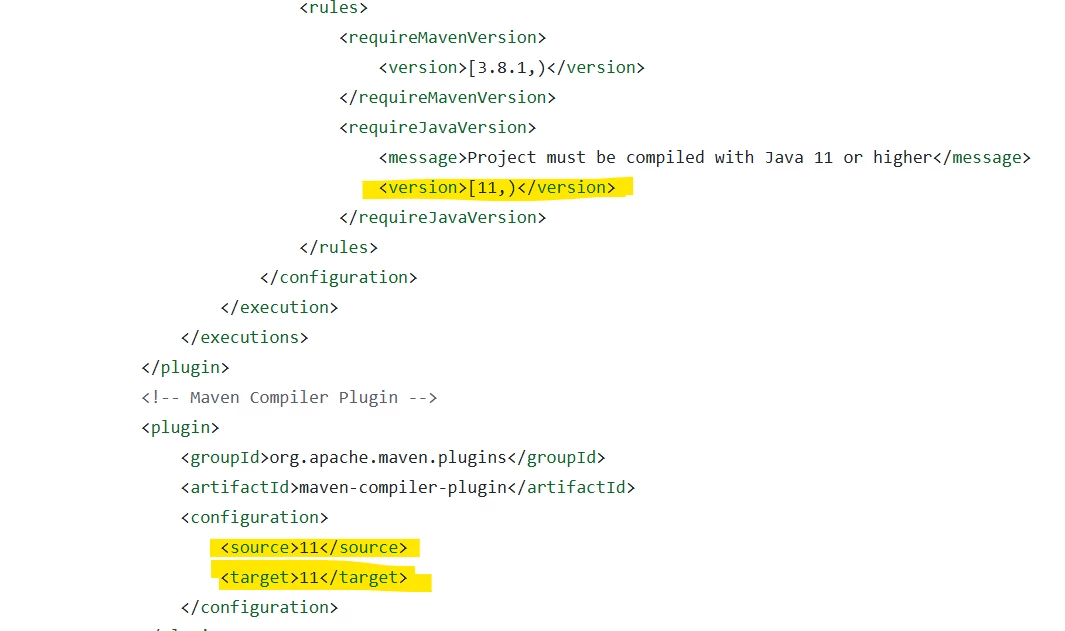


Can anyone please help here.


Thanks in Advance

Best answer by muskaanchandwani

@sunitach2 If the Cloud Manager Pipeline is failing, please refer to the Documentation for setting the Maven JDK Version :
https://experienceleague.adobe.com/en/docs/experience-manager-cloud-service/content/implementing/using-cloud-manager/create-application-project/build-environment-details#using-java-support

4 replies

kautuk_sahni
Employee
June 27, 2025

@sunitach2 Just checking in — were you able to resolve your issue?
We’d love to hear how things worked out. If the suggestions above helped, marking a response as correct can guide others with similar questions. And if you found another solution, feel free to share it — your insights could really benefit the community. Thanks again for being part of the conversation!

Kautuk Sahni
SantoshSai
New Participant
April 15, 2025

HI @sunitach2,

I think you forgot this,

To ensure Cloud Manager uses the correct Java version (Java 11) during the build process, you need to explicitly define it using the .cloudmanager/java-version file.

What to Do

Create a file named:

.cloudmanager/java-version

And add the following exact content inside it:

11

No spaces, no extra lines — just 11.


Hope that helps!

Regards,
Santosh

Santosh Sai
muskaanchandwani
muskaanchandwaniAccepted solution
Employee
April 11, 2025
Harwinder-singh
New Participant
April 10, 2025

@sunitach2 Are you running this build locally or is this error coming out of a pipeline build ?