@keerthana_h_n ,
If I am trying to understand you right, you are trying to embed an image or some kinda HTML to your pages, all pages who uses the "content template".
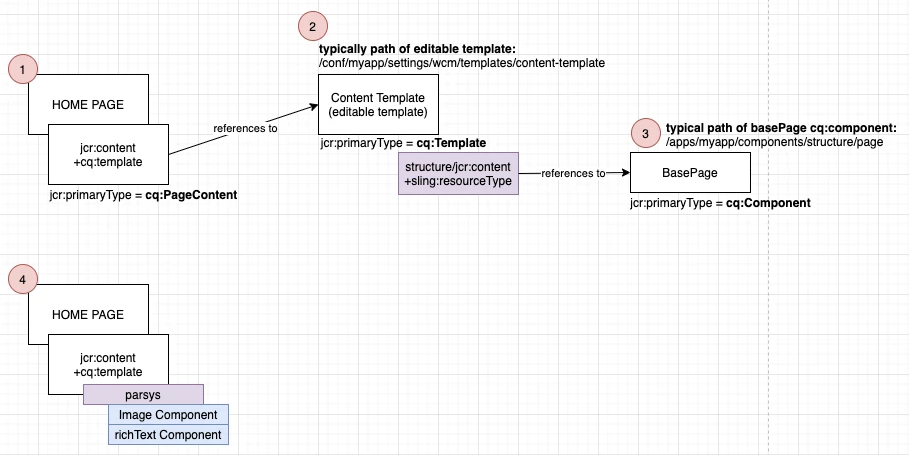
If you look at my diagram, we need to understand first, how the cq:template is being referenced from an AEM page. In this example, we will look at the home page node.
- From the homepage node, under the jcr:content node, you will find a property named cq:template; this value is the reference to the static and/or editable template. In this example, we will focus on the editable templates.
- Typically editable templates (cq:template) lives under /conf/*/wcm/templates/* (which you may have already created). This is where you can set page policies, allowed components, component rules, etc...
- The editable template, under structure/jcr:content has a sling:resourceType reference, which points to the BasePage cq:Component (page component). If you plan to add an image or HTML from here, you can do it with no problem, for example adding <img src="..."/>. Once changes are made in the cq:Component (from a references component), all of your pages that uses references to the cq:Component (page component), will be seeing the image as well. A typical scenario the basePage would be tweaked is when we add an analytics dataLayer to each and every page inside of AEM.
- Best Practice: Typically how we add images to an AEM page will be using components, for example below: an image or a richText component.