Requested profile "autoInstallSinglePackage" does not exist | Community
Skip to main content
New Participant
December 22, 2020
Solved

Requested profile "autoInstallSinglePackage" does not exist

  • December 22, 2020
  • 3 replies
  • 9579 views

I am currently trying to import my project to AEM. I can use the profile "autoInstallPackage" just fine, and the package appears in package manager, but I cannot install it as a single project. I am only able to deploy the ui.apps part of my project to my local AEM instance, despite building the whole project with autoInstallPackage. Does anyone know what may be occurring? Thanks.

This post is no longer active and is closed to new replies. Need help? Start a new post to ask your question.
Best answer by Kiran_Vedantam

Hi @iosborne,


Trying to understand your question: Whenever you are doing a build, you are only seeing ui.apps package but not other packages right?


So in AEM, specific code/content/assets will be placed in different modules. Please check the module details below
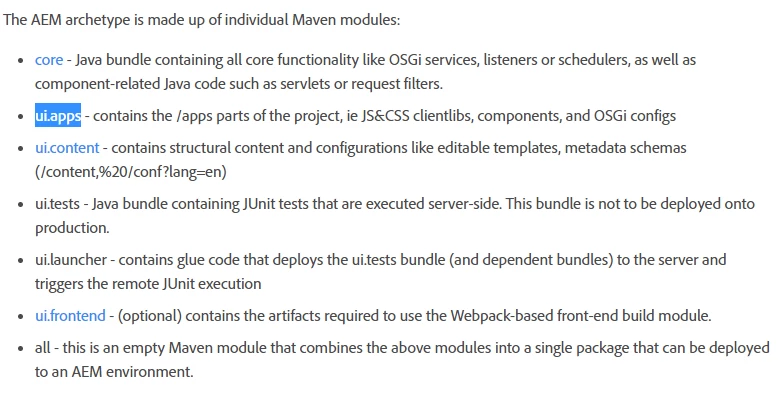
 

To install all the modules add them in the module section of your main pom.xml. Also, add a new profile to your main pom.xml for the ID that you are mentioning to get activated 

<profile>
<id>autoInstallSinglePackage</id>
<activation>
<activeByDefault>false</activeByDefault>
</activation>
<build>
<plugins>
<plugin>
<groupId>com.day.jcr.vault</groupId>
<artifactId>content-package-maven-plugin</artifactId>
<executions>
<execution>
<id>install-package</id>
<goals>
<goal>install</goal>
</goals>
<configuration>
<targetURL>http://${aem.host}:${aem.port}/crx/packmgr/service.jsp</targetURL>
<failOnError>true</failOnError>
</configuration>
</execution>
</executions>
</plugin>
</plugins>
</build>
</profile>


For more info on maven commands, visit my blog here.


Thanks,

Kiran Vedantam.


3 replies

New Participant
December 24, 2020

In case you have multiple module in project and want to install all package in single run, you can add those modules entry in profile, that profile will run all the modules in same sequence and install it in aem.

<profile>
   <id>install-all-modules</id>
   <modules>
      <module>module1</module>
      <module>module2</module>
   </modules>
</profile>


Regards
Praveen

Kiran_Vedantam
Kiran_VedantamAccepted solution
New Participant
December 23, 2020

Hi @iosborne,


Trying to understand your question: Whenever you are doing a build, you are only seeing ui.apps package but not other packages right?


So in AEM, specific code/content/assets will be placed in different modules. Please check the module details below


To install all the modules add them in the module section of your main pom.xml. Also, add a new profile to your main pom.xml for the ID that you are mentioning to get activated 

<profile>
<id>autoInstallSinglePackage</id>
<activation>
<activeByDefault>false</activeByDefault>
</activation>
<build>
<plugins>
<plugin>
<groupId>com.day.jcr.vault</groupId>
<artifactId>content-package-maven-plugin</artifactId>
<executions>
<execution>
<id>install-package</id>
<goals>
<goal>install</goal>
</goals>
<configuration>
<targetURL>http://${aem.host}:${aem.port}/crx/packmgr/service.jsp</targetURL>
<failOnError>true</failOnError>
</configuration>
</execution>
</executions>
</plugin>
</plugins>
</build>
</profile>


For more info on maven commands, visit my blog here.


Thanks,

Kiran Vedantam.


shelly-goel
Employee
December 22, 2020

@iosborne 

Please confirm which archetype you're using and does your project have a 'all' module with pom.xml having 'autoInstallSinglePackage' profile as below? The error you've shared suggest that this profile doesn't exist.

<profiles>
<profile>
<id>autoInstallSinglePackage</id>
<activation>
<activeByDefault>false</activeByDefault>
</activation>
<build>
<plugins>
<plugin>
<groupId>com.day.jcr.vault</groupId>
<artifactId>content-package-maven-plugin</artifactId>
<executions>
<execution>
<id>install-package</id>
<goals>
<goal>install</goal>
</goals>
<configuration>
<targetURL>http://${aem.host}:${aem.port}/crx/packmgr/service.jsp</targetURL>
<failOnError>true</failOnError>
</configuration>
</execution>
</executions>
</plugin>
</plugins>
</build>
</profile>