Rich Text Custom Plugin | Community
Skip to main content
Level 5
Feb 23, 2023 12:12 PM UTC
Solved

Rich Text Custom Plugin

Hi @arunpatidar ,


I hope you doing well.


I was following your article https://aemlab.blogspot.com/2019/07/aem-rte-custom-plugins-1.html.


AEM 6.5.13.


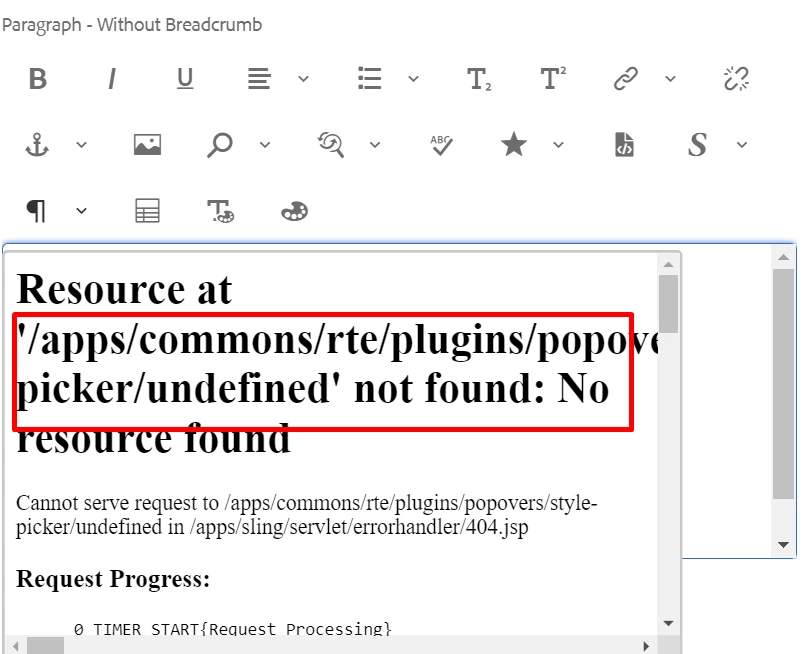
A)In Style Picker, close (x) and tick (✓) button does not work. When we try to click, it gives below error:
"Resource at '/apps/commons/rte/plugins/popovers/style-picker/undefined' not found: No resource found"

B) Remove style button: After we add a style using "Add property" button. Next time, if we want to remove this style from same text, It does not pre-select style in dropdown that was selected while using "Add styles button".


Screen Below:


Thanks a lot in advance.

 

This post is no longer active and is closed to new replies. Need help? Start a new post to ask your question.
arunpatidar
arunpatidarAccepted solution
New Participant
Feb 24, 2023 9:28 AM UTC

Hi,

Did you see, any console errors in the browser ? 

Those buttons were removed using javascript in this plugin(you can check gif in the blog) and close button has event to close the popup.
Seems like might be issue with underscore js. 

Arun Patidar

6 replies

arunpatidar
New Participant
Feb 24, 2023 9:29 AM UTC

yes, styles are not pre selected, I will try to fix this.

Translate
Arun Patidar
arvind-1Author
Level 5
Feb 24, 2023 12:34 PM UTC

we will fix it and share fully functional package  shortly.

Translate
arunpatidar
New Participant
Feb 25, 2023 9:23 AM UTC

you can trying adding another action on load to get the value and set the options 


sendDataMessage("load");


if (action === "load") { console.log('inside load : ' + inline); var $targetNode = startNode.nodeType == 3 ? $(startNode).parent() : $(startNode); var classList =$targetNode.attr('class').split(' '); $stylePicker = jQuery(document).find('.coral3-Select[name="./style"]'); $stylePicker.items.each({ console.log($(this)) // set values })


Translate
Arun Patidar
SivakumarKanoori
New Participant
Feb 23, 2023 12:55 PM UTC

@arvind-1 

Did you check , the below 2 paths are existing or not.


  • /apps/commons/rte/plugins/popovers/style-picker/datasource
  • /apps/commons/rte/plugins/popovers/style-picker/options.json'


Datasource is a JSP file which read json specified in options property and populates dropdown option for Style Picker plugin.
JSON file should have an array of elements in below format:

If want to show as Heading/Category use below format(value could be anything)
    {"text": "Background Color","value": "BTC","heading": "true"}


If Option

    {"text": "White","value": "white"}

Example : /apps/commons/rte/plugins/popovers/style-picker/options.json


[
    {"text": "Background Color","value": "BTC","heading": "true"},
    {"text": "White","value": "white"},
    {"text": "Black","value": "black"},
    {"text": "Green","value": "green"},
    {"text": "Orange","value": "orange"},
    {"text": "Light Grey","value": "lightgrey"},
    {"text": "List Style","value": "LS","heading": "true"},
    {"text": "Check","value": "list-checked"},
    {"text": "Cross","value": "list-crossed"},
    {"text": "Link Style","value": "LS","heading": "true"},
    {"text": "Primary","value": "btn-primary"},
    {"text": "Secondary","value": "btn-secondary"}
]


Thanks ,

Siva

Translate
Thanks,Siva
arvind-1Author
Level 5
Feb 23, 2023 3:07 PM UTC

@sivakumarkanoori  

Thanks for your kind reply. All Paths exist in AEM.


Issue is bit different. Not Data source .

If you could see below Gif FILE, when we try to close (X), It gives error.


FYI: @arunpatidar 

Translate
arunpatidar
arunpatidarAccepted solution
New Participant
Feb 24, 2023 9:28 AM UTC

Hi,

Did you see, any console errors in the browser ? 

Those buttons were removed using javascript in this plugin(you can check gif in the blog) and close button has event to close the popup.
Seems like might be issue with underscore js. 

Translate
Arun Patidar