Rich text editor plugins not visible on touch UI | Community
Skip to main content
Level 2
Jul 19, 2018 1:47 PM UTC
Solved

Rich text editor plugins not visible on touch UI

Hello everyone,

I found this article: RTE plugin menu is not visible until you click inside the RTE textarea in AEM 6.3 touch UI dialog

where I read that for multiple RTE this is not a bug, but a feature. But still... Guys, can I display my single rte-plugin menu after I just open my component in aem 6.4?

Following are the screenshots for your reference:

1) When the dialog is loaded
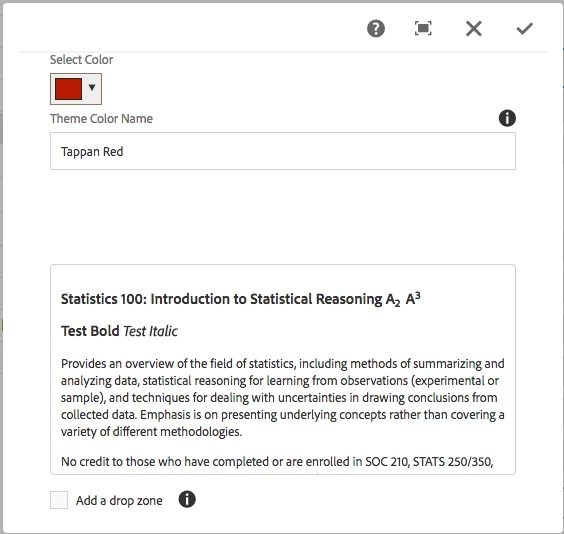
2) When I click inside the text area
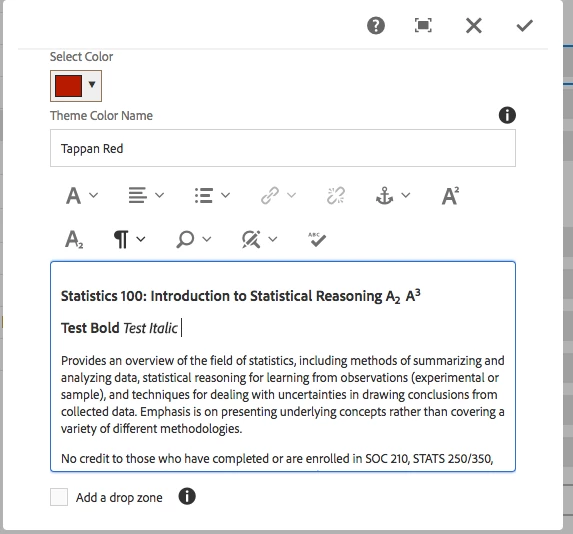
Thanks,

Dmitriy.

This post is no longer active and is closed to new replies. Need help? Start a new post to ask your question.
arunpatidar
arunpatidarAccepted solution
New Participant
Jul 19, 2018 3:53 PM UTC

Hi,

You can do it with CSS.

create/modify existing client libs css of category 'cq.authoring.dialog' and add below code snippet.

.cq-dialog-content .rte-ui .rte-toolbar {
  1.    visibility: visible!important;
Arun Patidar

5 replies

Aby_Ebin
New Participant
Jun 11, 2019 3:14 AM UTC

smacdonald2008​ : Does source edit work in RTE  in Design mode  ?

Translate
smacdonald2008
Level 10
Jul 20, 2018 12:10 AM UTC

Arun is correct!

Translate
arunpatidar
New Participant
Jul 19, 2018 7:53 PM UTC

Hi Dmitriy,

Glad to hear that, it works.

Just addition to your query -

RTE plugin is pure Javascript based.

You can though modify OOTB JS file to make is visible RTE on dialog load.

But I think using CSS is cleaner and easy way, you can disable whenever you want by commenting code or deleting file without impacting OOTB files.

But yes we can wait for other response then you can decide and use whichever solution suites best for your requirement.

Thanks

Arun

Translate
Arun Patidar
Level 2
Jul 19, 2018 7:25 PM UTC

Hi, yep, it works for me) thank you. But I think there are may be any more proper way to do this (may be by some configs).)

If I don't get other answers - I will mark yours as best one.

Thanks again,

Dmitriy.

Translate
arunpatidar
arunpatidarAccepted solution
New Participant
Jul 19, 2018 3:53 PM UTC

Hi,

You can do it with CSS.

create/modify existing client libs css of category 'cq.authoring.dialog' and add below code snippet.

.cq-dialog-content .rte-ui .rte-toolbar {
  1.    visibility: visible!important;
Translate
Arun Patidar