rte in multiline in composite multifield in content fragment | Community
Skip to main content
New Participant
October 8, 2021
Solved

rte in multiline in composite multifield in content fragment

  • October 8, 2021
  • 3 replies
  • 2819 views

Hi ,

I have created a composite multiefield in content fragment. one of my field is multieditor . i want to add rte plugin in that editor. Is there a way i can do that. Basically  i am trying  to add RTE in multifield in CF .  Plz let me know as i could not find anything on this 

This post is no longer active and is closed to new replies. Need help? Start a new post to ask your question.
Best answer by Asutosh_Jena_

Hi @learningguy 


We can add multifield with richtext inside a content fragment as it uses the same resource type i.e., cq/gui/components/authoring/dialog/richtext


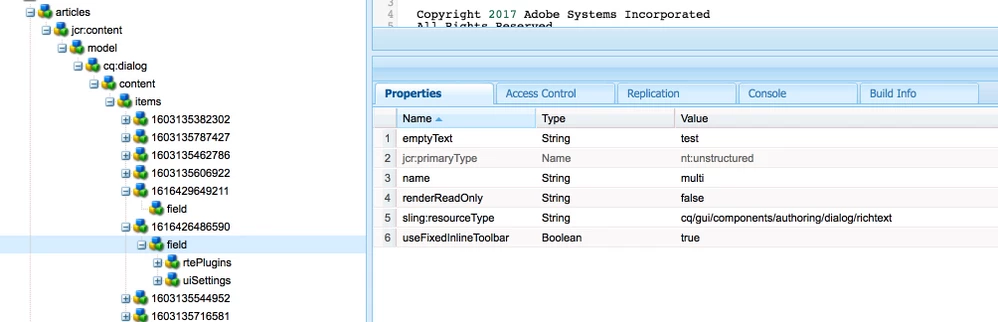
It works with multifield after configuring the content fragment model using (content reference widget --> and configure it for multifield) default will come with text field. Now go to your model its created for example /conf/someproject/setting/dam... and then change the configuration of "field" node under multifield node as shown below.


Make sure the mulfield node and field node has same "name" configured as it comes already configured when you create model.


Thanks!

3 replies

maddy_23
New Participant
April 20, 2023

@learningguy  let me know if your code is working. I have same requirement. There is a Content Fragment having composite multifield with 3 fields(2 text, and 1 RTE).

New Participant
December 28, 2023

Hi @maddy_23 

If you are able to find the solution to this problem.

Can it be possible to share the code snippet for dialog ?


Thank  you

Asutosh_Jena_
Asutosh_Jena_Accepted solution
New Participant
October 10, 2021

Hi @learningguy 


We can add multifield with richtext inside a content fragment as it uses the same resource type i.e., cq/gui/components/authoring/dialog/richtext


It works with multifield after configuring the content fragment model using (content reference widget --> and configure it for multifield) default will come with text field. Now go to your model its created for example /conf/someproject/setting/dam... and then change the configuration of "field" node under multifield node as shown below.


Make sure the mulfield node and field node has same "name" configured as it comes already configured when you create model.


Thanks!

New Participant
October 11, 2021

Hi Ashutosh,

I tried above approach but somehow it is not working. So my multifield has 3-4 field so in the field node I am using granite/ui/components/foundation/include to include those 3-4 field( which is created under apps). and in one of field I am using resource type to richtext and added all plugin node . But still my fragments just show the label of richtext with everything greyed out.

Sanjay_Bangar
New Participant
October 9, 2021
New Participant
October 11, 2021

Hi Sanjay,

I tried above approach but somehow it is not working. So my multifield has 3-4 field so in the field node I am using granite/ui/components/foundation/include to include those 3-4 field( which is created under apps). and in one of field I am using resource type to richtext and added all plugin node . But still my fragments just show the label of richtext with everything greyed out.