RTE Issue with AEM Cloud | Community
Skip to main content
New Participant
September 25, 2020
Solved

RTE Issue with AEM Cloud

  • September 25, 2020
  • 2 replies
  • 3202 views

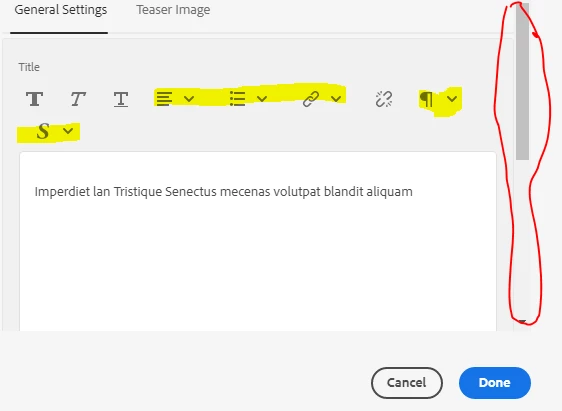
Team , I am facing weird issue while adding a rte component in dialog field.

Issue : If I click on the highlighted feature(i.e. which has dropdown box) it doesn't allow us to scroll down and getting the below error message on console.


`preventOverflow` modifier is required by `hide` modifier in order to work, be sure to include it before `hide`! coralui3.min.js


This post is no longer active and is closed to new replies. Need help? Start a new post to ask your question.
Best answer by ChitraMadan

Hi @sathyaprakasha2 ,


This has been fixed in 6.4.8

Please refer to NPR-27579

AEM 6.4 Service Pack Release Notes


Workaround, just in case you can't install SP at the moment:

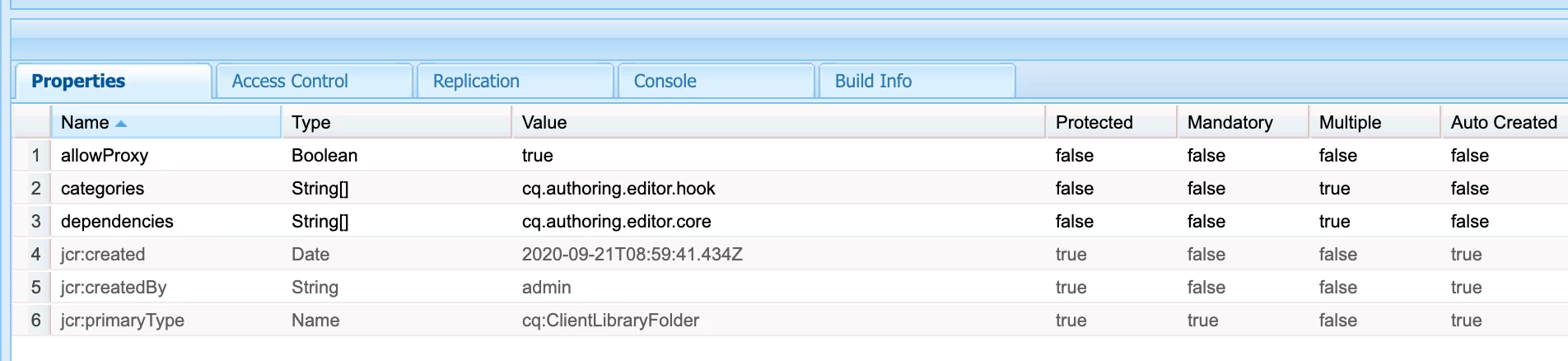
Create a clientlib


Create a css file with this code

.cq-Dialog:not([fullscreen]) .cq-RichText-editable {
height: 20rem !important;
}

2 replies

arunpatidar
New Participant
September 27, 2020

what version of SDK are you using? I am using  2020.6.3800.20200626T210738Z-200604

and did not see the issue.

Arun Patidar
AEMLearner-1989
New Participant
September 28, 2020
Hi Arun , Thanks for your reply ..I am using 2020.7.3981.20200731T205128Z.... I thought the issue du to popper.js but when we inject the same component on fresh instance.. it not working... its working fine on aem 6.5 and 6.4
ChitraMadan
ChitraMadanAccepted solution
New Participant
September 25, 2020

Hi @sathyaprakasha2 ,


This has been fixed in 6.4.8

Please refer to NPR-27579

AEM 6.4 Service Pack Release Notes


Workaround, just in case you can't install SP at the moment:

Create a clientlib


Create a css file with this code

.cq-Dialog:not([fullscreen]) .cq-RichText-editable {
height: 20rem !important;
}

New Participant
September 25, 2020
Hi, Still I am facing the issue.. the above css is loading....