
servlet with xml extension not working | Community
Skip to main content
Keerthi0555
New Participant
August 3, 2023
Solved

servlet with xml extension not working

  • August 3, 2023
  • 4 replies
  • 1231 views

Hi Team,


I tried servlet with extension as xml as below ,but it's not working 

@Component(service=Servlet.class,
property={
        Constants.SERVICE_DESCRIPTION+"=Servlet to render asset data in xml",
        ServletResolverConstants.SLING_SERVLET_RESOURCE_TYPES + "=mysite/components/text",
        ServletResolverConstants.SLING_SERVLET_METHODS + "=GET",
        ServletResolverConstants.SLING_SERVLET_EXTENSIONS + "=xml",
        ServletResolverConstants.SLING_SERVLET_SELECTORS + "=index"
})
public class SiteMapIndexServlet extends SlingAllMethodsServlet {

    @Override
    protected void doGet(SlingHttpServletRequest request, SlingHttpServletResponse response)
            throws ServletException, IOException {
        response.setContentType("text/xml");
        ResourceResolver resourceResolver = request.getResourceResolver();
        String path = request.getRequestParameter("path").toString();
        response.getWriter().print("hello World!!");
        response.setStatus(SlingHttpServletResponse.SC_OK);
    }
}
 
//It is showing below error

This page contains the following errors:

error on line 1 at column 1: Document is empty
Below is a rendering of the page up to the first error.

This post is no longer active and is closed to new replies. Need help? Start a new post to ask your question.
Best answer by Sady_Rifat

Hello @keerthi0555 ,

The problem is the incomplete XML file format you want to print. That's why it gives an error. To solve this you can follow this code snippet which will help you to complete your sitemap code,

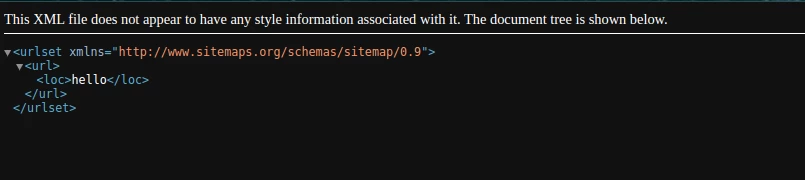
private static final String NS = "http://www.sitemaps.org/schemas/sitemap/0.9"; @Override protected void doGet(SlingHttpServletRequest request, SlingHttpServletResponse response) throws IOException { final XMLOutputFactory outputFactory = XMLOutputFactory.newFactory(); try { final XMLStreamWriter stream = outputFactory.createXMLStreamWriter(response.getWriter()); stream.writeStartDocument("1.0"); stream.writeStartElement("", "urlset", NS); stream.writeNamespace("", NS); // Loop & Make you Sitemap code stream.writeStartElement(NS, "url"); this.writeElement(stream, "loc", request.getRequestParameter("path").toString()); stream.writeEndElement(); stream.writeEndDocument(); response.setContentType("text/xml"); } catch (XMLStreamException e) { log.error("Error"); } } private void writeElement(final XMLStreamWriter stream, final String elementName, final String text) throws XMLStreamException { stream.writeStartElement(NS, elementName); stream.writeCharacters(text); stream.writeEndElement(); }

After running this code you will get the following output,

Now, you can change your code based on your requirement.

I hope this helps you.

4 replies

aanchal-sikka
New Participant
August 3, 2023

Hello @keerthi0555 


The error message "error on line 1 at column 1: Document is empty" typically indicates that the XML response received by the AEM) Servlet is empty or not well-formed.


Can you try with this please

import java.io.IOException; import java.io.PrintWriter; import javax.servlet.Servlet; import javax.servlet.ServletException; import org.apache.sling.api.SlingHttpServletRequest; import org.apache.sling.api.SlingHttpServletResponse; import org.apache.sling.api.servlets.SlingSafeMethodsServlet; import org.osgi.service.component.annotations.Component; @Component(service=Servlet.class, property={ Constants.SERVICE_DESCRIPTION+"=Servlet to render asset data in xml", ServletResolverConstants.SLING_SERVLET_RESOURCE_TYPES + "=mysite/components/text", ServletResolverConstants.SLING_SERVLET_METHODS + "=GET", ServletResolverConstants.SLING_SERVLET_EXTENSIONS + "=xml", ServletResolverConstants.SLING_SERVLET_SELECTORS + "=index" }) public class SiteMapIndexServlet extends SlingAllMethodsServlet { private static final long serialVersionUID = 1L; @Override protected void doGet(SlingHttpServletRequest request, SlingHttpServletResponse response) throws ServletException, IOException { response.setContentType("application/xml"); PrintWriter out = response.getWriter(); out.println("<?xml version=\"1.0\" encoding=\"UTF-8\"?>"); out.println("<books>"); out.println(" <book>"); out.println(" <title>Book One</title>"); out.println(" <author>Author One</author>"); out.println(" <publication>Publication One</publication>"); out.println(" </book>"); out.println(" <book>"); out.println(" <title>Book Two</title>"); out.println(" <author>Author Two</author>"); out.println(" <publication>Publication Two</publication>"); out.println(" </book>"); out.println("</books>"); response.setStatus(SlingHttpServletResponse.SC_OK); } }


Aanchal Sikka
Sady_Rifat
Sady_RifatAccepted solution
New Participant
August 3, 2023

Hello @keerthi0555 ,

The problem is the incomplete XML file format you want to print. That's why it gives an error. To solve this you can follow this code snippet which will help you to complete your sitemap code,

private static final String NS = "http://www.sitemaps.org/schemas/sitemap/0.9"; @Override protected void doGet(SlingHttpServletRequest request, SlingHttpServletResponse response) throws IOException { final XMLOutputFactory outputFactory = XMLOutputFactory.newFactory(); try { final XMLStreamWriter stream = outputFactory.createXMLStreamWriter(response.getWriter()); stream.writeStartDocument("1.0"); stream.writeStartElement("", "urlset", NS); stream.writeNamespace("", NS); // Loop & Make you Sitemap code stream.writeStartElement(NS, "url"); this.writeElement(stream, "loc", request.getRequestParameter("path").toString()); stream.writeEndElement(); stream.writeEndDocument(); response.setContentType("text/xml"); } catch (XMLStreamException e) { log.error("Error"); } } private void writeElement(final XMLStreamWriter stream, final String elementName, final String text) throws XMLStreamException { stream.writeStartElement(NS, elementName); stream.writeCharacters(text); stream.writeEndElement(); }

After running this code you will get the following output,

Now, you can change your code based on your requirement.

I hope this helps you.

Nishant-Singh
Employee
August 3, 2023

you need to provide XML structure of the response. example - 

<?xml version="1.0" encoding="UTF-8"?>
<aem>
  <message>Hello world</message>
</aem>

Ritesh_Mittal
New Participant
August 3, 2023