Set default value for tags in AEM cloud | Community
Skip to main content
New Participant
June 19, 2023
Solved

Set default value for tags in AEM cloud

  • June 19, 2023
  • 4 replies
  • 1446 views

Hi team,

I want to set default value for cq:tags for the below resource typecq/gui/components/coral/common/form/tagfield


Could someone tell me is there any way to set it through properties or any other approach please?

Thank you
This post is no longer active and is closed to new replies. Need help? Start a new post to ask your question.
Best answer by AsifChowdhury

Hello @lakshmi99 

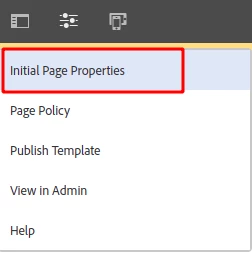
If you want default value/values in the tag field in the page properties, you can set the value in the template level in the "initial page properties".

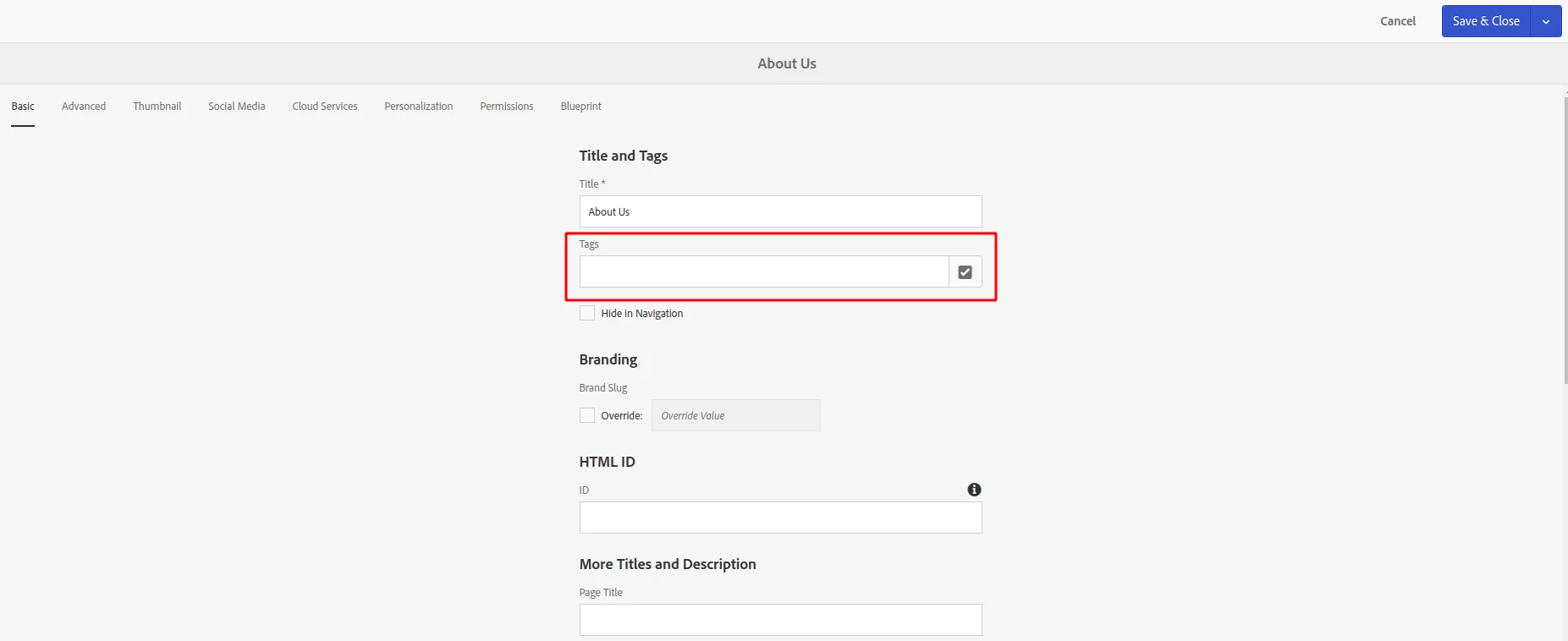
In the Initial Page Properties, you will find a similar window like normal page properties. And here you can set the default tags.

And when you will create any page using this template you will get the default tags that you provided earlier in the template level. You can remove or add new in page properties.


Regards

Asif Ahmed Chowdhury

Brain Station 23 Ltd.

4 replies

AsifChowdhury
AsifChowdhuryAccepted solution
New Participant
June 20, 2023

Hello @lakshmi99 

If you want default value/values in the tag field in the page properties, you can set the value in the template level in the "initial page properties".

In the Initial Page Properties, you will find a similar window like normal page properties. And here you can set the default tags.

And when you will create any page using this template you will get the default tags that you provided earlier in the template level. You can remove or add new in page properties.


Regards

Asif Ahmed Chowdhury

Brain Station 23 Ltd.

Tanika02
New Participant
June 19, 2023

Hello @lakshmi99 


You can try leveraging below client-library : 


(function ($) { $(document).on('foundation-contentloaded', function () { var tagField = $('.cq-TagField'); if (tagField.length > 0) { tagField.each(function () { var field = $(this); var tags = field.find('.tag-manager-tags').data('foundationTags'); var defaultValue = ['defaultTag1', 'defaultTag2']; // Set your desired default tags here tags.addValue(defaultValue); }); } }); }(jQuery));


In this code, you're using jQuery to listen for the foundation-contentloaded event, which ensures that the script is executed after the Coral UI components have been initialized. It then finds all instances of the cq-TagField class and sets the default value by calling the addValue() method on the tag manager.

Kiran_Vedantam
New Participant
June 19, 2023
EstebanBustamante
New Participant
June 19, 2023

Here are some alternatives: 


1.) Use the cq:template to set a default value when the component is dropped, you can find more info  here: http://www.sgaemsolutions.com/2018/02/cqtemplate-and-cqtemplatepath.html 

2) You could add a default value through your code (not really good but it will work). For example, in your SlingModel, you could add some condition to check if the list is empty, then return the default list, 

3) You could hook the dialog to add a custom value if nothing is entered before submitting the dialog.


Esteban Bustamante