Smart Tags for AEMaaCS is not working | Community
Skip to main content
New Participant
March 8, 2023
Solved

Smart Tags for AEMaaCS is not working

  • March 8, 2023
  • 2 replies
  • 2258 views

When I'm trying, the tags are getting trained successfully but it is not automatically applying tags to the relevant assets.

Also, whenever I'm uploading new assets the tags are not getting assigned automatically.


I'm following all the steps mentioned here, but it's not working:

https://experienceleague.adobe.com/docs/experience-manager-cloud-service/content/assets/manage/smart-tags.html?lang=en


Here is the setting of my "Asset Processing" under "Properties" of the folder 
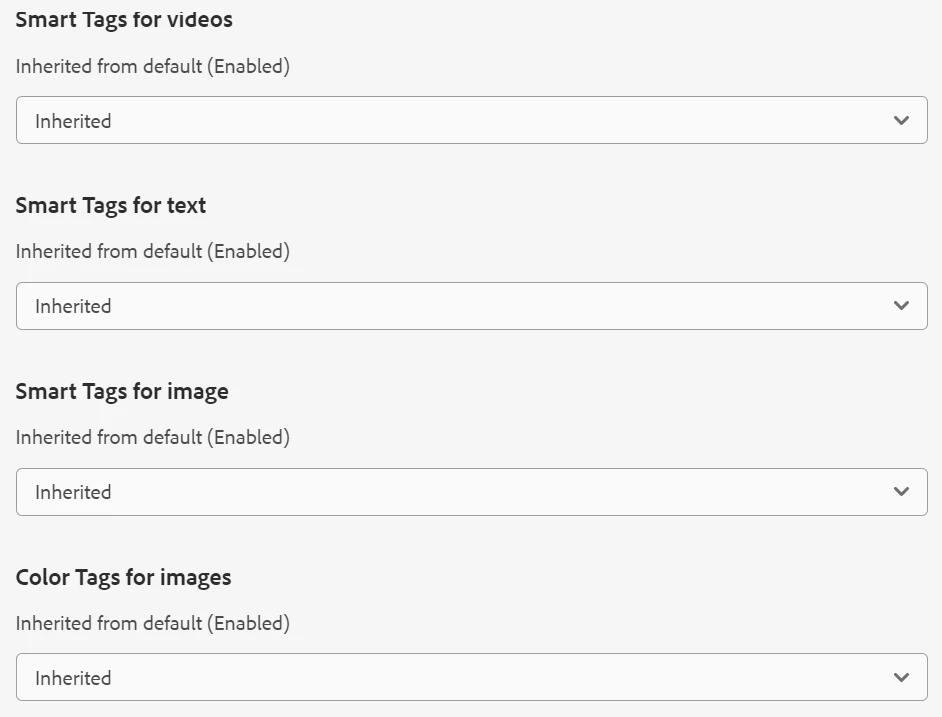
 

is there anything else that I have to do ? any other settings that I have to enable ?

This post is no longer active and is closed to new replies. Need help? Start a new post to ask your question.
Best answer by vivekanand-mish

Have you done necessary configuration with smart content service? I suggest validate your configuration and check logs for any error. You can refer these links -[0], [1].


Also, you have configured Asset Processing as inherited. Can you check if you have enabled it at the top folder somewhere.


[0]- https://experienceleague.adobe.com/docs/experience-manager-65/assets/administer/config-smart-tagging.html?lang=en 

[1] - https://techrevel.blog/2019/10/21/smart-tags/ 

2 replies

vivekanand-mishAccepted solution
Employee
March 9, 2023

Have you done necessary configuration with smart content service? I suggest validate your configuration and check logs for any error. You can refer these links -[0], [1].


Also, you have configured Asset Processing as inherited. Can you check if you have enabled it at the top folder somewhere.


[0]- https://experienceleague.adobe.com/docs/experience-manager-65/assets/administer/config-smart-tagging.html?lang=en 

[1] - https://techrevel.blog/2019/10/21/smart-tags/ 

New Participant
October 4, 2023

I'm seeing the same issue ion my AEM as a Cloud Service.  These should be enabled by default.  All of my settings are inherited and enabled yet we have folders with no smart tags.

DPrakashRaj
New Participant
October 4, 2023

Is this happening for all assets in the folder?

can you check with selecting the option as Enable from the drop-down of folder property?

DPrakashRaj
New Participant
March 9, 2023

Can you check if the dam assets folder on which you are trying to have smart tag have enable Smart Tag checkbox checked.