
Sorting in Touch Component | Community
Skip to main content
akhilraj
Level 5
Jun 14, 2022 2:16 PM UTC
Solved

Sorting in Touch Component

Hi Team We have a classic component with dynamic values, and having some title tabs in it and which is having sorting functionality(Ascending/Descending)
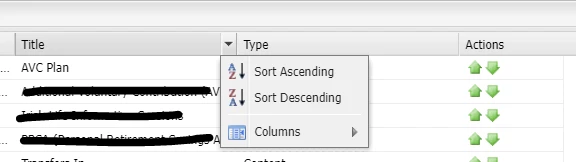
 

How this kind of sorting can be achieved in Touch dialogs? Any Idea is really helpful.

 

This post is no longer active and is closed to new replies. Need help? Start a new post to ask your question.
Kiran_Vedantam
Kiran_VedantamAccepted solution
New Participant
Jun 14, 2022 3:51 PM UTC

Hi @akhilraj 


Please check this link: https://adobe-consulting-services.github.io/acs-aem-commons/features/sort-nodes/index.html


It has OOTB ACS commons sorting and also some code that you can leverage.


Hope this helps!


Thanks,

Kiran Vedantam.

3 replies

SantoshSai
New Participant
Jun 15, 2022 12:54 AM UTC

Hi @akhilraj ,

In classic UI (ExtJS) your component might be referring to 

/libs/cq/reporting/components/columnbase/columnbase.jsp

which looks responsible for sorting. However, If you wish to achieve it in Granite Touch UI you have to customize it.

Please refer one of component from we-retail - Product Grid.

Hope that helps!

Regards,

Santosh

Translate
Santosh Sai
Kiran_Vedantam
Kiran_VedantamAccepted solution
New Participant
Jun 14, 2022 3:51 PM UTC

Hi @akhilraj 


Please check this link: https://adobe-consulting-services.github.io/acs-aem-commons/features/sort-nodes/index.html


It has OOTB ACS commons sorting and also some code that you can leverage.


Hope this helps!


Thanks,

Kiran Vedantam.

Translate
Employee
Jun 14, 2022 3:41 PM UTC

One thing that you can try is having the oak index defined with ordered property.

Translate