Special Characters Search using Querybuilder | Community
Skip to main content
sai_kumart66079
New Participant
August 3, 2018
Solved

Special Characters Search using Querybuilder

  • August 3, 2018
  • 17 replies
  • 12000 views

Hi All,

I have a query regarding the search in JCR:content,

1. In the AEM using QueryBuilder. When I try searching with keyword "

KalmKap®" the trademark symbols are not getting searched. Instead of that it is searching for the keyword "Kalmkap".

2. The special characters like "[", "]", "{", "}", and many..... my search is not working...

Below is my Query::

group.1_fulltext.relPath=jcr:content/@jcr:title

group.1_fulltext=[KalmKap]

group.1_fulltext.relPath=jcr:content/@jcr:title

group.1_fulltext=KalmKap®

kindly help me out on this........
This post is no longer active and is closed to new replies. Need help? Start a new post to ask your question.
Best answer by arunpatidar

If you want to do this only with QueryBuilder then create custom predicate

e.g.

Code:

aem63app-repo/CaseInsensitiveLikePredicate.java at master · arunpatidar02/aem63app-repo · GitHub

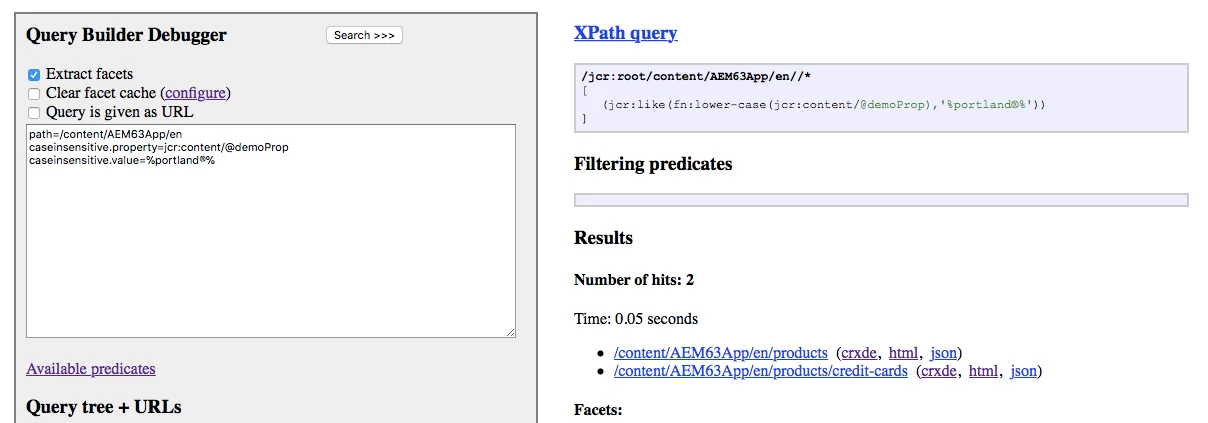
Query

path=/content/we-retail/us/en/products

caseinsensitive.property=jcr:content/@jcr:title

caseinsensitive.value=%portland®%

17 replies

arunpatidar
New Participant
August 21, 2018

Hi,

JCR XPATH only support few function, If you want better control over searching and querying the JCR, then use the JCR API SQL2 or the Query Builder

Arun Patidar
sai_kumart66079
New Participant
August 21, 2018

Thanks Arun Patidar​ The above worked well... I'm able to fetch all the expected results....

Still I'm stuck at one point. How can I limit the search result in XPath, like "guessTotal" in queryBuilder.

smacdonald2008
New Participant
August 20, 2018

Nice suggestion and a correct answer

arunpatidar
arunpatidarAccepted solution
New Participant
August 20, 2018

If you want to do this only with QueryBuilder then create custom predicate

e.g.

Code:

aem63app-repo/CaseInsensitiveLikePredicate.java at master · arunpatidar02/aem63app-repo · GitHub

Query

path=/content/we-retail/us/en/products

caseinsensitive.property=jcr:content/@jcr:title

caseinsensitive.value=%portland®%

Arun Patidar
arunpatidar
New Participant
August 20, 2018

Hi,

fn:lower-case is not supported anymore with QueryBuilder.

Though you can use same with Xpath like below.

/jcr:root/content/we-retail/us/en/products//element(*, cq:Page)

[

(jcr:like(fn:lower-case(jcr:content/@jcr:title), '%portland®%'))

]

Arun Patidar
sai_kumart66079
New Participant
August 20, 2018

Hi Arun,

Using like operator is case sensitive. Please provide any suggestion to make it case insensitive. I tried using

property=fn:lower-case(jcr:content/@jcr:title)

property.value=%kalmkap®%

property.operation=like

but it didn't generate the X-Path in query debugger and no results found.

Any suggestions for using query builder.

cc: Techaspect Solutions

Thanks,

Sai Kumar.

sai_kumart66079
New Participant
August 7, 2018

Thanks Techaspect Solutions​, Arun Patidar​...

Using like operator it is working as expected.

Thanks,

Sai.

arunpatidar
New Participant
August 6, 2018

Hi,

Can you try above query suggested by

/jcr:root/content/we-retail/us/en/products//element(*, cq:Page)

[

(jcr:like(jcr:content/@jcr:title, '%Portland®%'))
]

For Java you can either use QueryBuilderAPI or SQL2 queries.

9 JCR-SQL2 Queries Every AEM Developer Should Know - Blog - 6D Global

https://helpx.adobe.com/experience-manager/using/querying-experience-manager-data-using1.html

http://drfits.com/jcr-sql2-query-with-examples/

Thanks

Arun

Arun Patidar
sai_kumart66079
New Participant
August 6, 2018

Hi Arun Patidar

I tried your method, still i'm not getting expected results..

Below without (®)?

With (®)?

Can you provide reference for JAVA API Search.

Thanks,

Sai.

Techaspect_Solu
New Participant
August 6, 2018

Hi,

We could achieve your requirement by using the below query. We'd suggest you to give it a try and check if it works.

For trying the below query, go to "/content/we-retail/ca/en/men" and change jcr:title property in title component to "Featured products ®". Then hit the following query from http://localhost:4502/libs/cq/search/content/querydebug.html

path=/content/we-retail/ca/en/men

property=jcr:title

property.operation=like

property.value=%®%

p.limit=-1

You should see the result now.

Hope this helps!

Regards,

TechAspect Solutions