Styles In RTE are getting combined | Community
Skip to main content
Employee
September 10, 2023

Styles In RTE are getting combined

  • September 10, 2023
  • 2 replies
  • 705 views

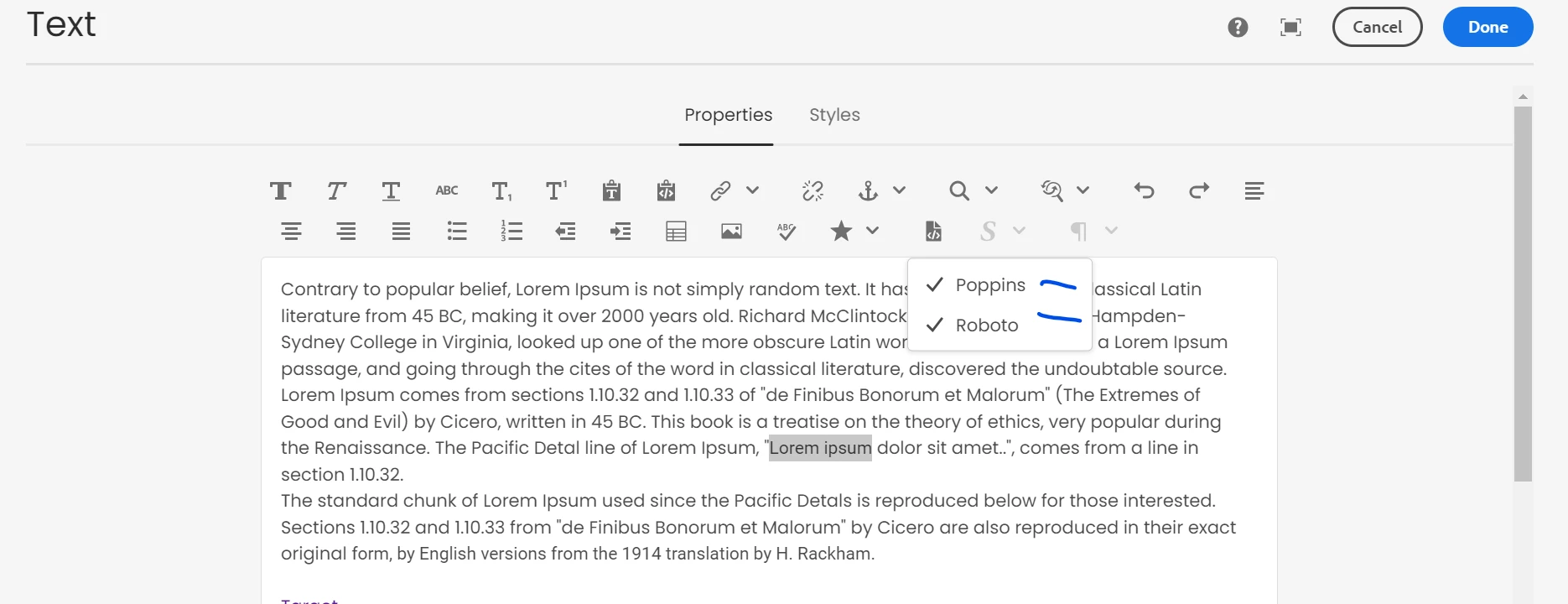
When I select Styles from RTE system it is getting combined. I want that only one styles in RTE should get selected at a time.

When i select One, other should get unselected.
This post is no longer active and is closed to new replies. Need help? Start a new post to ask your question.

2 replies

kautuk_sahni
Employee
September 12, 2023

@avi-adobe Do you find the suggestions from kaikubad useful? Please let us know if more information is required. Otherwise, please mark the answer as correct for posterity. 

Kautuk Sahni
kaikubad
New Participant
September 11, 2023

Hi @avi-adobe ,

Yes you can configure it in a way that only one item is check-able. I am giving an example, configure your policy of text component like below

<text-policy cq:styleDefaultClasses="_text" jcr:primaryType="nt:unstructured" jcr:title="Text Policy" sling:resourceType="wcm/core/components/policy/policy" disableReadMore="true"> <jcr:content cq:lastReplicated="{Date}2020-01-01T00:00:00.000+01:00" cq:lastReplicatedBy="Deployment" cq:lastReplicationAction="Activate" jcr:primaryType="nt:unstructured"/> <rtePlugins jcr:primaryType="nt:unstructured"> <paraformat jcr:primaryType="nt:unstructured" features="*"> <formats jcr:primaryType="nt:unstructured" override="true"> <item0 jcr:primaryType="nt:unstructured" description="Paragraph" tag="p"/> <item1 jcr:primaryType="nt:unstructured" description="Heading 1" tag="h1"/> <item2 jcr:primaryType="nt:unstructured" description="Heading 2" tag="h2"/> <item3 jcr:primaryType="nt:unstructured" description="Heading 3" tag="h3"/> <item4 jcr:primaryType="nt:unstructured" description="Heading 4" tag="h4"/> <item5 jcr:primaryType="nt:unstructured" description="Heading 5" tag="h5"/> <item6 jcr:primaryType="nt:unstructured" description="Quote" tag="blockquote"/> <item7 jcr:primaryType="nt:unstructured" description="Preformatted" tag="pre"/> </formats> </paraformat> </rtePlugins>

You need to add the styles under one section and add override=true.

avi-adobeAuthor
Employee
September 13, 2023

Hi @kaikubad ,

Can you explain a bit more, as Styles in RTE is not OOTB, and also we don't have options to add through component styles plugin policy.

Here is what i have in my text policy.:

Where you want me to add ?