subassets not getting activated | Community
Skip to main content
Kiran_Vedantam
New Participant
Mar 17, 2021 11:17 AM UTC
Solved

subassets not getting activated

Sub assets that are created as a part of the "Dam update asset workflow" are not getting activated to publish.


Similar post with no resolution: https://experienceleaguecommunities.adobe.com/t5/adobe-experience-manager/subassets-created-as-part-of-workflow-not-getting-activated-to/qaq-p/292285


I know couple of ways this can be achieved is

  • Activating the whole tree
  • Creating a package and replicating it

But I need to know how this can be done via the authoring console.


CC: @kautuk_sahni  @arunpatidar 

 

This post is no longer active and is closed to new replies. Need help? Start a new post to ask your question.
arunpatidar
arunpatidarAccepted solution
New Participant
Mar 18, 2021 2:12 PM UTC

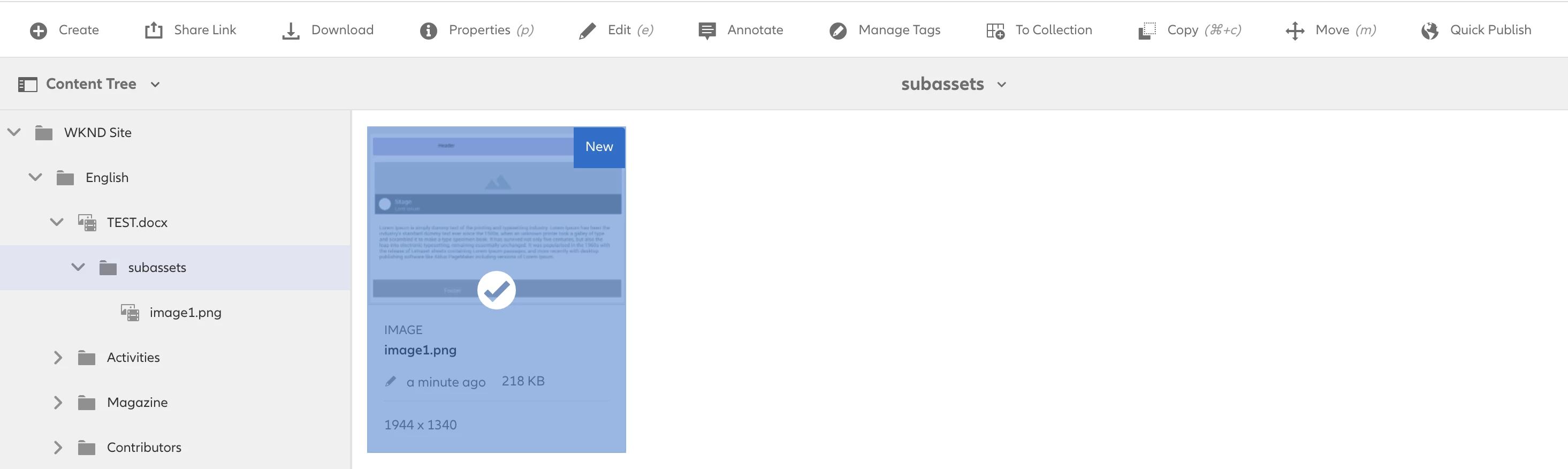
Hi, There is a way to publish subassets from the author,

just switch to content tree view and select the subassets and publish


Arun Patidar

7 replies

arunpatidar
arunpatidarAccepted solution
New Participant
Mar 18, 2021 2:12 PM UTC

Hi, There is a way to publish subassets from the author,

just switch to content tree view and select the subassets and publish


Translate
Arun Patidar
Kiran_Vedantam
New Participant
Mar 18, 2021 2:18 PM UTC
Hi Arun, yes we can do it like this. But if you have 20 subassets we need to select everything and publish it. Cant we do it on single click?
Translate
Nikhil-Kumar
New Participant
Mar 18, 2021 1:42 PM UTC

@kiran_vedantam - After looking at your structure, it seems you have manually created the subassets folder. DAM asset workflow only activates the Asset not the folders underneath. I guess you need to activate the subassets folder explicitly.

Thanks,
Nikhil Kumar

Translate
Kiran_Vedantam
New Participant
Mar 18, 2021 1:49 PM UTC

Hi @nikhil-kumar,


Thanks for your response. This folder is created by Dam Update Asset workflow, but not manually.


Thanks,

Kiran Vedantam.

Translate
joerghoh
Employee
Mar 17, 2021 8:56 PM UTC

In the referenced posting it's mentioned that the resulting content structure looks like this:


asset.jpg

-- jcr:content

-- subassets

---- subasset.jpg


is this correct?

Translate
Kiran_Vedantam
New Participant
Mar 18, 2021 6:06 AM UTC

Hi @joerghoh this is how the content structure looks.


Translate