Suspend CTA not working live copy and Inherit Rollout Configs from Parent checkbox value not getting updated 6.5 | Community
Skip to main content
New Participant
February 14, 2024

Suspend CTA not working live copy and Inherit Rollout Configs from Parent checkbox value not getting updated 6.5

  • February 14, 2024
  • 2 replies
  • 1001 views

Hi Everyone, 

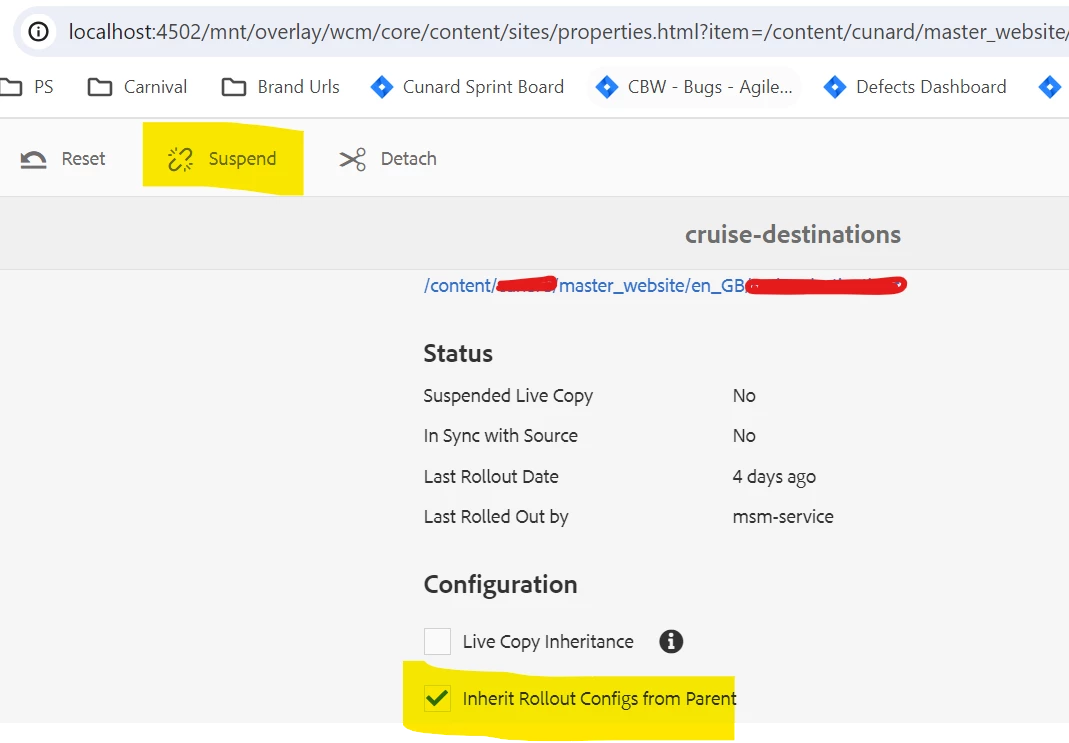
"The 'suspend' link present on the 'Live Copy' tab in page properties doesn't perform any action when clicked. Ideally, upon clicking 'suspend,' two options should appear: 'suspend' and 'suspend with children.'
Additionally, there is a checkbox present on the tab labeled 'Inherit Rollout Configs from Parent.' However, upon unchecking it, the value is not retained, and upon reload, it appears as checked."

AEM version : (6.5.18.0)


@kautuk_sahni 

This post is no longer active and is closed to new replies. Need help? Start a new post to ask your question.

2 replies

New Participant
February 27, 2024

I have found the root cause and its solution to this issue. This issue was coming becasue  jquery was embeded in clientlibs. On changing the embed to dependency, the suspend cta started working as expected. 

Thanks

Raja_Reddy
New Participant
February 14, 2024

Hi @aasishjain 

All the properties are inherited from the OOTB path below:
/libs/wcm/foundation/components/basicpage/v1/basicpage/tabs/livecopy/items/column/items/configuration

Please see if anyone has overridden the path and the configuration node might have been removed from the /apps path so it's not showing on the page. Once you add it back it, you should be able to see the configuration tab on all the pages.


Here is a link for more info about live copy: https://experienceleague.adobe.com/docs/experience-manager-64/administering/introduction/msm-livecop...
https://docs.mktossl.com/docs/experience-manager-cloud-service/content/sites/administering/reusing-content/msm/creating-live-copies.html?lang=en 

New Participant
February 14, 2024

Thanks Raja for the insight. 
But the path is not overridden. We are inheriting it from the libs.

Raja_Reddy
New Participant
February 16, 2024

Hi @aasishjain 

  1. Check for custom code or overlays: Verify if there are any custom code or overlays that might be affecting the behavior of the Live Copy tab. Look for any custom JavaScript or CSS files that could be conflicting with the default functionality. Disable or remove any customizations temporarily to see if the issue is resolved.

  2. Clear the AEM cache: Clear the AEM cache to ensure that any cached data related to the Live Copy tab is refreshed. You can do this by navigating to the AEM Web Console (http://localhost:4502/system/console) and selecting "Cache" from the left-hand menu. Then, click on "Clear All Caches" to clear the cache.

  3. Verify permissions: Ensure that the user has the necessary permissions to perform actions on the Live Copy tab. Check the user's permissions for the specific page and the Live Copy functionality. Make sure that the user has the appropriate permissions to suspend and modify Live Copies.

  4. Check for conflicting configurations: Look for any conflicting configurations that might be causing the issue. Check if there are any custom configurations or workflows that are overriding or conflicting with the default behavior of the Live Copy tab. Review any custom configurations related to Live Copy and ensure they are correctly set up.