Tab ID appended in URL | Community
Skip to main content
Level 3
Jul 27, 2023 11:17 AM UTC
Solved

Tab ID appended in URL

Hi,

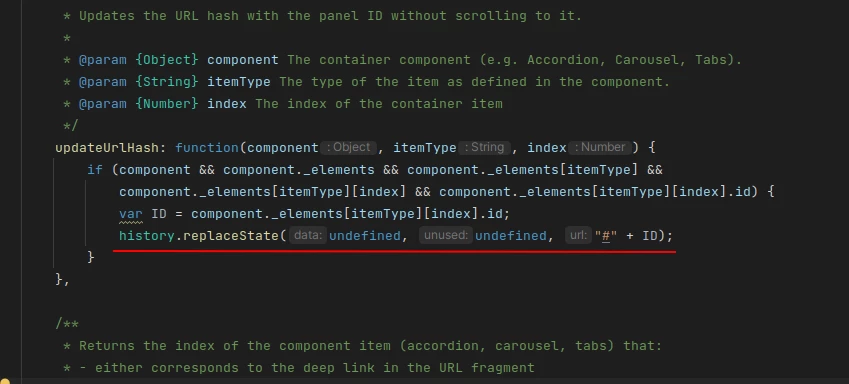
We are over-riding AEM cloud Tab component the tab functionality is working fine but when the user tries to hit the URL the first tab ID is appending in the URL automatically.

For Example : When we try to access https://www.test.com/home.html and tif there is a tab component in the page then it is redirecting to the URL https://www.test.com/home.html#tabs-04676-item-64e6-tab

Any idea is this the default behaviour?

 

This post is no longer active and is closed to new replies. Need help? Start a new post to ask your question.
Sady_Rifat
Sady_RifatAccepted solution
New Participant
Jul 27, 2023 1:35 PM UTC

Yes, this is the default behavior of the Tab component. You can check this for your surety http://localhost:4503/content/core-components-examples/library/tabs.html 

If you don't want to append the ID with the URL you need to stop using core.wcm.components.tabs.v1 clientlib.


3 replies

Sudheer_Sundalam
New Participant
Jul 27, 2023 3:11 PM UTC

@helptech ,

Tab IDs are implemented to enable the deeplinking of tabs using the page URLs.

Example from component library: https://www.aemcomponents.dev/content/core-components-examples/library/core-content/tabs.html#tabs-763e4cccf7-item-39c1e53864-tab


As @sady_rifat mentioned, you need to stop using the core component tabs client lib to stop this from happening.


Translate
HelpTechAuthor
Level 3
Jul 27, 2023 3:37 PM UTC

Hi @sudheer_sundalam 


I understand that the default behavior will append the ID to the URL when the user clicks on the tab. But in my scenario when I hit a URL which has a tab component then the first ID is automatically updated to the URL.

Example :

When I try to hit the below URL it is not appending any ID's

https://www.aemcomponents.dev/content/core-components-examples/library/core-content/tabs.html

Whereas in my scenario when I hit  https://www.test.com/home.html the ID is appended when the page loads(Before clicking anything in the Tab component).

Translate
Sady_Rifat
Sady_RifatAccepted solution
New Participant
Jul 27, 2023 1:35 PM UTC

Yes, this is the default behavior of the Tab component. You can check this for your surety http://localhost:4503/content/core-components-examples/library/tabs.html 

If you don't want to append the ID with the URL you need to stop using core.wcm.components.tabs.v1 clientlib.


Translate