Tagfield in Content Fragment not displaying values from standard tags selection | Community
Skip to main content
New Participant
July 28, 2022
Solved

Tagfield in Content Fragment not displaying values from standard tags selection

  • July 28, 2022
  • 1 reply
  • 1203 views

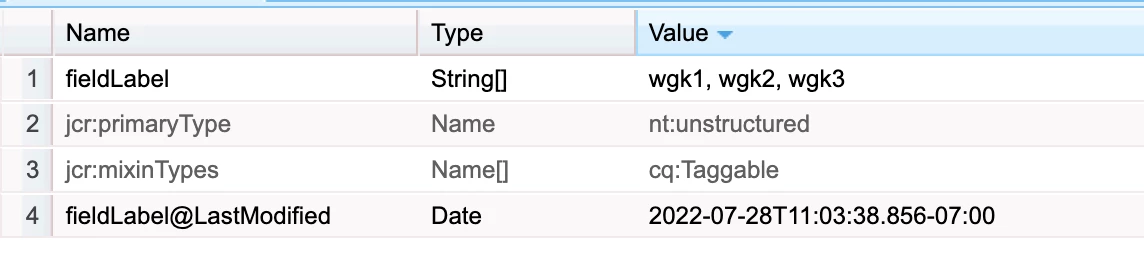
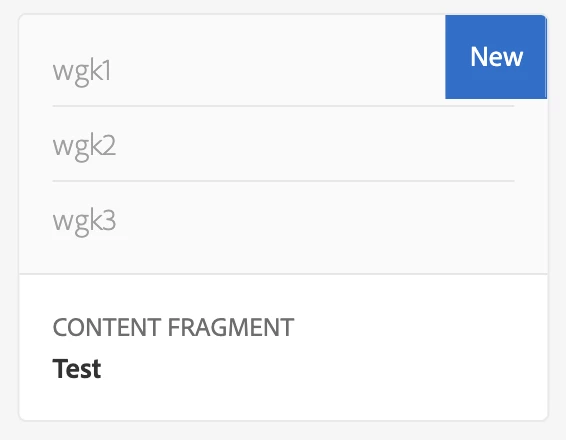
I created a content fragment model with a tagfield selector, and whenever I select a tag and save it will save to JCR but when I click back to author it, the tags are not selected and I click into the tag selector it has 0 tags selected  


Working normally:

 

After editing and clicking back into content fragment: 



28.07.2022 11:08:35.853 *WARN* [[0:0:0:0:0:0:0:1] [1659031715681] GET /editor.html/content/dam/cob-corp-acquisition/content-fragments/test-1 HTTP/1.1] org.apache.jackrabbit.oak.plugins.index.lucene.LucenePropertyIndex This index is deprecated: /oak:index/lucene; it is used for query Filter(query=select [jcr:path], [jcr:score], * from [nt:base] as a where contains(*, '"/content/dam/cob-corp-acquisition/content-fragments/test-1"') /* xpath: //*[jcr:contains(., '"/content/dam/cob-corp-acquisition/content-fragments/test-1"')] */ fullText="/content/dam/cob-corp-acquisition/content-fragments/test-1", path=*). Please change the query or the index definitions.


the error.log only displays this notable warning when I save/open the content fragment


This post is no longer active and is closed to new replies. Need help? Start a new post to ask your question.
Best answer by lukasz-m

Hi @juanec2,

It looks that you've added free text instead of tags. This can be observed in the repository, tags have always following structure namespace:tagID.

Nevertheless, the issue you have described is an AEM bug - a bug in the product. This has been fixed by Adobe - fix is available starting from SP9 for AEM 6.5. This can be confirmed looking into AEM 6.5.9 release notes:

Summarizing, to fix this issue you have to upgrade your AEM instance to version AEM 6.5.9 or higher. Please also be aware that in AEM 6.5.10 significant change regarding Content Fragments has been introduced, so if you'll decide to upgrade to AEM 6.5.10+ you may need to recreate your CF models and CF.

1 reply

lukasz-m
lukasz-mAccepted solution
New Participant
July 30, 2022

Hi @juanec2,

It looks that you've added free text instead of tags. This can be observed in the repository, tags have always following structure namespace:tagID.

Nevertheless, the issue you have described is an AEM bug - a bug in the product. This has been fixed by Adobe - fix is available starting from SP9 for AEM 6.5. This can be confirmed looking into AEM 6.5.9 release notes:

Summarizing, to fix this issue you have to upgrade your AEM instance to version AEM 6.5.9 or higher. Please also be aware that in AEM 6.5.10 significant change regarding Content Fragments has been introduced, so if you'll decide to upgrade to AEM 6.5.10+ you may need to recreate your CF models and CF.

JuanEc2Author
New Participant
August 2, 2022

Hello @lukasz-m, I believe this is a different issue, the tags in the JCR are labelled as cq:Tag within the

/etc/tags/default

However if I were to delete the tag, and recreate it, it then saves correctly. I do not know if this is another bug?

This is what the Content Fragment looks like in the JCR

Tagpicker is the tagfield datatype, and all the values within are the ones I picked, and cq:tags are the only that reappear/save when clicking back into the cfm.


JuanEc2Author
New Participant
August 2, 2022

It seems the tagID being in CAPS caused the issue as the ones with lowercase tagIDs save correctly.