TextFields and PathFields inside multifield are collapsing in AEM 6.2 | Community
Skip to main content
New Participant
April 17, 2018
Solved

TextFields and PathFields inside multifield are collapsing in AEM 6.2

  • April 17, 2018
  • 11 replies
  • 2430 views

Hi,

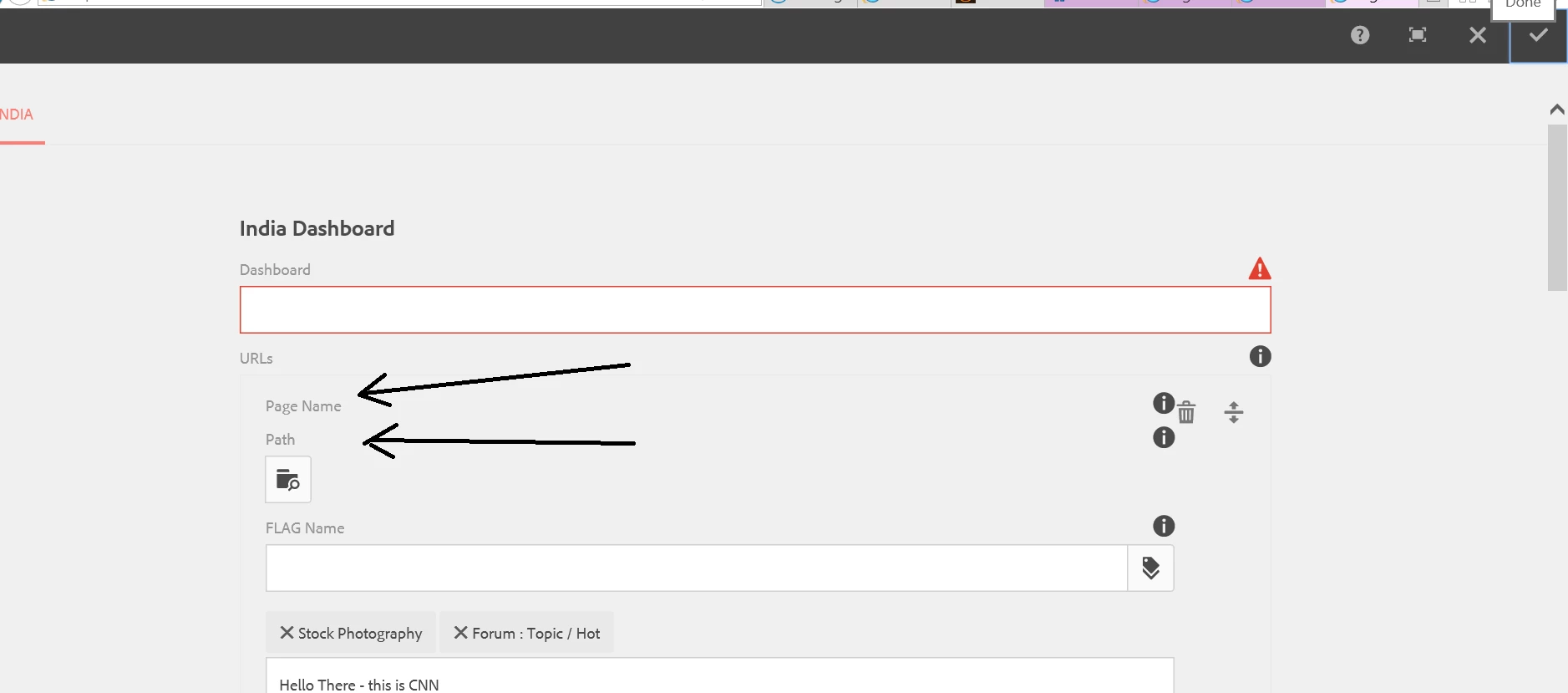
TextFields and PathFields inside multifield are collapsing in AEM 6.2 if top level TextFields or PathFields are made  mandatory by using required=true. I followed below helpx article and installed latest ACS commons jar as well. After clicking on Done button these fields are collapsing.
Adobe Experience Manager Help | Creating an AEM 6.2 HTML Template Language component that uses a Multi-Field dialog

Thanks,

Surendra

This post is no longer active and is closed to new replies. Need help? Start a new post to ask your question.
Best answer by smacdonald2008

I see you are referring to the top level text field here - this is a text field - above the MF. 

This does cause a issue with the fields in the multi field below it. I was able to reproduce.

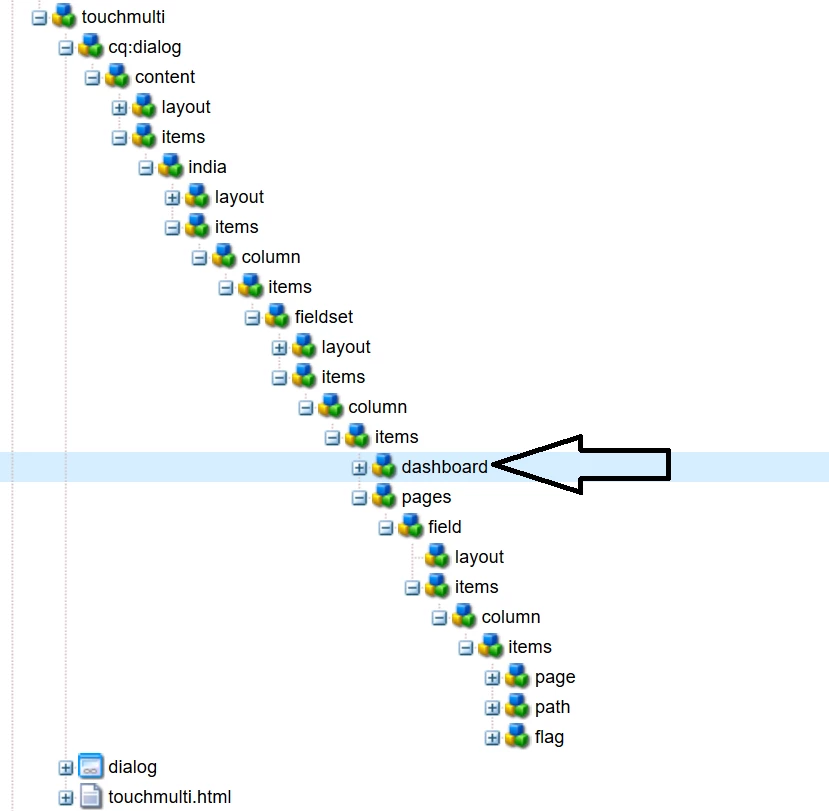
This is a bug in the software. Please open a case for this. And show them the node structure here.

11 replies

smacdonald2008
New Participant
April 18, 2018

Nice catch on this btw!

smacdonald2008
smacdonald2008Accepted solution
New Participant
April 18, 2018

I see you are referring to the top level text field here - this is a text field - above the MF. 

This does cause a issue with the fields in the multi field below it. I was able to reproduce.

This is a bug in the software. Please open a case for this. And show them the node structure here.

New Participant
April 18, 2018

Hi Scott,

I followed the steps Ratna suggested. I do not wish to set required to true on Flag field inside multifield . I want to set required=true(Boolean) on Dashboard text field . But once i am doing that and clicking on DONE button entire multifield is collapsing.

Thanks,

Surendra

smacdonald2008
New Participant
April 18, 2018

We asked you to install the package that Ratna pointed you too. You have not done that - as we can see you are still showing a dialog with a light background. THis is not a 6.2 Touch UI dialog.

Once you install the package that Ratna pointed you too. Set the Flag field with required = true

As you can see - the Flag field does not behave in an unusual way---

So - please install the package from Dropbox that Ratna pointed you to. Then set required to true on the Flag field. You will see the same results as illustrated in this thread.

New Participant
April 18, 2018

Hi Ratna,

Multifield is working fine, but the issue is when i make Dashboard field mandatory by adding required=true(Boolean)

Then the textfield and pathfield start collapsing while clicking on DONE button:

Thanks,

Surendra

Ratna_Kumar
New Participant
April 17, 2018

Hi,

Yes it is working fine. Here is the below screenshot. Make sure you install the ACS Commons package as described in the article.

Also, here is the working package for your reference: Dropbox - mfHTL62.ui.apps-1.0-SNAPSHOT(1).zip  - However we will update this HELPX article for AEM 6.2!!

Hope this helps!!

Thanks,

Ratna.

smacdonald2008
New Participant
April 17, 2018

You said you are working on AEM 6.2 - that screenshot looks like 6.3 - unless you changed the theme.

ANyhow - I got a MF working properly on AEM 6.2 -- as shown here;

This uses Granite MF and ACS-Commons. We will package up this soon and attach to article.

smacdonald2008
New Participant
April 17, 2018

We are testing this. This article did not use ACS-Commons - but used JS Script that was done at the time of the writing. I will check it however on a fresh AEM 6.2 install.

kautuk_sahni
Employee
April 17, 2018

Checking this with Scott (writer of the article).

Kautuk Sahni
New Participant
April 17, 2018

Hi Kautuk,

Did a fresh installation of AEM 6.2,  installed acs-aem-commons-content-3.14.8 package and package mentioned in the helpx article too.

added required=true(Boolean) for the node . No errors are appearing either in browser console or log files.

I even tried to do a validation before submit by following the link mentioned below URL(after removing required=true(Boolean)), still after clicking the Done button those fields were collapsing:

Experiencing Adobe Experience Manager - Day CQ: AEM 6 SP2 - Touch UI Dialog Before Submit Confirmation

Thanks,

Surendra