The dynamic table previews correctly in HTML, but when converted to PDF, the page is cut off. | Community
Skip to main content
New Participant
November 21, 2024
Solved

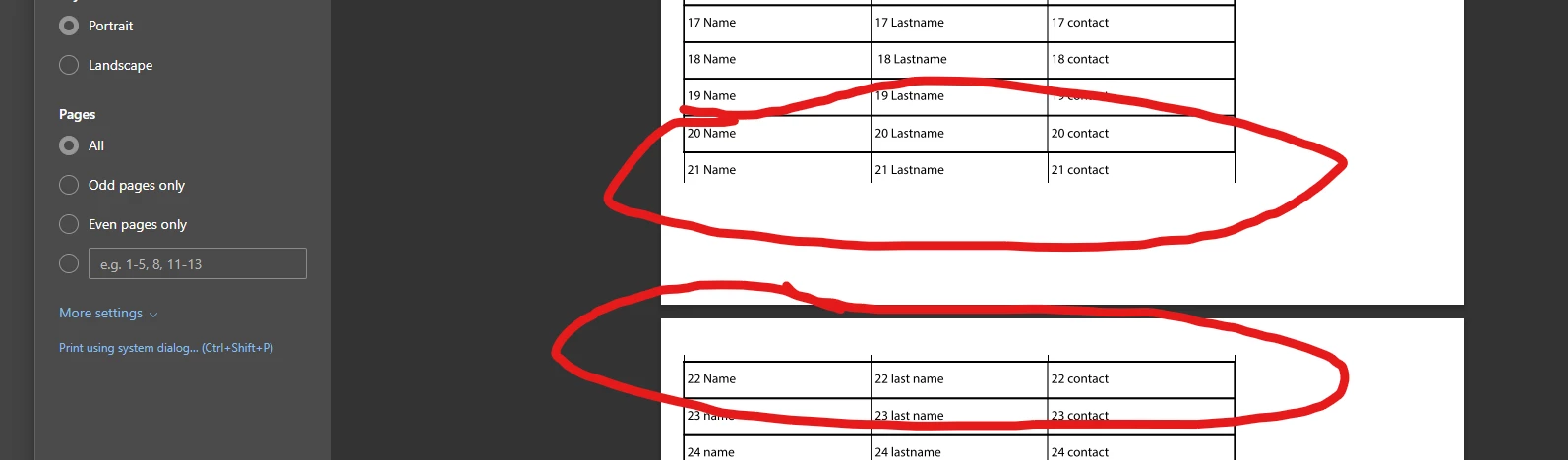
The dynamic table previews correctly in HTML, but when converted to PDF, the page is cut off.

  • November 21, 2024
  • 3 replies
  • 805 views

Kindly help, or if someone has already encountered this issue, I have already tried setting the subform to flowed, but the page is still cut off. The dynamic table previews correctly in HTML, but when converted to PDF, the page is cut off.



This post is no longer active and is closed to new replies. Need help? Start a new post to ask your question.

3 replies

kautuk_sahni
Employee
November 25, 2024

@sheilapa1  Did you find the suggestions helpful? Please let us know if you require more information. Otherwise, please mark the answer as correct for posterity. If you've discovered a solution yourself, we would appreciate it if you could share it with the community. Thank you!

Kautuk Sahni
Shubham_borole
New Participant
November 22, 2024

Hi @sheilapa1 if you are using AEM designer, I think for table scenario you may need to add logic to the sub form to put the table to next page.


Also it will be better to add this question to the forms forum as well.


Regards,


Shubham

arunpatidar
New Participant
November 22, 2024

Hi @sheilapa1 

Are you trying this in AEM or AEM Guides?


If it is in AEM then you need to check if you can write additional print CSS to control the table flow.


If it is in Guide then change the layout using additional CSS attribute.

Arun Patidar
SheilaPa1Author
New Participant
November 22, 2024

Yes , Aem tried adding css but still not working

( aem designer)


arunpatidar
arunpatidarAccepted solution
New Participant
November 22, 2024