Touch UI Dialogs Stripping out Custom Data Elements | Community
Skip to main content
New Participant
August 21, 2018
Solved

Touch UI Dialogs Stripping out Custom Data Elements

  • August 21, 2018
  • 4 replies
  • 3087 views

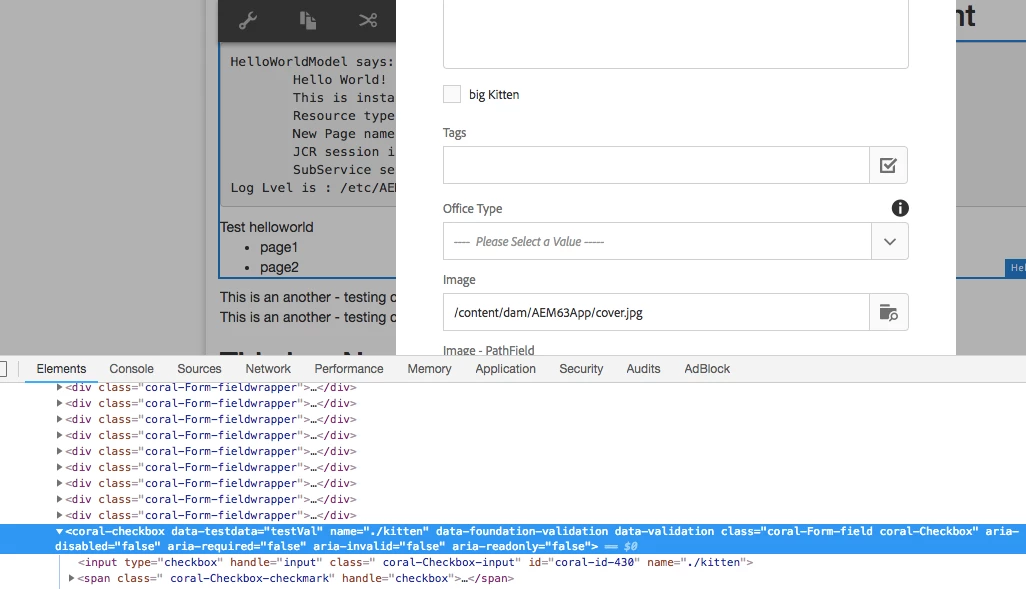
I've been working through several examples for AEM 6.0/6.1 online to hide/show elements on my AEM 6.3 dialog and I have the listener JS functions properly firing finally but the issue seems to be with the removal of customer data elements from the Touch UI dialog fields when the dialog is created.

One such example AEM 6 Touch UI Show/Hide Checkbox associated  panels . It enables hiding/unhiding of other components based on the selec…

For instance with the code provided below the elements are created in the dialog but the show-hide-target, should-show-when-checked fields are not being created and the class field doesn't seem to be updating either if I leave it as class instead of wrapperClass like i have below which will at least set the class correctly on the wrapping div tag.

So the question is based on .content.xml for my dialog.  How do I properly set the class and add other elements to the TouchUI dialog for AEM 6.3 so that my extra elements aren't removed.

      <option jcr:primaryType="nt:unstructured"

                          sling:resourceType="granite/ui/components/coral/foundation/form/checkbox"

                            text="Show other fields"

                            fieldDescription="Anchor heading will only be visible in the navigation bar"

                            name="./showInNavOnly"

                            value="true"

                           show-hide-target="show-dropDown-panel"

                            should-show-when-checked="false"

                            wrapperClass="cq-dialog-checkbox-showhide"/>

<setChildren

                            jcr:primaryType="nt:unstructured"

                            sling:resourceType="granite/ui/components/coral/foundation/container"

                            wrapperClass="hidden showhide-target"

                            id="show-dropDown-panel">

                            <items jcr:primaryType="nt:unstructured">

                            <testing

                                        jcr:primaryType="nt:unstructured"

                                        sling:resourceType="granite/ui/components/coral/foundation/form/textfield"

                                        fieldDescription="TESTING FIELD"

                                        fieldLabel="TESTING FIELD"

                                        name="./testing"/>

                                        </items>

                        </setChildren>

This post is no longer active and is closed to new replies. Need help? Start a new post to ask your question.
Best answer by arunpatidar

Hi,

You probably using the Coral2 components try with Granite/coral3 e.g.

granite/ui/components/coral/foundation/form/checkbox

granite/ui/components/coral/foundation/form/select

add granite:data node as a child node of an item.

Thanks

Arun

4 replies

smacdonald2008
New Participant
August 21, 2018

Moving forward in AEM 6.3 - always use coral 3 types as discussed here:

Building Experience Manager Components using Granite/Coral Resource Types

arunpatidar
arunpatidarAccepted solution
New Participant
August 21, 2018

Hi,

You probably using the Coral2 components try with Granite/coral3 e.g.

granite/ui/components/coral/foundation/form/checkbox

granite/ui/components/coral/foundation/form/select

add granite:data node as a child node of an item.

Thanks

Arun

Arun Patidar
New Participant
August 21, 2018

Do you know of any examples of adding this new granite:data node to things like a select or checkbox?  I tried a few variants by adding it as another filed within that element and outside of it with no luck getting it to display the extra fields.

arunpatidar
New Participant
August 21, 2018

Hi,

Coral3/Granite components only retain data attribute if you added those in granite:data node.

Add granite:node as items child node.

Common Attributes — Granite UI 1.0 documentation

Arun Patidar