Translation Status is "Do Not Translate" . | Community
Skip to main content
karansheel
New Participant
December 17, 2018
Solved

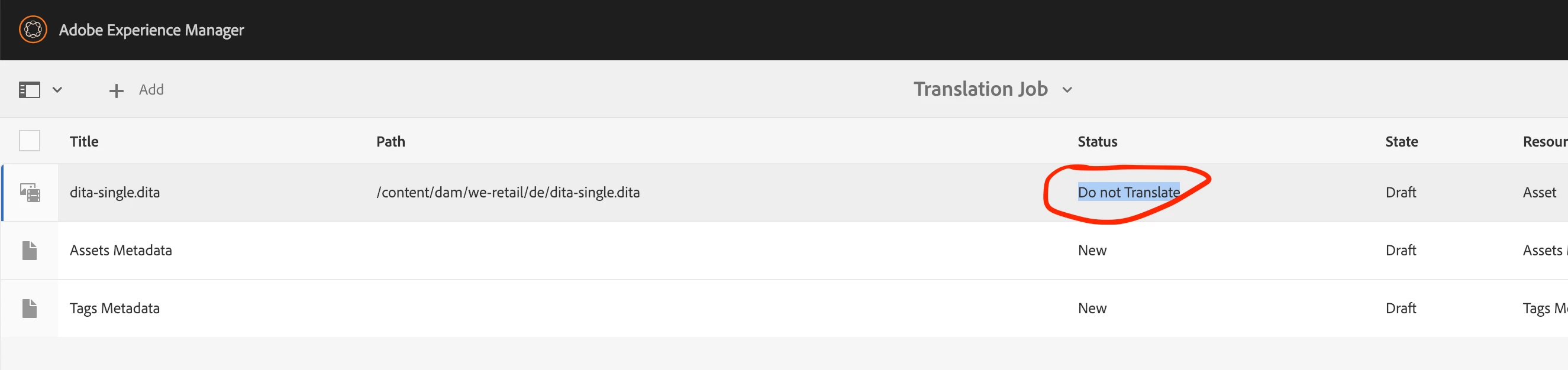
Translation Status is "Do Not Translate" .

  • December 17, 2018
  • 5 replies
  • 3142 views

I have added a AEM XML add-on "com.adobe.fmdita-6.4-3.0.46.zip" to create Dita files. i have created a .dita file using this addon. now when i'm trying to tranlate this file i'm getting status "Do Not Translate" , which is due to a property "translationRequired" set to false. In what condition this property is set to false ? any idea . Is it related to tranlation-rules.xml ? below is screenshot for reference

This post is no longer active and is closed to new replies. Need help? Start a new post to ask your question.
Best answer by Juhee_Garg

Hi Karansheel,

You need to disable "Component-based translation" in com.adobe.fmdita.config.ConfigManager configuration in Adobe Experience Manager Web Console Configuration page. You can see details at:

https://helpx.adobe.com/content/dam/help/en/xml-add-on/XML-Documentation-for-Adobe-Experience-Manager_Installation-Confi…

5 replies

karansheel
New Participant
December 18, 2018

Thanks Juhee !

it's working fine now .

Juhee_Garg
Juhee_GargAccepted solution
New Participant
December 18, 2018

Hi Karansheel,

You need to disable "Component-based translation" in com.adobe.fmdita.config.ConfigManager configuration in Adobe Experience Manager Web Console Configuration page. You can see details at:

https://helpx.adobe.com/content/dam/help/en/xml-add-on/XML-Documentation-for-Adobe-Experience-Manager_Installation-Confi…

New Participant
December 18, 2018

Thanks for updates karansheel. This seems to be one of the out of the box configuration. Could you please confirm that this is the effective Translation Integration Configuration for the dita file.

karansheel
New Participant
December 18, 2018

Hi Ankur,

It's already checked . Below is screenshot.

New Participant
December 17, 2018

Hi,

In the effective "Translation Integration Configuration" for the dita file, please go under Assets tab and check "Translate Assets" option. Once done, please try the workflow again and let us know your observations.