Traverse through nodes and consume data into Sling Model | Community
Skip to main content
Level 4
Jun 27, 2023 8:29 PM UTC
Solved

Traverse through nodes and consume data into Sling Model

I have an asset in /content/dam/myproject/<assetFile> the hierarchy being :
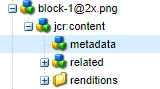
I will get the path of the image from dialog and I have injected the same in the sling model.

@586265 private String imagePath

 My ultimate aim is to traverse to the metadata node and get a certain property from there. 

Can someone please help me with the Java code for that? Also please let me know how I will get that data into frontend via HTL.

Thanks!

This post is no longer active and is closed to new replies. Need help? Start a new post to ask your question.
EstebanBustamante
EstebanBustamanteAccepted solution
New Participant
Jun 27, 2023 9:15 PM UTC

Hi, you can just adapt the resource (your image block.png) to an Asset object and then get the AssetMetaData object

You can use something like this:


@Model(adaptables = { SlingHttpServletRequest.class, Resource.class }, defaultInjectionStrategy = DefaultInjectionStrategy.OPTIONAL, resourceType = "myproject/components/content/image") @Exporter(name = "jackson", extensions = "json", options = { @ExporterOption(name = "MapperFeature.SORT_PROPERTIES_ALPHABETICALLY", value = "true") }) public class ImageModel { private static Logger LOG = LoggerFactory.getLogger(ImageModel.class); @SlingObject private SlingHttpServletRequest request; private String imageMetaData; /** * Returns the property tiff:ImageWidth from the metadata */ public String getImageMetaData() { String url = request.getRequestURI(); //You can get this path dynamically from HTL or resolve by other means, for now is just hardcoded Resource resource = request.getResourceResolver().getResource("/content/dam/my-project/image/image.png"); Asset asset = resource.adaptTo(Asset.class); String width = asset.getMetadataValue("tiff:ImageWidth"); return this.imageMetaData; } }


And then use it in the HTL like this:


<!--/* Invoke the model you have created and access the method where you have obtained the information */--> <div data-sly-use.model="com.my.models.package.ImageModel"> <p>${model.imageMetaData @ context='html'}</p> </div>


You can learn more here:
https://redquark.org/aem/day-07-sling-models/

http://www.aemcq5tutorials.com/tutorials/sling-model-sightly-aem/ 


Esteban Bustamante

5 replies

EstebanBustamante
EstebanBustamanteAccepted solution
New Participant
Jun 27, 2023 9:15 PM UTC

Hi, you can just adapt the resource (your image block.png) to an Asset object and then get the AssetMetaData object

You can use something like this:


@Model(adaptables = { SlingHttpServletRequest.class, Resource.class }, defaultInjectionStrategy = DefaultInjectionStrategy.OPTIONAL, resourceType = "myproject/components/content/image") @Exporter(name = "jackson", extensions = "json", options = { @ExporterOption(name = "MapperFeature.SORT_PROPERTIES_ALPHABETICALLY", value = "true") }) public class ImageModel { private static Logger LOG = LoggerFactory.getLogger(ImageModel.class); @SlingObject private SlingHttpServletRequest request; private String imageMetaData; /** * Returns the property tiff:ImageWidth from the metadata */ public String getImageMetaData() { String url = request.getRequestURI(); //You can get this path dynamically from HTL or resolve by other means, for now is just hardcoded Resource resource = request.getResourceResolver().getResource("/content/dam/my-project/image/image.png"); Asset asset = resource.adaptTo(Asset.class); String width = asset.getMetadataValue("tiff:ImageWidth"); return this.imageMetaData; } }


And then use it in the HTL like this:


<!--/* Invoke the model you have created and access the method where you have obtained the information */--> <div data-sly-use.model="com.my.models.package.ImageModel"> <p>${model.imageMetaData @ context='html'}</p> </div>


You can learn more here:
https://redquark.org/aem/day-07-sling-models/

http://www.aemcq5tutorials.com/tutorials/sling-model-sightly-aem/ 


Translate
Esteban Bustamante
Level 4
Jun 27, 2023 9:38 PM UTC

Hi @estebanbustamante , can you please let me know why we are using the exporter annotation? I don't want to export the content to json or any other form, then what is the sue of @Exporter annotation.

Translate
Level 4
Jun 27, 2023 9:55 PM UTC

@estebanbustamante  -  Also I'm getting an error like the following when I'm using the above snippet. But the error goes away when I remove the following in HTL.

@ context='html'


Translate