Tree view hiding page names/asset names | Community
Skip to main content
Level 2
Sep 18, 2020 3:39 PM UTC
Solved

Tree view hiding page names/asset names

In the tree view, if the asset or page name is long, the characters get hidden. We are trying to expand the column width.

Is there anyone who has done this before?

This post is no longer active and is closed to new replies. Need help? Start a new post to ask your question.
Singaiah_Chintalapudi
Singaiah_ChintalapudiAccepted solution
Level 7
Sep 18, 2020 11:08 PM UTC

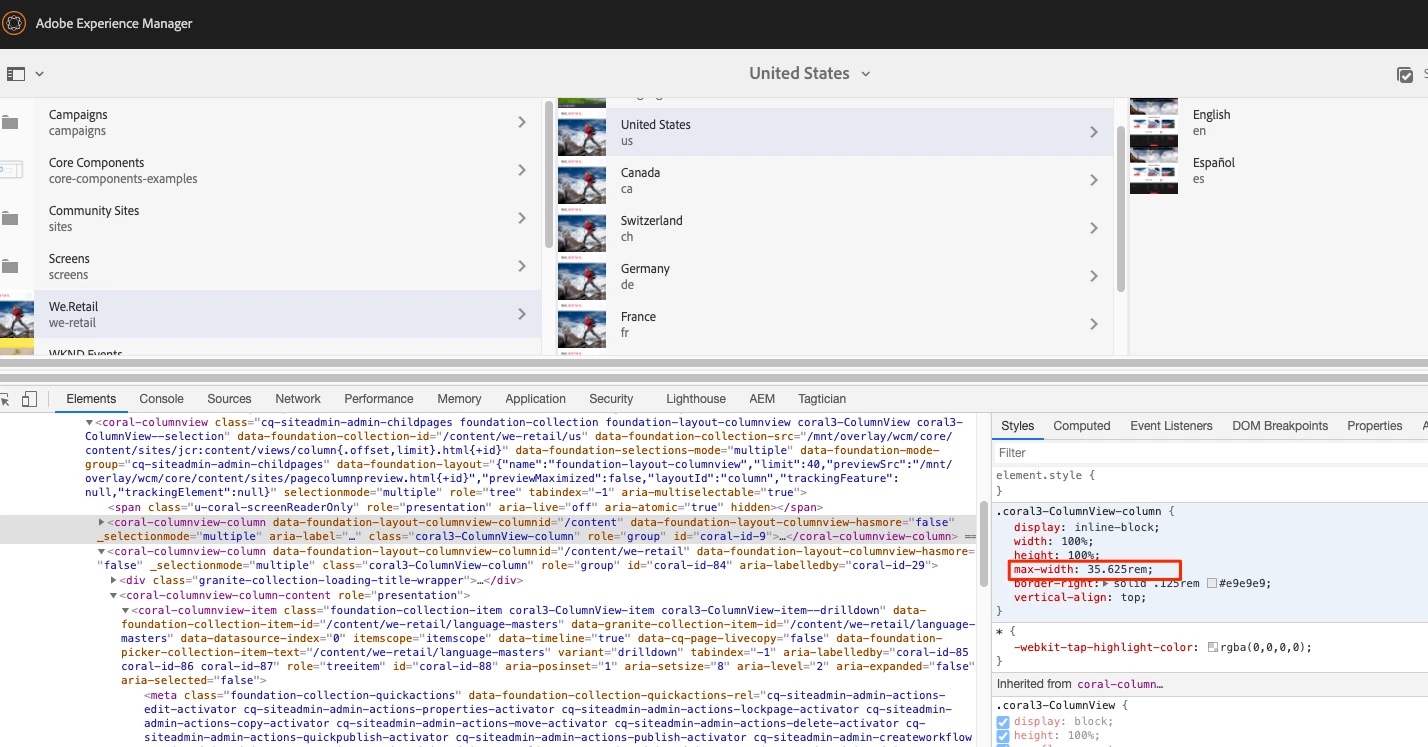
Check the OOTB styles. You just need to override those default styles. See attached screenshot (I have increased the width by 3 times).

2 replies

Singaiah_Chintalapudi
Level 7
Sep 18, 2020 11:23 PM UTC

You just need to overlay this clientlib: /libs/clientlibs/granite/coralui3 and change the highlighted value:


Translate
Singaiah_Chintalapudi
Singaiah_ChintalapudiAccepted solution
Level 7
Sep 18, 2020 11:08 PM UTC

Check the OOTB styles. You just need to override those default styles. See attached screenshot (I have increased the width by 3 times).

Translate