Trigger onclick event to a coral button component in aem 6.5 | Community
Skip to main content
New Participant
May 2, 2021
Solved

Trigger onclick event to a coral button component in aem 6.5

  • May 2, 2021
  • 1 reply
  • 3071 views

Hi 
I am trying to use a coral button component to get a text field. I am not able to understand how to trigger onClick event for this button. 
I have used "granite/ui/components/foundation/button" as sling:resourceType to a nt:unstructured node and created the button.
Can anyone suggest how to get a text field by clicking on the button.
This post is no longer active and is closed to new replies. Need help? Start a new post to ask your question.
Best answer by Asutosh_Jena_

Hi @sushmapoojitha 


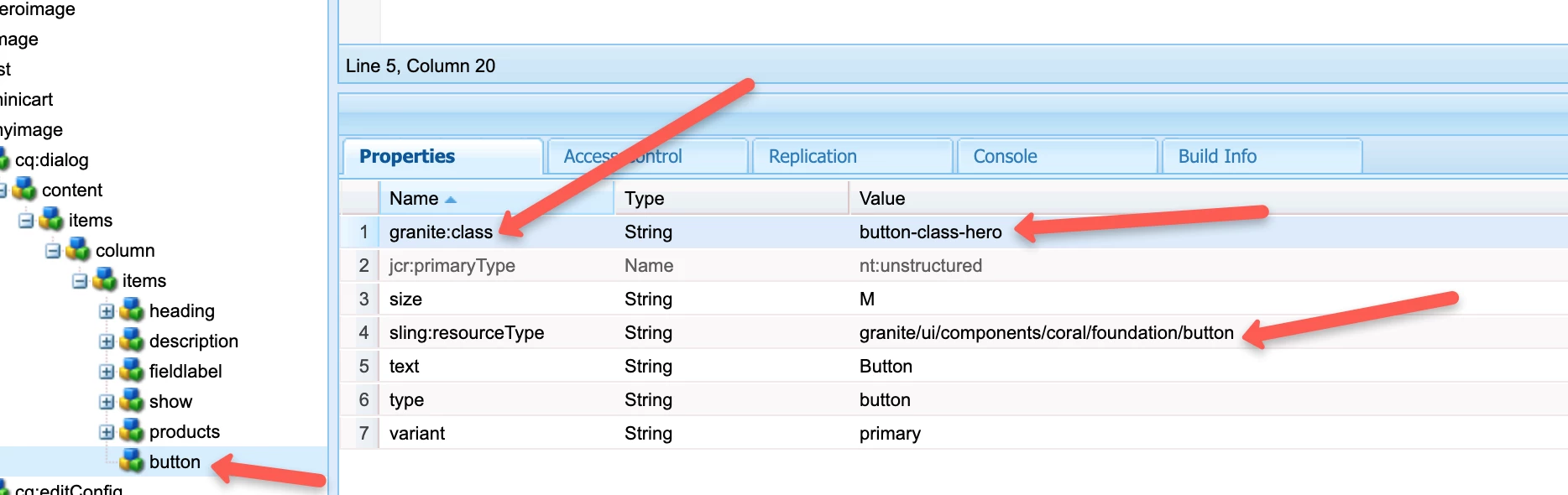
You can use Coral resource type i.e. granite/ui/components/coral/foundation/button and define a granite:class property with some defined class name for the button let's say class name is "button-class-hero". Then you can add a component specific extraClientLibs which will be loaded only during dialog authoring and the below piece of code should work.


(function ($, $document) {
$(document).on("click", ".button-class-hero", function () {
alert("Hi"); // Rest of the code will go here
});
})($, $(document));


Hope this helps!

Thanks

1 reply

Asutosh_Jena_
Asutosh_Jena_Accepted solution
New Participant
May 2, 2021

Hi @sushmapoojitha 


You can use Coral resource type i.e. granite/ui/components/coral/foundation/button and define a granite:class property with some defined class name for the button let's say class name is "button-class-hero". Then you can add a component specific extraClientLibs which will be loaded only during dialog authoring and the below piece of code should work.


(function ($, $document) {
$(document).on("click", ".button-class-hero", function () {
alert("Hi"); // Rest of the code will go here
});
})($, $(document));


Hope this helps!

Thanks

New Participant
May 2, 2021
It worked!!! Thanks a lot