Trying to extend custom AEM component | Community
Skip to main content
stiegjo
New Participant
April 5, 2024
Solved

Trying to extend custom AEM component

  • April 5, 2024
  • 2 replies
  • 680 views

I'm trying to extend a custom site banner component in my application from another project. I've created the .content.xml, dialogExtension.xml and extendedSiteBanner.html. However I'm not seeing the hide checkbox under properties in the component that I'm trying to add.
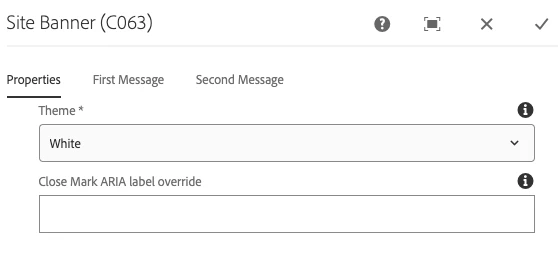

Here's the xml for the .content.xml


<?xml version="1.0" encoding="UTF-8"?> <jcr:root xmlns:sling="http://sling.apache.org/jcr/sling/1.0" xmlns:cq="http://www.day.com/jcr/cq/1.0" xmlns:jcr="http://www.jcp.org/jcr/1.0" jcr:primaryType="cq:Component" jcr:title="Extended Site Banner" sling:resourceSuperType="other-project/components/structure/siteBanner/v1/siteBanner" componentGroup=".hidden" sling:resourceType = "com.mim.aem.mysite.core.models.sitebanner.ExtendedSiteBannerModel"/>


And here's the HTL:


<!-- extendedSiteBanner.html --> <div data-sly-resource="${'/other-project/components/structure/siteBanner/siteBanner/siteBanner.html'}"> <!-- Checkbox to hide the site banner --> <input type="checkbox" id="hideBannerCheckbox" data-sly-test="${!model.hideBanner}"> <label for="hideBannerCheckbox">Hide Site Banner</label> </div>

 

This post is no longer active and is closed to new replies. Need help? Start a new post to ask your question.
Best answer by Raja_Reddy

Hi @stiegjo 
In the dialogExtension.xml file, define the additional property for the "hide" checkbox. 

<?xml version="1.0" encoding="UTF-8"?> <jcr:root xmlns:sling="http://sling.apache.org/jcr/sling/1.0" xmlns:cq="http://www.day.com/jcr/cq/1.0" xmlns:jcr="http://www.jcp.org/jcr/1.0" jcr:primaryType="nt:unstructured" sling:resourceType="cq/gui/components/authoring/dialog"> <content jcr:primaryType="nt:unstructured"> <items jcr:primaryType="nt:unstructured"> <hideBanner jcr:primaryType="nt:unstructured" sling:resourceType="granite/ui/components/coral/foundation/form/checkbox" fieldLabel="Hide Site Banner" name="./hideBanner"/> </items> </content> </jcr:root>

a checkbox property named "hideBanner" is added to the dialog.

  1. Save the dialogExtension.xml file and reload the component in AEM.


2 replies

Raja_Reddy
Raja_ReddyAccepted solution
New Participant
April 7, 2024

Hi @stiegjo 
In the dialogExtension.xml file, define the additional property for the "hide" checkbox. 

<?xml version="1.0" encoding="UTF-8"?> <jcr:root xmlns:sling="http://sling.apache.org/jcr/sling/1.0" xmlns:cq="http://www.day.com/jcr/cq/1.0" xmlns:jcr="http://www.jcp.org/jcr/1.0" jcr:primaryType="nt:unstructured" sling:resourceType="cq/gui/components/authoring/dialog"> <content jcr:primaryType="nt:unstructured"> <items jcr:primaryType="nt:unstructured"> <hideBanner jcr:primaryType="nt:unstructured" sling:resourceType="granite/ui/components/coral/foundation/form/checkbox" fieldLabel="Hide Site Banner" name="./hideBanner"/> </items> </content> </jcr:root>

a checkbox property named "hideBanner" is added to the dialog.

  1. Save the dialogExtension.xml file and reload the component in AEM.


kapil_rajoria
New Participant
April 6, 2024

Hi @stiegjo , if you want checkbox under properties in the dialog of the component, consider adding this in the dialog's xml having the same structure under the tab "Properties":

<checkBox
jcr:primaryType="nt:unstructured"
sling:resourceType="granite/ui/components/coral/foundation/form/checkbox"
name="./checkBox"
text="checkbox_name"
uncheckedValue="false"
value="true"/>