Unable Start Translation Job using translation project | Community
Skip to main content
Level 2
Oct 19, 2021 11:17 AM UTC
Solved

Unable Start Translation Job using translation project

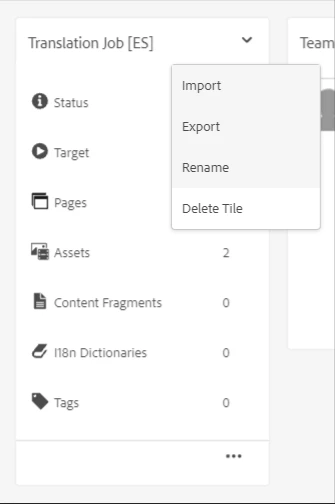
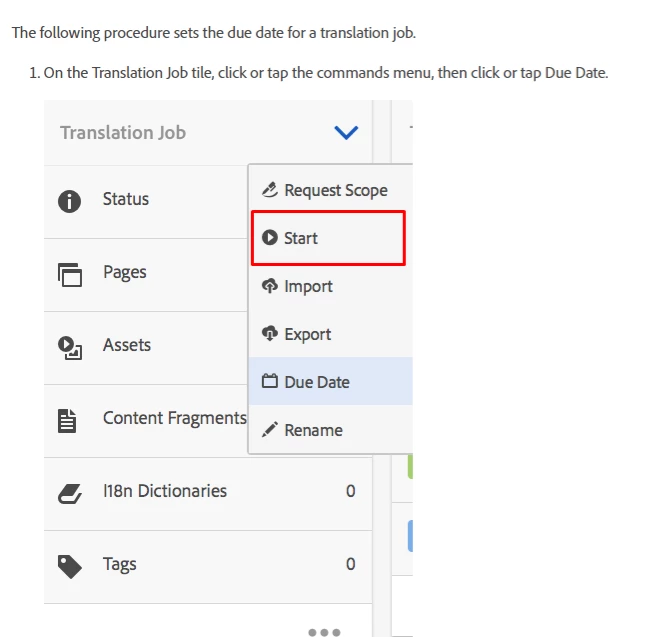
Hi all, I'm trying to create a language copy using a translation project. After launching the language copy I can see the translation jobs but I cannot see the start button (I'm using human translation).


localhost screenshot:
 

Doc screenshot:
 

I was checking the permissions, and I added administrators in all project translation groups but with the same results.


This post is no longer active and is closed to new replies. Need help? Start a new post to ask your question.
Daniel-GPAccepted solution
Level 2
Oct 20, 2021 6:36 AM UTC

Finally, I was researching and the Start button is only for automatic translation. Our need is the human translation and in this way, you need to export it in XML or Xliff translate it outside of AEM and import it again.

3 replies

Daniel-GPAuthorAccepted solution
Level 2
Oct 20, 2021 6:36 AM UTC

Finally, I was researching and the Start button is only for automatic translation. Our need is the human translation and in this way, you need to export it in XML or Xliff translate it outside of AEM and import it again.

Translate
Sanjay_Bangar
New Participant
Oct 19, 2021 2:41 PM UTC

Hi @daniel-gp ,

         Is this specific requirements for human translation instead of human translation can you please try Adobe provided Microsoft machine translation.

Here may be due to the human translation issue.

Regards,

Sanjay.


Translate
Siva_Sogalapalli
New Participant
Oct 19, 2021 1:06 PM UTC

Hi Daniel,

Which version of AEM are you using? There are some enhancements related to translation on AEM6.5. Please check below and see if that helps to resolve your issue.


https://experienceleague.adobe.com/docs/experience-manager-learn/sites/translation/translation-enhancements-feature-video-use.html?lang=en


Thanks

Translate