Unable to edit locked pages due to javascript error | Community
Skip to main content
Level 3
Feb 8, 2019 10:57 PM UTC
Solved

Unable to edit locked pages due to javascript error

AEM 6.3, Touch UI. I have a simple template and page component, described in detail at Layout Mode Not Showing Up. When a page using that template is locked, the page cannot be edited, due to a javascript error:
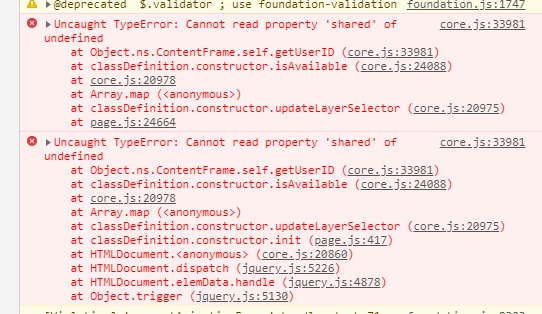
Once this error occurs, the globalbar buttons, like Edit, Preview, Unlock, and Page Information are all non-functional.

I have seen it happen with other templates too, sometimes with the same error happening in page.js

In this particular example, the page template component looks like this:

<html>
<%@include file="/libs/foundation/global.jsp" %>
<cq:include script="/libs/wcm/core/components/init/init.jsp"/>
  <body>
    <cq:include path="" resourceType="/libs/foundation/components/title"/>
    <h3>Layout:</h3>
    <cq:include path="pagecontent/layout" resourceType="wcm/foundation/components/responsivegrid"/>
  </body>
</html>

I've also seen templates where this doesn't happen (like the We.Retail pages), so something is clearly missing in these templates.

Does anyone know what I need to do, or what needs to be in this template to avoid this error?

This post is no longer active and is closed to new replies. Need help? Start a new post to ask your question.
prashanth55Accepted solution
Level 2
Feb 11, 2019 5:34 PM UTC

Hi Matt,

You can include cq.shared js clientlib before loading your application custom js files and try.

7 replies

smacdonald2008
Level 10
Feb 11, 2019 7:57 PM UTC

I am glad that worked for you! This is a great example of how the AEM community helps.

Translate
Matt-H-Author
Level 3
Feb 11, 2019 7:38 PM UTC

Thanks Prashanth (and Peter and Scott). Adding that client library did the trick.

Now that I know the answer, I found places where it even says as such:

Note:
Translate
prashanth55Accepted solution
Level 2
Feb 11, 2019 5:34 PM UTC

Hi Matt,

You can include cq.shared js clientlib before loading your application custom js files and try.

Translate
Peter_Puzanovs
New Participant
Feb 11, 2019 9:21 AM UTC

Hey Matt,

Thanks for asking this question,

You are missing an include from OOTB AEM that would normally allow you to unlock this page.

Check OOTB site how's it's implemented and add missing clientlibs to your project.

P.S. this does happen on auto generated projects as they do miss that clientlib import, which causes this exact issue.

Regards,

Peter

Translate
Matt-H-Author
Level 3
Feb 11, 2019 5:16 AM UTC

No, this is not about editing a page by another author. This is about the fact that after the static is locked, if I, the admin and owner of the page, go into that page to edit it, I am unable to edit it or unlock it or preview it, because the global bar functions no longer work. When the page loads and AEM's javascript runs, it gets a javascript error that kills the rest of the javascript functionality: "Uncaught TypeError: Cannot read property 'shared' of undefined" from core.js at line 33981.

It will even happen on a very simple static template:

<html>

    <body>

        <h1>Hello world.</h1>

    </body>

</html>

Using this as the page component, if you edit the page, lock the page then reload the page, the javascript error happens and the global bar buttons don't work.

It does not happen on all pages, clearly. But it is happening on this page with this template component. So the other pages must be doing something or loading some library that mine does not.

Translate
smacdonald2008
Level 10
Feb 10, 2019 9:11 PM UTC

As Gaurav asked - if the page is locked - are you expecting to be able to edit it by another author? A locked page cannot be edited by another author. 

Translate
Gaurav-Behl
Level 10
Feb 10, 2019 9:04 PM UTC

Do you mean that the author should be able to edit a page locked by some other author? Refer - Page Properties Edit Issue

We-Retail uses Editable templates -Page Templates - Editable 

Are you talking about 'editable feature in lock mode' (probably a bug) or the 'responsive mode feature' of static templates vs editable templates?

Translate