Unable to get in to Policies on editable template in Structure.html | Community
Skip to main content
New Participant
May 16, 2024
Solved

Unable to get in to Policies on editable template in Structure.html

  • May 16, 2024
  • 2 replies
  • 770 views

Hi all,

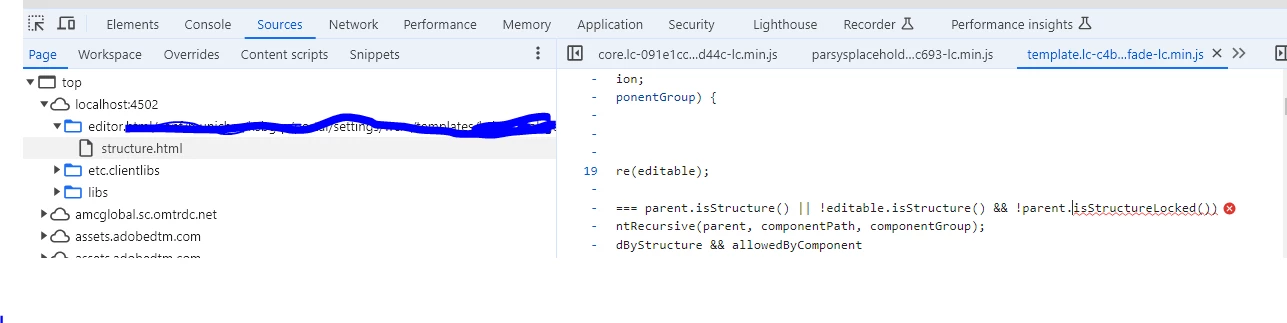
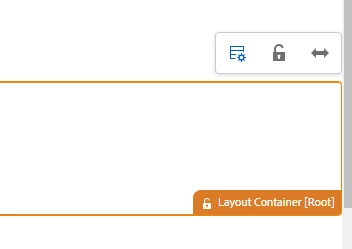
I have just tried to add a policy through code. Since then  I am not able to see the Policies gear on the Layout container[Root]

before code changes:
 

After the code changes ( I tried to add a policy in .context.xml under /congf/....wcm/policies/.content.xml)
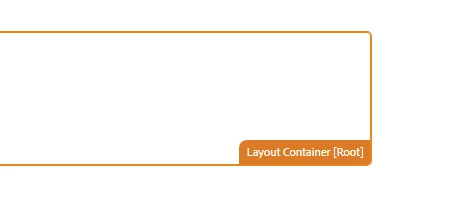
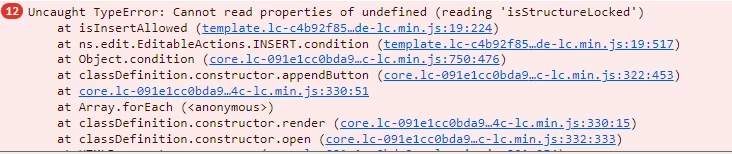
I am unable to go to policies even after reverting code/policy changes.

Any insights on the above problem if anyone had ever faced similar issue.

This post is no longer active and is closed to new replies. Need help? Start a new post to ask your question.
Best answer by RohiniTh

Hi,


This is issue is resolved when the ma;pping has been changes from core/responsivegrid to /apps/...container mapping


Thanks,

2 replies

kautuk_sahni
Employee
May 20, 2024

@rohinith Did you find the suggestion helpful? Please let us know if more information is required. Otherwise, please mark the answer as correct for posterity. If you have found out solution yourself, please share it with the community.

Kautuk Sahni
RohiniThAuthorAccepted solution
New Participant
May 21, 2024

Hi,


This is issue is resolved when the ma;pping has been changes from core/responsivegrid to /apps/...container mapping


Thanks,

gkalyan
New Participant
May 17, 2024

@rohinith 


Check the access control lists (ACLs) on these paths and ensure your user have permissions. 
/conf/{your-project}/settings/wcm/policies and /etc/policies
 

Try removing the policies from the repository at /conf/{yourproject}/settings/wcm/policies/{policypath} using CRXDELite, and then re-adding them through the UI

RohiniThAuthor
New Participant
May 20, 2024

Thank you for your inputs. The issue still persists.


gkalyan
New Participant
May 20, 2024

@rohinith 

Did you try checking the policy at the component level.