
Unable to remove the components from Editable Templates | Community
Skip to main content
chirran414
Level 4
Sep 11, 2018 8:49 PM UTC
Solved

Unable to remove the components from Editable Templates

Hello Everyone,

We are using editable templates, after adding the components to the editable template I noticed that there is no trash icon in the toolbar so we are unable to remove the component from Template. Is it expected behavior with the editable templates because when I use the same component on static templates I am seeing trash icon and I am able to remove the component.

Note:

We are not seeing trash icon for the components in their rendering script

If we referencing content within structure components via data-sly-resource using the @ resourceType option, we are unable to delete the component.

Code snippet of my component rendering script:

<div class="full-stack-content">

    <div class="container">

        <data-sly-resource="${ @path='sectionResponsiveGrid', resourceType='wcm/foundation/components/responsivegrid'}"></div>

    </div>

</div>
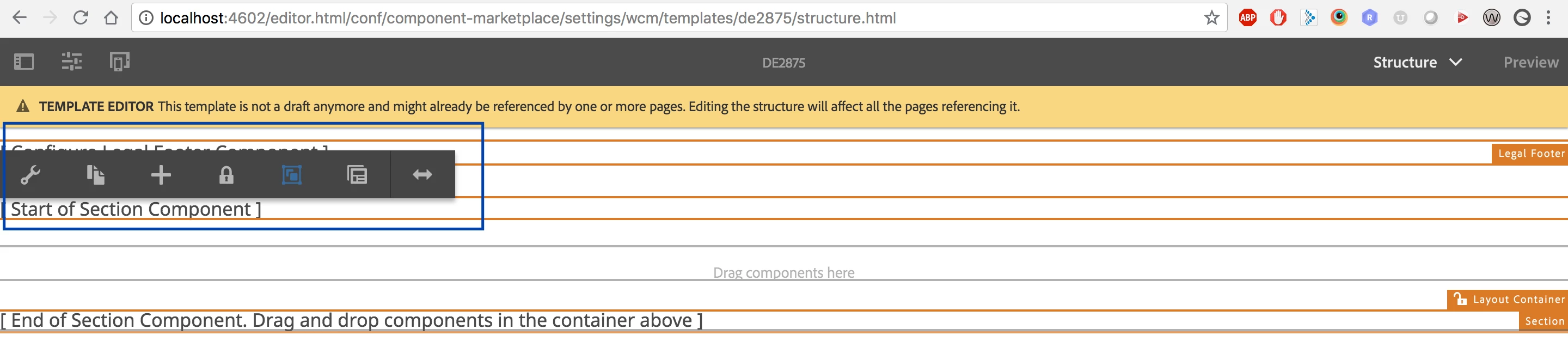
If we do not have any referencing content within structure components via data-sly-resource using the @ resourceType option we are seeing the trash icon like shown below.

Thanks,

Narayana.

This post is no longer active and is closed to new replies. Need help? Start a new post to ask your question.
chirran414
chirran414Accepted solution
Level 4
Sep 13, 2018 4:48 PM UTC

I found one article about it, after following those steps (after adding the section component and if I authored it I am able to see the trash icon/ delete button) I am able to remove that component from editable template.
adobe - Not able to remove components in Editable Template AEM - Stack Overflow

Hi  smacdonald2008​ can you confirm is this the correct way to follow it ?

13 replies

New Participant
Nov 5, 2022 3:21 AM UTC

I had the same problem. The Stackoverflow solution indeed helped. https://stackoverflow.com/questions/50447249/not-able-to-remove-components-in-editable-template-aem

For me, I had to go into the editable template and switch from Structure to Initial Content, in order to add content to the component. Then I was able to delete it. 

Adobe should consider improving the experience of using a component with data-sly-resource using the @ resourceType option. 

Translate
smacdonald2008
Level 10
Sep 13, 2018 5:06 PM UTC

Here is a video i just created to clear this up:

Also for more information on Editable Templates - watch this Guided Journey (You can also find this GJ in Experience League):

Scott's Digital Community: Guided Journey for Experience Manager on Editable Templates

Hope this helps...

Translate
smacdonald2008
Level 10
Sep 13, 2018 4:52 PM UTC

That 6.4 article should be backwards compatible for 6.3.

Translate
smacdonald2008
Level 10
Sep 13, 2018 4:51 PM UTC

If the component is locked in the editable template - only way to delete it is from the template view. You cannot delete (or even modify) a locked component from the page view. A locked component results in an author not being able to touch it within the page view (see the video below).

Translate
chirran414
Level 4
Sep 13, 2018 4:50 PM UTC

we are using AEM 6.3 is there any article on AEM 6.3.

Translate
chirran414
chirran414AuthorAccepted solution
Level 4
Sep 13, 2018 4:48 PM UTC

I found one article about it, after following those steps (after adding the section component and if I authored it I am able to see the trash icon/ delete button) I am able to remove that component from editable template.
adobe - Not able to remove components in Editable Template AEM - Stack Overflow

Hi  smacdonald2008​ can you confirm is this the correct way to follow it ?

Translate
chirran414
Level 4
Sep 13, 2018 4:45 PM UTC

Yes, I did try to do like that but once we add the components (in my case section) to editable templates they are not disappearing even if you unlock the component from template and go back to the policies and try to remove the components.

Translate
smacdonald2008
Level 10
Sep 13, 2018 1:01 PM UTC

For those reading this and want to get up and running fast with editable templates - see this HELPX artilce -- Adobe Experience Manager Help | Creating an Adobe Experience Manager 6.4 website using Editable Templates

Translate
smacdonald2008
Level 10
Sep 13, 2018 12:57 PM UTC

Furthermore - you can delete a component that is locked in the editable template from the template view (as opposed to within a page). See here:

So in summary - components can be deleted from the page - if they are allowed to be used in the Responsive Grid and set via the policy

Components that are locked in the editable template cannot be deleted from the page. They have to be deleted from the editable template - then all pages that use this template will no longer have the component shown.

Translate
smacdonald2008
Level 10
Sep 13, 2018 12:51 PM UTC

An Author can only delete components that are set in the Responsive Grid and are allowed to be used via the policy - such as the Text component.

However - an author cannot delete components on a page that are locked down in the editable template.  This is by design.

To modify this, you need to open an editable template and make changes to it - as Arun points out.

Translate