Unable to see Allowed Components list in custom layout container | Community
Skip to main content
srikanthp689160
New Participant
January 24, 2019
Solved

Unable to see Allowed Components list in custom layout container

  • January 24, 2019
  • 13 replies
  • 6568 views

Hi Team,

We are trying to create custom Layout Container(wcm/foundation/components/responsivegrid) component in AEM 6.4 to have fixed width and full width layouts in our project. Below are the steps i followed to create an editable template but unable to see Allowed Components even after creating a policy and configuring components.

  1. Create an editable template, open it to find a Layout Container(wcm/foundation/components/responsivegrid)
  2. Create a policy at Layout Container root level to allow custom Layout Container
  3. Drag and drop custom Layout Container
  4. Create and set another policy to allow project specific components for example, title, text, etc...
  5. Unlock custom Layout Container, i do not see allowed components here, whereas for OOTB Layout Container, am able to see Allowed Components list.
  6. I believe this section is necessary to edit component policies where style system configurations can be set

Attached screenshot of we.retail hero-page template where it works
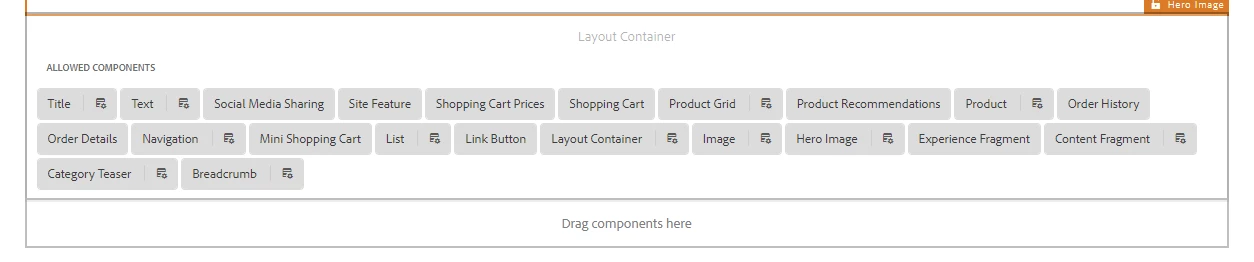
Note: sling:resourceSuperType of our custom layout container component is wcm/foundation/components/responsivegrid, we have just added dialog fields for full-width and fixed-width to add bootstrap classes container-fluid and container respectively.

Can someone please let us know if the above approach is correct or could you please point me to references to achieve our requirement.

This post is no longer active and is closed to new replies. Need help? Start a new post to ask your question.
Best answer by leoberliant

As per your post, the goal is to have "have fixed width and full-width layouts".

I don't think that you really need a custom layout component. In your editable template, you can add a layout container and then set teh width in Layout mode.

More staff can be applied to a layout container with a style. You can review this approach in WKND sample project:

https://helpx.adobe.com/experience-manager/kt/sites/using/getting-started-wknd-tutorial-develop/part4.html#putting-it-together

13 replies

srikanthp689160
New Participant
January 24, 2019

I do not see this issue with OOTB Layout component

srikanthp689160
New Participant
January 24, 2019

Hi smacdonald2008,

I just added a wrapper div with class="container" or class="container-fluid" in custom layout container sightly html script based on selection in component's dialog.

<div class="${properties.layoutClass == undefined ? 'container-fluid' : properties.layoutClass}">

<<-- OOTB code from responsivegrid.html -->>

</div>

smacdonald2008
New Participant
January 24, 2019

What changes in the code did you do in your custom layout container?

I assume if you use the OOTB Layout component - you are not seeing any issue.