Unable to validate node types since project ... is not associated with a server or the server is not started. | Community
Skip to main content
New Participant
February 3, 2018
Solved

Unable to validate node types since project ... is not associated with a server or the server is not started.

  • February 3, 2018
  • 16 replies
  • 4177 views

I am getting this error which is described in one of the AEM tutorials

Getting Started with AEM Sites Part 2 - Creating a Base Page and Template
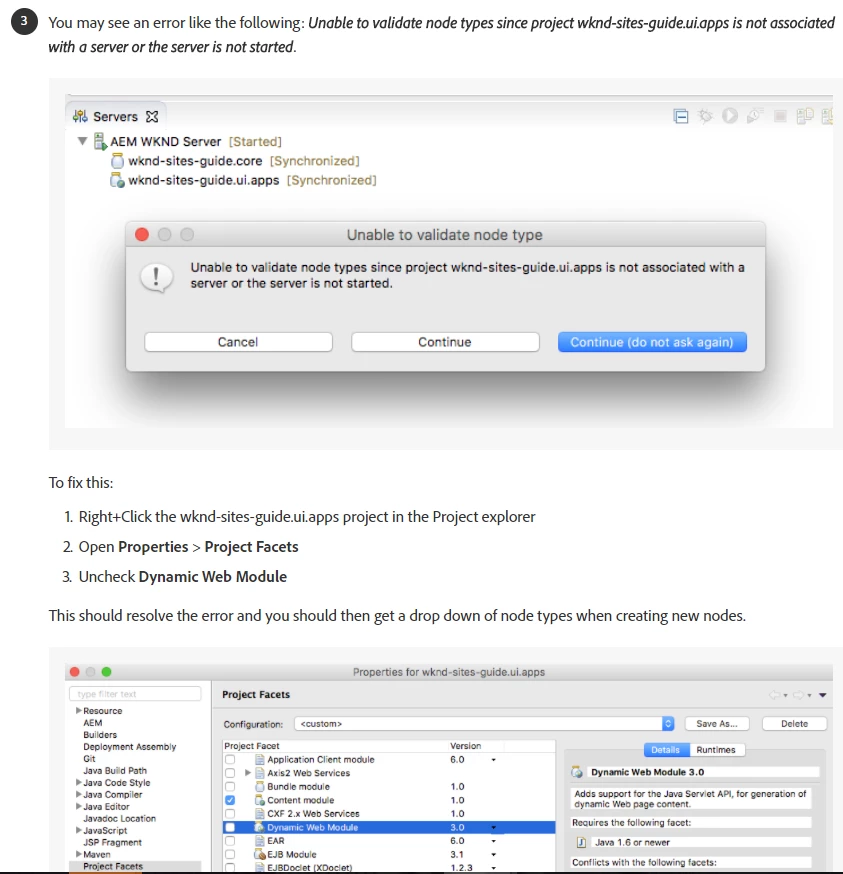
Unfortunately, the suggested fix does not work:

  • First issue is, Eclipse does not allow removing Dynamic Web Module through the UI.

  • Second issue is, if you forcibly remove it by editing /ui.apps/.settings/org.eclipse.wst.common.project.facet.core.xml, the actual problem is still not solved.

Any other ideas?

This post is no longer active and is closed to new replies. Need help? Start a new post to ask your question.
Best answer by alexr21

The problem appears to be gone after the following updates are applied. The archetype has a lot of outdated references:

  • maven-sling-plugin 2.2.0 -> 2.3.4
  • htl-maven-plugin 1.0.6 -> 1.1.2
  • maven-bundle-plugin 3.3.0 -> 3.5.0
  • Do not upgrade: content-package-maven-plugin - stay on 0.5.1, because 1.0.2 causes other problems
  • Eclipse Sling IDE Tools 1.1.0 -> 1.2.0
  • Eclipse Neon.3 vs Oxygen doesn't seem to matter

16 replies

Ratna_Kumar
New Participant
February 5, 2018

Hi,

I have followed the same instructions given in the article: Getting Started with AEM Sites Part 2 - Creating a Base Page and Template  and it got worked for me many times.

However as Scott mentioned, please refer to the community HELPX article for the same for creating the project using Lazybones: Creating an Adobe Experience Manager project using Lazybones

Also, use latest eclipse version like Mars or Neon.

Thanks,

Ratna Kumar.

smacdonald2008
New Participant
February 5, 2018

I was able to successfully deploy using Eclipse NEON and the LazyBone article i specified above.

smacdonald2008
New Participant
February 5, 2018

Try this article and see if you are successful - Creating an Adobe Experience Manager project using Lazybones

smacdonald2008
New Participant
February 5, 2018

Looks like you are not using the correct version of Eclipse. I tested this on NEON - it works fine.

Daniel_Gordon
Employee
February 5, 2018

What version of Eclipse are you using? The fix was using Mars. I have never seen the Dynamic Web Module not able to be checked/unchecked in the Project Facets.

Also you might want to double-check that under Project Facets > AEM > the content sync root directory points the jcr_root directory ("src/main/content/jcr_root").  Here is the xml for the org.eclipse.wst.common.project.facet.core.xml if that helps to compare:

<?xml version="1.0" encoding="UTF-8"?>

<faceted-project>

  <fixed facet="wst.jsdt.web"/>

  <installed facet="sling.content" version="1.0"/>

  <installed facet="sightly" version="1.1"/>

  <installed facet="java" version="1.7"/>

  <installed facet="wst.jsdt.web" version="1.0"/>

</faceted-project>

kautuk_sahni
Employee
February 5, 2018

Checking this with internal expert!!

Kautuk Sahni