update the page property for all pages using groovy script | Community
Skip to main content
Level 3
May 25, 2023 11:15 AM UTC
Solved

update the page property for all pages using groovy script

Hloo all,

Can someone help me here update the page property for all pages using groovy script

This post is no longer active and is closed to new replies. Need help? Start a new post to ask your question.
vinuu123Accepted solution
Level 3
May 25, 2023 12:21 PM UTC

hi @shiv_prakash_patel ,

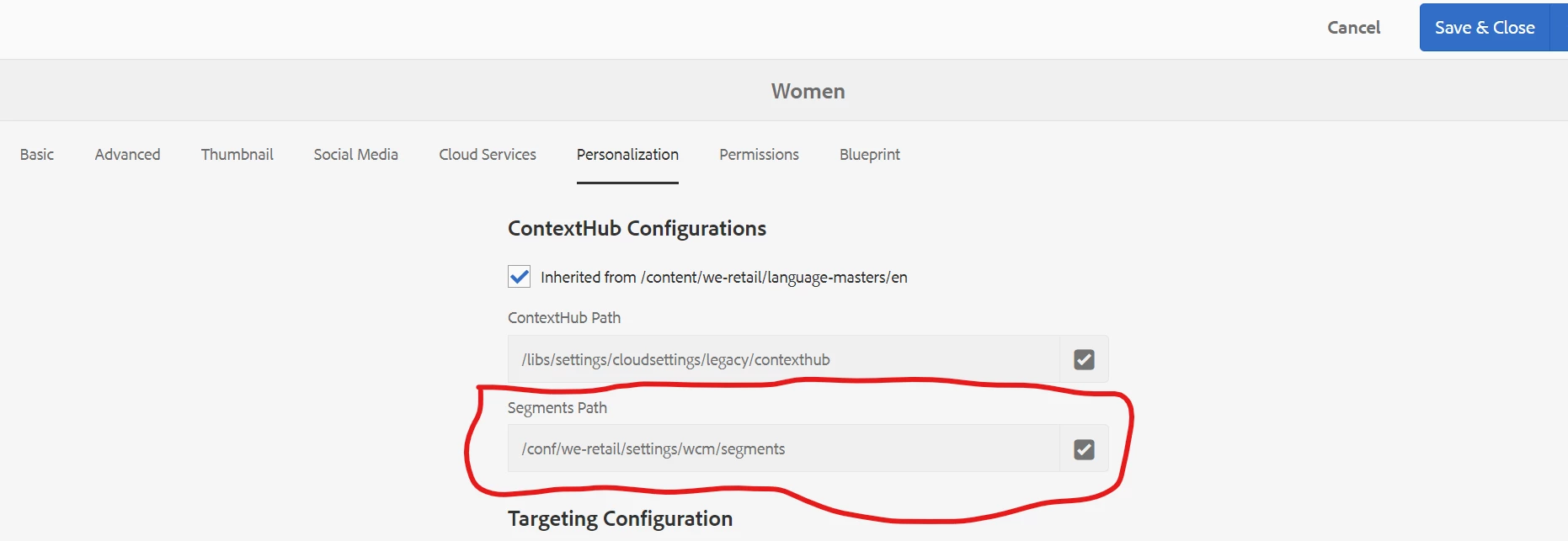
need to update/change this path in all pages using groovy script


5 replies

Level 3
Jun 15, 2023 12:58 PM UTC

import javax.jcr.Node;

getNode('/content/project').recurse {
resourceNode ->
if (resourceNode.hasProperty('cq:test')) {
resourceNode.setProperty('cq:test', 'new text');
resourceNode.getSession().save();
}
}

Translate
rawvarun
New Participant
May 25, 2023 11:05 PM UTC
Shiv_Prakash_Patel
New Participant
May 25, 2023 12:15 PM UTC

Hi @vinuu123 ,

Please use below groovy code to update the page property.

In this you can update the root page path, property name and value.

import javax.jcr.Node; getNode('/content/learning').recurse { resourceNode -> if (resourceNode.hasProperty('jcr:primaryType')) { def primaryType = resourceNode.getProperty('jcr:primaryType').string; if(primaryType.equals('cq:PageContent')){ resourceNode.setProperty('customProperty', 'customValue'); resourceNode.getSession().save(); } } } println('All Page property updated !!!');

Regards,

Shiv


Translate
Shiv Prakash
vinuu123AuthorAccepted solution
Level 3
May 25, 2023 12:21 PM UTC

hi @shiv_prakash_patel ,

need to update/change this path in all pages using groovy script


Translate
Shiv_Prakash_Patel
New Participant
May 25, 2023 1:09 PM UTC

Update the above code with below line. You can also change the value /conf/we-retail/settings/wcm/segments to your project specific.

resourceNode.setProperty('cq:contextHubSegmentsPath', '/conf/we-retail/settings/wcm/segments');

Regards,

Shiv

Translate
Shiv Prakash