Using checkboxes to add tabs in Touch UI
I'm trying to create a dialog in Touch UI that opens up with a hidden tab in it. If a user ticks a checkbox, the tab and its contents show (if the checkbox is ticked again, the tab returns to its hidden state).
I've found a few examples for adding/changing fields in the same tab but nothing much useful for adding/removing other tabs. So far I have the dialog and a listener in a client library.
The tab in the dialog:
<ctacontainer
jcr:primaryType="nt:unstructured"
sling:resourceType="granite/ui/components/foundation/container"
class="hidden showhide-target"
id="show-cta-tab">
<items jcr:primaryType="nt:unstructured">
<calltoactiontab
jcr:primaryType="nt:unstructured"
jcr:title="Call To Action"
sling:resourceType="granite/ui/components/foundation/section" >
<layout
jcr:primaryType="nt:unstructured"
margin="{Boolean}false"
sling:resourceType="granite/ui/components/foundation/layouts/fixedcolumns" />
<items jcr:primaryType="nt:unstructured">
<column
jcr:primaryType="nt:unstructured"
sling:resourceType="granite/ui/components/foundation/container" >
<items jcr:primaryType="nt:unstructured">
...
</items>
</column>
</items>
</calltoactiontab>
</items>
</ctacontainer>
And the listener:
//Listener to show/hide item or container based on checkbox value
(function ($, $document) {
"use strict";
$(document).on("foundation-contentloaded", function(e) {
$(".cq-dialog-checkbox-showhide").each( function() {
showHide($(this));
});
});
$document.on("change", ".cq-dialog-checkbox-showhide", function(e) {
showHide($(this));
});
function showHide($el) {
var shouldShowWhenChecked = $el.data('should-show-when-checked');
var isChecked = $el.is(":checked");
var targetElementSelector = $el.data('show-hide-target');
var $targetElement = $('#' + targetElementSelector);
var isVisible = shouldShowWhenChecked ? isChecked : !isChecked;
$targetElement.toggleClass('hidden', !isVisible);
}
})($, $(document));
This works to the extent that the fields in the tab appear and disappear. What is odd though is that the tab selector at the top of the container is still showing and without the tab name:
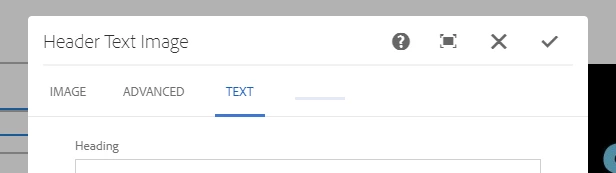
Can anyone provide a reason why the tab button is still showing and how I can get that to disappear with the contents of the tab?