Using Context Aware Configuration Collection | Community
Skip to main content
New Participant
February 27, 2023
Solved

Using Context Aware Configuration Collection

  • February 27, 2023
  • 2 replies
  • 3653 views

I created a CAC Configuration with the collection = true like this (redacting real values and field names)

package com.cws.aem.core.beans.caconfigs;

import org.apache.sling.caconfig.annotation.Configuration;
import org.apache.sling.caconfig.annotation.Property;

@Configuration(label = "Some Configuration", collection = true)
public @interface SomeConfiguration{
@Property(label = "Field A", order = 1)
String fieldA();

@Property(label = "Field B", order = 6)
String fieldB();
}

 When I try to use the configuration above I used the following code


        resource = getRequest().getRequestPathInfo().getSuffixResource();
resourceResolver = resource.getResourceResolver();
collection = resourceResolver.adaptTo(PageManager.class).getContainingPage(resource)
.getContentResource().adaptTo(ConfigurationBuilder.class).asCollection(SomeConfiguration.class);

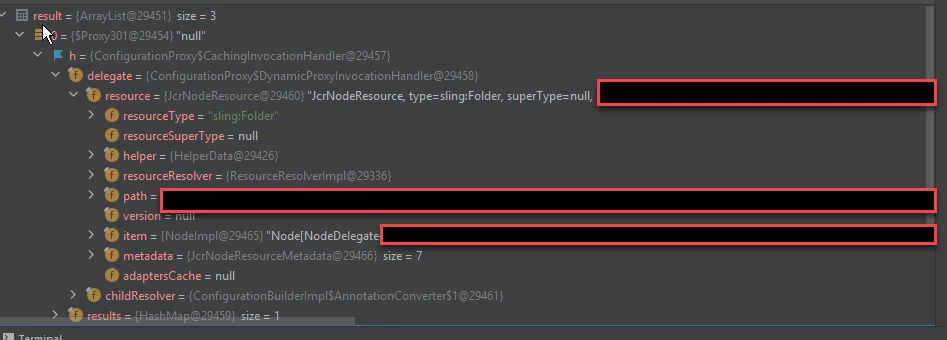
I step through the logic with the JVM debugger, I can actually see the resource nodes for the configurations I stored. I don't know how to access that data though and render the values in the HTL template.


This post is no longer active and is closed to new replies. Need help? Start a new post to ask your question.
Best answer by sunil_kumar_

Hi @johns43992246,
As I understood, You have two requirements. Let me give you another solution.
1. Populate dialog dropdown from CA config(collection type).
 Create a servlet which serve as datasource. 

@Component(service = Servlet.class) @SlingServletResourceTypes( methods = {HttpConstants.METHOD_GET}, resourceTypes = "aemgeeks/components/datasource/dropdown" ) public class DataSourceServlet extends SlingAllMethodsServlet { private static final Logger LOG = LoggerFactory.getLogger(DataSourceServlet.class); @Override protected void doGet(SlingHttpServletRequest request, SlingHttpServletResponse response) throws ServletException, IOException { Resource resource = request.getRequestPathInfo().getSuffixResource(); PageManager pageManager = request.getResourceResolver().adaptTo(PageManager.class); Page formPage = pageManager.getContainingPage(resource); List<Resource> list = new ArrayList<>(); InheritanceValueMap ivm = new HierarchyNodeInheritanceValueMap(formPage.getContentResource()); String ctxConfigPath = ivm.getInherited("sling:configRef", String.class); if (StringUtils.isNotEmpty(ctxConfigPath)) { String apiConfigRoot =ctxConfigPath +"/sling:configs/"+ SomeConfiguration.class.getCanonicalName(); Resource apiResource = request.getResourceResolver().getResource(apiConfigRoot); apiResource.listChildren().forEachRemaining(child -> { ValueMap vm = new ValueMapDecorator(new HashMap<String, Object>()); vm.put("text", child.getValueMap().get("fieldA", String.class)); vm.put("value", child.getValueMap().get("fieldA", String.class)); list.add(new ValueMapResource(request.getResourceResolver(), new ResourceMetadata(), "nt:unstructured", vm)); }); DataSource dataSource = new SimpleDataSource(list.iterator()); request.setAttribute(DataSource.class.getName(), dataSource); } } }

Dropdown Dialog field- Use resourceType used in servlet as datasource for dropdown 

<caconfig jcr:primaryType="nt:unstructured" sling:resourceType="granite/ui/components/coral/foundation/form/select" fieldLabel="CA Configs" name="./caconfig"> <datasource jcr:primaryType="nt:unstructured" sling:resourceType="aemgeeks/components/datasource/dropdown"/> </caconfig>


2. Now if you need same CA Config values in Sighlty, use Sling model to get CA Config values.
Sling Model: 

public List<SomeConfiguration> getConfigList() { InheritanceValueMap ivm = new HierarchyNodeInheritanceValueMap(currentPage.getContentResource()); String ctxConfigPath = ivm.getInherited("sling:configRef", String.class); String apiConfigRoot =ctxConfigPath +"/sling:configs/"+ SomeConfiguration.class.getCanonicalName(); Resource configResource=resourceResolver.getResource(apiConfigRoot); Collection<SomeConfiguration> configs=configResource.adaptTo(ConfigurationBuilder.class).asCollection(SomeConfiguration.class); return new ArrayList<SomeConfiguration>(configs); }

Sightly Code - As you have entire CA Config object in list, you can get any data.

<div data-sly-use.config="com.aem.geeks.core.models.CAConfig"></div> <div data-sly-list.item="${config.configList}"> <p> Config : <b>${item.fieldA} </b></p> </div>


2 replies

sunil_kumar_
sunil_kumar_Accepted solution
New Participant
February 28, 2023

Hi @johns43992246,
As I understood, You have two requirements. Let me give you another solution.
1. Populate dialog dropdown from CA config(collection type).
 Create a servlet which serve as datasource. 

@Component(service = Servlet.class) @SlingServletResourceTypes( methods = {HttpConstants.METHOD_GET}, resourceTypes = "aemgeeks/components/datasource/dropdown" ) public class DataSourceServlet extends SlingAllMethodsServlet { private static final Logger LOG = LoggerFactory.getLogger(DataSourceServlet.class); @Override protected void doGet(SlingHttpServletRequest request, SlingHttpServletResponse response) throws ServletException, IOException { Resource resource = request.getRequestPathInfo().getSuffixResource(); PageManager pageManager = request.getResourceResolver().adaptTo(PageManager.class); Page formPage = pageManager.getContainingPage(resource); List<Resource> list = new ArrayList<>(); InheritanceValueMap ivm = new HierarchyNodeInheritanceValueMap(formPage.getContentResource()); String ctxConfigPath = ivm.getInherited("sling:configRef", String.class); if (StringUtils.isNotEmpty(ctxConfigPath)) { String apiConfigRoot =ctxConfigPath +"/sling:configs/"+ SomeConfiguration.class.getCanonicalName(); Resource apiResource = request.getResourceResolver().getResource(apiConfigRoot); apiResource.listChildren().forEachRemaining(child -> { ValueMap vm = new ValueMapDecorator(new HashMap<String, Object>()); vm.put("text", child.getValueMap().get("fieldA", String.class)); vm.put("value", child.getValueMap().get("fieldA", String.class)); list.add(new ValueMapResource(request.getResourceResolver(), new ResourceMetadata(), "nt:unstructured", vm)); }); DataSource dataSource = new SimpleDataSource(list.iterator()); request.setAttribute(DataSource.class.getName(), dataSource); } } }

Dropdown Dialog field- Use resourceType used in servlet as datasource for dropdown 

<caconfig jcr:primaryType="nt:unstructured" sling:resourceType="granite/ui/components/coral/foundation/form/select" fieldLabel="CA Configs" name="./caconfig"> <datasource jcr:primaryType="nt:unstructured" sling:resourceType="aemgeeks/components/datasource/dropdown"/> </caconfig>


2. Now if you need same CA Config values in Sighlty, use Sling model to get CA Config values.
Sling Model: 

public List<SomeConfiguration> getConfigList() { InheritanceValueMap ivm = new HierarchyNodeInheritanceValueMap(currentPage.getContentResource()); String ctxConfigPath = ivm.getInherited("sling:configRef", String.class); String apiConfigRoot =ctxConfigPath +"/sling:configs/"+ SomeConfiguration.class.getCanonicalName(); Resource configResource=resourceResolver.getResource(apiConfigRoot); Collection<SomeConfiguration> configs=configResource.adaptTo(ConfigurationBuilder.class).asCollection(SomeConfiguration.class); return new ArrayList<SomeConfiguration>(configs); }

Sightly Code - As you have entire CA Config object in list, you can get any data.

<div data-sly-use.config="com.aem.geeks.core.models.CAConfig"></div> <div data-sly-list.item="${config.configList}"> <p> Config : <b>${item.fieldA} </b></p> </div>


New Participant
March 7, 2023

Thanks, this works, I adapted it to the

com.adobe.granite.ui.components.ds.DataSource

without needing a servlet. However, I am not able to replicate the child nodes to the /conf path when I publish. This probably should be a separate question though.

Kiran_Vedantam
New Participant
February 27, 2023

HI @johns43992246 


Once you get the collection, you can iterate it through the data-sly-list in htl


Collection<CAConfig> CAConfigs
<ul data-sly-list.collection="${classObject.CAConfigs}" data-sly-unwrap>
  <li>${collection.configValue}</li> </ul>


Hope it helps!

Thanks,
Kiran Vedantam.

New Participant
February 27, 2023

I'm actually trying to pass these values in as part of a data query for a dropdown in authoring dialog. So there needs to be some transformation here from the array to the DataSource class object. If I could figure out how to get the ValueMap of each child node in the collection, I think I can handle the transformation logic.

Kiran_Vedantam
New Participant
February 27, 2023

My query is why are you trying to populate the config values in the drop-down? Ideally, they should be authored on the page. Anyways, for your use case you can try this Map code


HTL-code:

<div data-sly-use.hashmap="com.adobe.examples.htl.core.hashmap.HashMapExample"
     data-sly-list="${hashmap.map.keySet.iterator}">
     ${item}
     <ul data-sly-list.aem="${hashmap.map[item].keySet.iterator}">
         <li>${aem} ${hashmap.map[item][aem]}</li>
     </ul>
</div>


Hope it helps!

Thanks,
Kiran Vedantam.