Validate Touch Ui Dialog | Community
Skip to main content
New Participant
September 23, 2022
Solved

Validate Touch Ui Dialog

  • September 23, 2022
  • 2 replies
  • 2164 views

Hi I have Touch Ui Dialog, in that dialog I have 5 fields are there. So when author open dialog and submit without author anything [all dialog fields are empty] on that time we have to show alert like "No value entered .please add at least one of the field..."
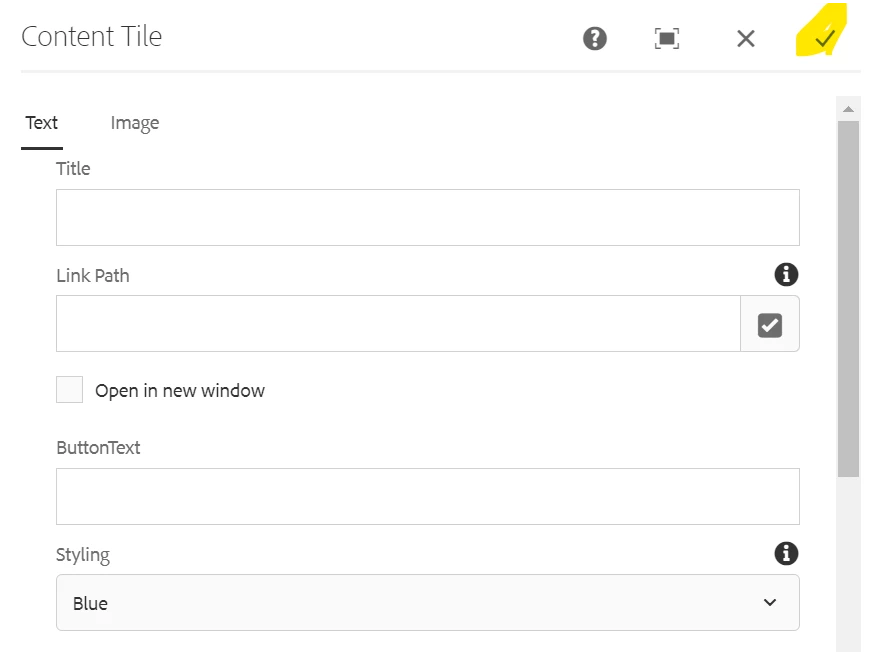
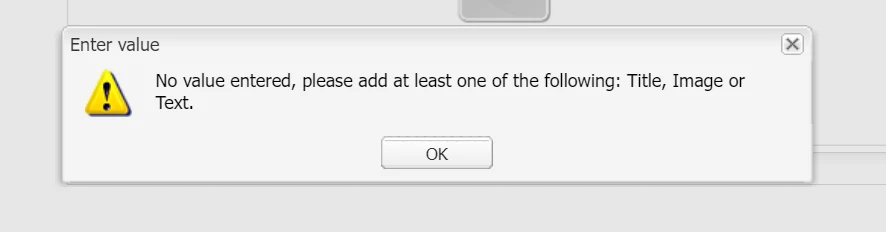


Please help me

thanks in advance

This post is no longer active and is closed to new replies. Need help? Start a new post to ask your question.
Best answer by Saravanan_Dharmaraj

Below are the couple of helpful links to go through to set up the custom validation in touch UI dialog. Its pretty straight forward

https://blogs.perficient.com/2017/11/06/aem-touch-ui-dialog-validation-new-best-practice-use-foundation-validation/

https://medium.com/@ramamity94/easily-achieving-dialog-validations-in-aem-touch-ui-e78106012282

https://aemhints.com/2020/11/02/validating-dialog-value/


Or if these fields are mandatory you can set the 

required="{Boolean}true"

 for those fields in the dialog.


2 replies

Jagadeesh_Prakash
New Participant
September 23, 2022

Hi @rajini 


It seems you wanted an alert as a popup to show what are mandatory fields. Example urls from @saravanan_dharmaraj  also works with in the dialog but not sure if it can show as a alert popup. For this you might need to add a custom JS to show the message on a dialog. Please refer to below example you can use it and customize it according to your requirement. Hope that works for you


https://aemlab.blogspot.com/2019/05/aem-touch-ui-component-dialog-field.html


RajiniAuthor
New Participant
September 26, 2022

@jagadeesh_prakash Thanks for your help

Saravanan_Dharmaraj
Saravanan_DharmarajAccepted solution
New Participant
September 23, 2022

Below are the couple of helpful links to go through to set up the custom validation in touch UI dialog. Its pretty straight forward

https://blogs.perficient.com/2017/11/06/aem-touch-ui-dialog-validation-new-best-practice-use-foundation-validation/

https://medium.com/@ramamity94/easily-achieving-dialog-validations-in-aem-touch-ui-e78106012282

https://aemhints.com/2020/11/02/validating-dialog-value/


Or if these fields are mandatory you can set the 

required="{Boolean}true"

 for those fields in the dialog.


RajiniAuthor
New Participant
September 26, 2022

@saravanan_dharmaraj Thanks for your help