Watermarking issues with AEM 6.5 | Community
Skip to main content
New Participant
August 11, 2020
Solved

Watermarking issues with AEM 6.5

  • August 11, 2020
  • 1 reply
  • 1042 views

Dear all,


We added a watermarking step in the default DAM Update WF, as per https://docs.adobe.com/content/help/en/experience-manager-65/assets/administer/watermarking.html.


Expected:

When I select the position of the watermark, it reflects on the watermark rendering after the asset is processed.

I can also choose the font for the watermark.


Actual:

Watermark is always placed on top left, error.log output confirms that TOP_LEFT is the position always passed in the processing.

I cannot choose a font for the watermark.


Reason for watermark position issue:

Markup of dialog is wrong, see below:
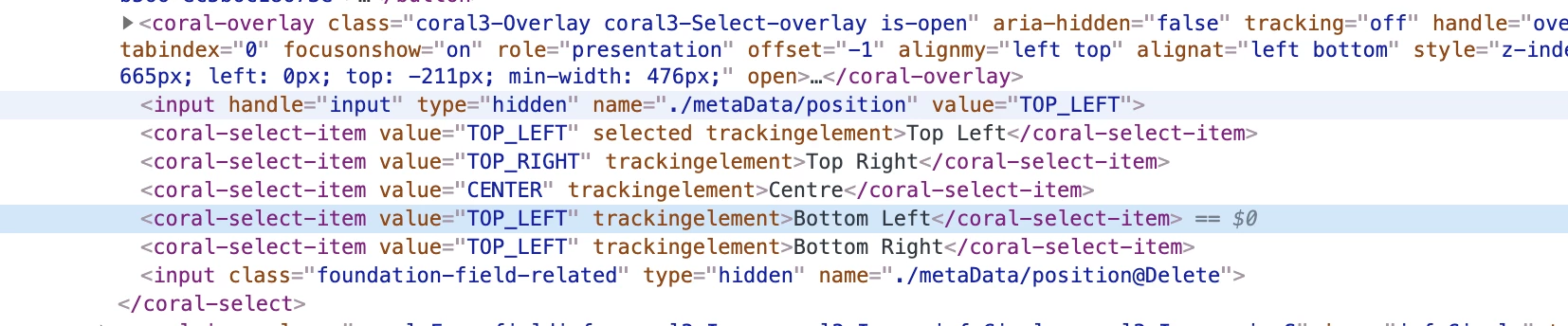


Current workaround:

Manually change TOP_LEFT to e.g. BOTTOM_RIGHT in the WF model metadata node,  via CRXDE.


Any ideas around this? Didn't see any SP fixes around this so far.

This post is no longer active and is closed to new replies. Need help? Start a new post to ask your question.
Best answer by user05162

I just tested it on 6.5.5 and works with all orientations(Center,Top Right etc). Make sure you are placing the watermarking step before Process Thumbnail step. Try adding a DEBUG logger on "com.day.cq.dam.core.process.WaterMarkProcess" or more details

1 reply

user05162Accepted solution
Employee
August 11, 2020

I just tested it on 6.5.5 and works with all orientations(Center,Top Right etc). Make sure you are placing the watermarking step before Process Thumbnail step. Try adding a DEBUG logger on "com.day.cq.dam.core.process.WaterMarkProcess" or more details

user55521Author
New Participant
August 13, 2020

Hi jbrar, thanks for your reply; can you try using bottom left or bottom right placement for the watermark? The screenshot containing wrong dropdown values comes from a AEM 6.5.5 instance. Also, do you have any feedback on the fonts (empty dropdown, no selection possible) issue?