web console log support error | Community
Skip to main content
This post is no longer active and is closed to new replies. Need help? Start a new post to ask your question.
Best answer by joerghoh

Hi,

the replication errors are not related to your problem.

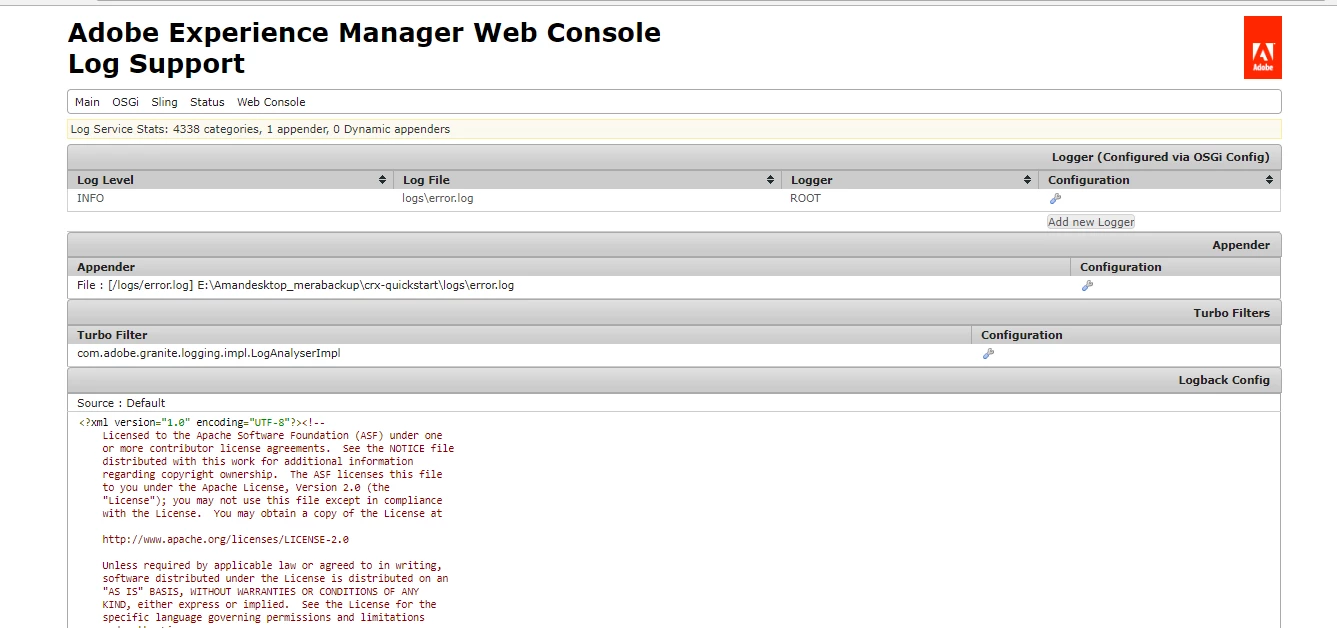
The fact, that you have only this small number of entries in the /system/console/slinglog screen (only 1 logger and 1 appender) is interesting, because a default AEM comes with some more entries (it writes a request.log, an access.log, update.log etc). So either you have messed with the default configuration (I would never remove loggers, but only add new ones) or the system you are working is in a way broken.

The exception "org.osgi.service.cm.ConfigurationException: oauth.config.id : Config Id must be unique" shows me that you have played with this instance quite a bit, so maybe rebuilding it from scratch is much faster than diagnosing strange issues which arose out of experiments with AEM.

Jörg

12 replies

joerghoh
joerghohAccepted solution
Employee
September 19, 2018

Hi,

the replication errors are not related to your problem.

The fact, that you have only this small number of entries in the /system/console/slinglog screen (only 1 logger and 1 appender) is interesting, because a default AEM comes with some more entries (it writes a request.log, an access.log, update.log etc). So either you have messed with the default configuration (I would never remove loggers, but only add new ones) or the system you are working is in a way broken.

The exception "org.osgi.service.cm.ConfigurationException: oauth.config.id : Config Id must be unique" shows me that you have played with this instance quite a bit, so maybe rebuilding it from scratch is much faster than diagnosing strange issues which arose out of experiments with AEM.

Jörg

AdobeID24
AdobeID24Author
New Participant
September 19, 2018

Som more error lines from error.log file ..if you can hlp please:-)

18.09.2018 16:00:48.813 *ERROR* [FelixDispatchQueue] org.apache.aries.subsystem.core FrameworkEvent ERROR (org.osgi.service.coordinator.CoordinationException: Coordination failed)

18.09.2018 16:01:36.809 *ERROR* [CM Configuration Updater (ManagedServiceFactory Update: factoryPid=[com.adobe.granite.auth.oauth.provider])] org.apache.felix.configadmin Service [org.apache.felix.cm.ConfigurationAdmin,9, [org.osgi.service.cm.ConfigurationAdmin]] [org.osgi.service.cm.ManagedServiceFactory, id=546, bundle=149/launchpad:resources/install/0/com.adobe.granite.auth.oauth-1.0.44.jar]: Updating property oauth.config.id of configuration com.adobe.granite.auth.oauth.provider.c1ed00e1-d5bd-432d-bf81-be3006530a78 caused a problem: Config Id must be unique. (org.osgi.service.cm.ConfigurationException: oauth.config.id : Config Id must be unique.)

org.osgi.service.cm.ConfigurationException: oauth.config.id : Config Id must be unique.

18.09.2018 16:01:56.306 *ERROR* [FelixStartLevel] com.day.cq.replication.Agent.publish Error while sending request: java.net.ConnectException: Connection refused: connect

18.09.2018 16:01:56.306 *ERROR* [FelixStartLevel] com.day.cq.replication.Agent.publish Replication (DELETE) of /content/mymsmfolder not successful: java.net.ConnectException: Connection refused: connect Conversation follows

18.09.2018 16:01:56.306 *ERROR* [FelixStartLevel] com.day.cq.replication.Agent.publish ------------------------------------------------

18.09.2018 16:01:56.306 *ERROR* [FelixStartLevel] com.day.cq.replication.Agent.publish Sending message to localhost:4503

18.09.2018 16:01:56.306 *ERROR* [FelixStartLevel] com.day.cq.replication.Agent.publish >> POST /bin/receive HTTP/1.0

18.09.2018 16:01:56.306 *ERROR* [FelixStartLevel] com.day.cq.replication.Agent.publish >> Action: Delete

18.09.2018 16:01:56.306 *ERROR* [FelixStartLevel] com.day.cq.replication.Agent.publish >> Path: /content/mymsmfolder

18.09.2018 16:01:56.306 *ERROR* [FelixStartLevel] com.day.cq.replication.Agent.publish >> Handle: /content/mymsmfolder

18.09.2018 16:01:56.306 *ERROR* [FelixStartLevel] com.day.cq.replication.Agent.publish >> Referer: about:blank

18.09.2018 16:01:56.306 *ERROR* [FelixStartLevel] com.day.cq.replication.Agent.publish >> Content-Length: 0

18.09.2018 16:01:56.306 *ERROR* [FelixStartLevel] com.day.cq.replication.Agent.publish >> Content-Type: application/octet-stream

smacdonald2008
New Participant
September 19, 2018

Reason why that was asked was becasue we can tell if issue is with your project or something is corrupt on the system. If it successfully works in a DEV sandbox instance - then we know its not something specific to your project. You should be able to deploy your project as a package and deploy very fast.

AdobeID24
AdobeID24Author
New Participant
September 19, 2018

If fresh instance means new instance then I will loose my code which i made in my instance and i need to replicate the same in new instance.

Which will take so much time ...

Is there any other way like restarting any particular bundle related to this ?

AdobeID24
AdobeID24Author
New Participant
September 19, 2018

18.09.2018 22:12:57.135 *INFO* [pool-11-thread-5-com_day_cq_replication_job_publish(com/day/cq/replication/job/publish)] com.day.cq.replication.Agent.publish * Auth User: admin

18.09.2018 22:12:57.135 *INFO* [pool-11-thread-5-com_day_cq_replication_job_publish(com/day/cq/replication/job/publish)] com.day.cq.replication.Agent.publish * HTTP Version: 1.1

18.09.2018 22:12:57.135 *INFO* [pool-11-thread-5-com_day_cq_replication_job_publish(com/day/cq/replication/job/publish)] com.day.cq.replication.Agent.publish Sending POST request to http://localhost:4503/bin/receive?sling:authRequestLogin=1

18.09.2018 22:12:58.137 *ERROR* [pool-11-thread-5-com_day_cq_replication_job_publish(com/day/cq/replication/job/publish)] com.day.cq.replication.Agent.publish Error while sending request: java.net.ConnectException: Connection refused: connect

18.09.2018 22:12:58.137 *ERROR* [pool-11-thread-5-com_day_cq_replication_job_publish(com/day/cq/replication/job/publish)] com.day.cq.replication.Agent.publish Replication (DELETE) of /content/mymsmfolder not successful: java.net.ConnectException: Connection refused: connect Conversation follows

18.09.2018 22:12:58.137 *ERROR* [pool-11-thread-5-com_day_cq_replication_job_publish(com/day/cq/replication/job/publish)] com.day.cq.replication.Agent.publish ------------------------------------------------

18.09.2018 22:12:58.137 *ERROR* [pool-11-thread-5-com_day_cq_replication_job_publish(com/day/cq/replication/job/publish)] com.day.cq.replication.Agent.publish Sending message to localhost:4503

18.09.2018 22:12:58.137 *ERROR* [pool-11-thread-5-com_day_cq_replication_job_publish(com/day/cq/replication/job/publish)] com.day.cq.replication.Agent.publish >> POST /bin/receive HTTP/1.0

18.09.2018 22:12:58.137 *ERROR* [pool-11-thread-5-com_day_cq_replication_job_publish(com/day/cq/replication/job/publish)] com.day.cq.replication.Agent.publish >> Action: Delete

18.09.2018 22:12:58.137 *ERROR* [pool-11-thread-5-com_day_cq_replication_job_publish(com/day/cq/replication/job/publish)] com.day.cq.replication.Agent.publish >> Path: /content/mymsmfolder

18.09.2018 22:12:58.137 *ERROR* [pool-11-thread-5-com_day_cq_replication_job_publish(com/day/cq/replication/job/publish)] com.day.cq.replication.Agent.publish >> Handle: /content/mymsmfolder

18.09.2018 22:12:58.137 *ERROR* [pool-11-thread-5-com_day_cq_replication_job_publish(com/day/cq/replication/job/publish)] com.day.cq.replication.Agent.publish >> Referer: about:blank

18.09.2018 22:12:58.137 *ERROR* [pool-11-thread-5-com_day_cq_replication_job_publish(com/day/cq/replication/job/publish)] com.day.cq.replication.Agent.publish >> Content-Length: 0

18.09.2018 22:12:58.137 *ERROR* [pool-11-thread-5-com_day_cq_replication_job_publish(com/day/cq/replication/job/publish)] com.day.cq.replication.Agent.publish >> Content-Type: application/octet-stream

18.09.2018 22:12:58.137 *INFO* [pool-11-thread-5-com_day_cq_replication_job_publish(com/day/cq/replication/job/publish)] com.day.cq.replication.Agent.publish.queue Job for agent publish processed in 1002ms. Failed.

These are last ;lines of error.log file which is generated automatically.

joerghoh
Employee
September 18, 2018

Do you find anything in the error.log or in the stdout.log file?

Jörg

VeenaVikraman
New Participant
September 18, 2018

Yeah I also recommend checking in a fresh instance.

smacdonald2008
New Participant
September 18, 2018

Try on a fresh instance. Also try this artilce to create a custom log - Creating a custom log file for an Adobe Experience Manager project

AdobeID24
AdobeID24Author
New Participant
September 18, 2018

Hi Veena ..Thanks for your reply

Yeah I restarted the instance but was getting the same error

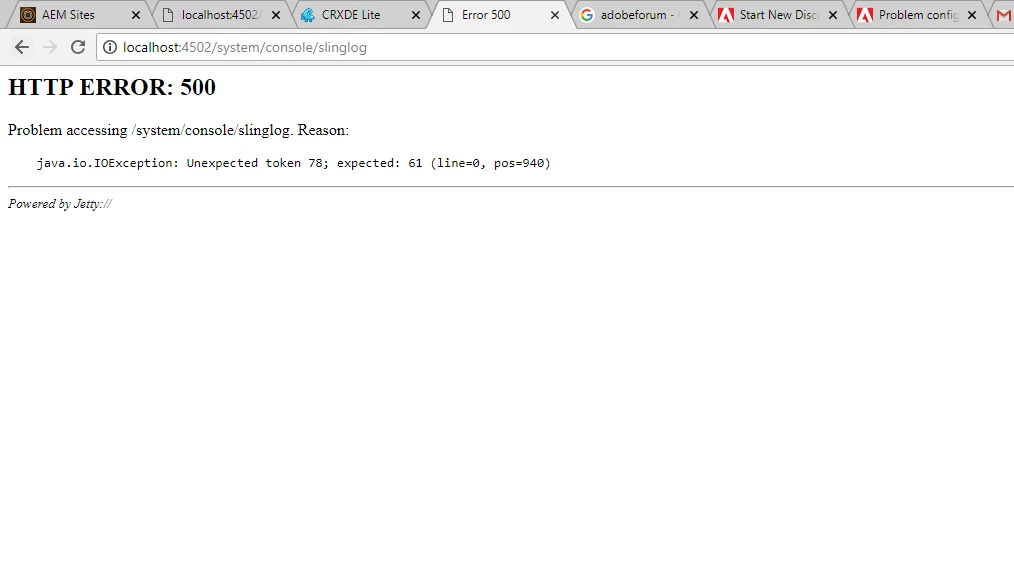
Yeah this problem is related to instance it seems ..I attacheed the screenshot also like my log console is looking like that only which is not normal I am getting error .

VeenaVikraman
New Participant
September 18, 2018

There could be a chance of possibly some issue in the instance . Did you try restarting ? What is the AEM version ?