What is the best way to add more properties to the page component? | Community
Skip to main content
Level 3
Jul 10, 2017 2:13 PM UTC
Solved

What is the best way to add more properties to the page component?

Hello all,

I've a requirement where I have to add more properties to the existing page component. I've tried these two ways:

- Overlay the page component and add more properties in tab_basic (this worked)

- Inherit the page component (giving in slingResourceSuperType) and copy and paste the dialog node and add more properties (this did not work)

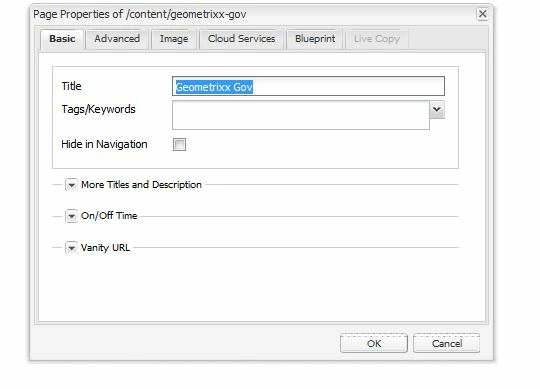
Are there any other options to do it? Basically I want to have more options in the basic tab rather than just 3 which has been given. I have added the pic also here for more clarity. Thanks!

This post is no longer active and is closed to new replies. Need help? Start a new post to ask your question.
viveksachdeva
viveksachdevaAccepted solution
New Participant
Jul 11, 2017 4:32 AM UTC

Should not copy paste whole dialog. That defeats the purpose of resource merger. Here is a link that does similar to what you are doing GitHub - Adobe-Marketing-Cloud/aem-authoring-extension-page-dialog​ .

But still its strange that copying the dialog doesnt work. Could you add details exactly what doesnt work? Does the dialog not open or it still shows old fields?

6 replies

vitis90Author
Level 3
Jul 11, 2017 10:43 AM UTC

There was no js error in console actually. Wonder why. But I'm going with overlaying approach. Thank you.

Translate
viveksachdeva
New Participant
Jul 11, 2017 6:26 AM UTC

I think there would be some JS error.. Possible that the dialog got copied under incorrect node.. Can verify the hierarchy of your new component? If there is a sample package that you can share, that will be great... Could you also check browser console and share JS error, if you see any?

P.S. overlaying(that works for you) is better practice. So your work is accomplished but it would be good to find out root cause of this issue.

Translate
vitis90Author
Level 3
Jul 11, 2017 6:17 AM UTC

Yes I was able to see that new properties. OVerlaying works fine but I'm wondering if its the right practice or not.

Translate
vitis90Author
Level 3
Jul 11, 2017 6:11 AM UTC

The dialog doesn't open when i click on page properties

Translate
viveksachdeva
viveksachdevaAccepted solution
New Participant
Jul 11, 2017 4:32 AM UTC

Should not copy paste whole dialog. That defeats the purpose of resource merger. Here is a link that does similar to what you are doing GitHub - Adobe-Marketing-Cloud/aem-authoring-extension-page-dialog​ .

But still its strange that copying the dialog doesnt work. Could you add details exactly what doesnt work? Does the dialog not open or it still shows old fields?

Translate
smacdonald2008
Level 10
Jul 10, 2017 7:42 PM UTC

When you overlayed the page component - where you able to see the new tabs?

Translate