What privileges are missing in inbox view? | Community
Skip to main content
Level 4
Apr 3, 2021 11:57 PM UTC
Solved

What privileges are missing in inbox view?

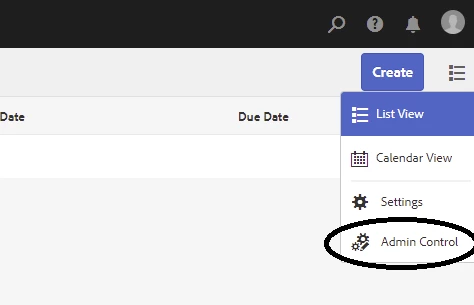
In my client instance, I am unable to see the "Admin Control" option in the inbox view. What privileges are required to see that view? I am already in the "Admins" group (with AMS). Do I need to be in "Administrator" group to see that?

This post is no longer active and is closed to new replies. Need help? Start a new post to ask your question.
Asutosh_Jena_
Asutosh_Jena_Accepted solution
New Participant
Apr 4, 2021 4:17 AM UTC

Hi @aembytes 

The Admin Control option is visible only to the members of the administrators or workflow-administrators group. As you said you are already part of 'Admin' groups by AMS, which will a customized group created by AMS for your organization with few admin privilege such as system console access but it is definitely not part of the other 2 groups which is why you do not see the option.

You can ask AMS to include workflow-administrators into your customized Admin group and you should be able to see it afterwords.


Adobe Link for your reference:

https://experienceleague.adobe.com/docs/experience-manager-65/authoring/essentials/inbox.html?lang=en#inbox-admin-control


Hope this helps!

Thanks!
1 reply

Asutosh_Jena_
Asutosh_Jena_Accepted solution
New Participant
Apr 4, 2021 4:17 AM UTC

Hi @aembytes 

The Admin Control option is visible only to the members of the administrators or workflow-administrators group. As you said you are already part of 'Admin' groups by AMS, which will a customized group created by AMS for your organization with few admin privilege such as system console access but it is definitely not part of the other 2 groups which is why you do not see the option.

You can ask AMS to include workflow-administrators into your customized Admin group and you should be able to see it afterwords.


Adobe Link for your reference:

https://experienceleague.adobe.com/docs/experience-manager-65/authoring/essentials/inbox.html?lang=en#inbox-admin-control


Hope this helps!

Thanks!

Translate