Where can I find the feature pack for Dynamic Media on AEM 6.3.3.0? | Community
Skip to main content
Level 4
Dec 11, 2018 5:37 PM UTC
Solved

Where can I find the feature pack for Dynamic Media on AEM 6.3.3.0?
Hello Everyone,

Can I ask a question ?

Now I am using AEM 6.3.3.0

I have to install the Dynamic Media on AEM 6.3.3.0.

I can not find  the feature pack  for Dynamic Media on AEM 6.3.3.0.

There are  the feature pack  for Dynamic Media on  AEM 6.3.1.0.

Dynamic Media Feature Packs 14410 and 18912 Release Notes

https://helpx.adobe.com/ca/experience-manager/6-3/release-notes/dynamic-media-featurepack-14410.html

Feature Pack 14410 - This feature pack is compatible with AEM 6.3.1.0, Service Pack 1. 

Feature Packs

https://helpx.adobe.com/ca/experience-manager/6-3/release-notes/feature-packs-release-notes.html

AEM Assets

Dynamic Media Feature Packs 14410 and 18912

Feature Pack 14410

Feature Pack 18912

Dynamic Media Feature Packs 14410 and 18912

New automation and delivery features for Dynamic Media. Upgrade release for Dynamic Media Classic customers.

Where can I find the feature pack  for Dynamic Media on AEM 6.3.3.0?

This post is no longer active and is closed to new replies. Need help? Start a new post to ask your question.
chung_yonge1684Accepted solution
Level 4
Dec 12, 2018 11:22 PM UTC

We don't need to install the feature pack  for Dynamic Media on AEM 6.3.3.0.

For Configuring Dynamic Media - Hybrid mode

Step01 : cd C:\Adobe\AEM\6.3\Author
Step02 : java -Xms8192m -Xmx8192m -Xss1024k -XX:MaxPermSize=1024m -XX:-UseGCOverheadLimit -Djava.awt.headless=true -Djava.io.tmpdir=C:\Adobe\AEM\cq-temp -jar aem-author-4502.jar -r dynamicmedia

For Configuring Dynamic Media - Scene7 mode

Step01 : cd C:\Adobe\AEM\6.3\Author

Step02 : java -Xms8192m -Xmx8192m -Xss1024k -XX:MaxPermSize=1024m -XX:-UseGCOverheadLimit -Djava.awt.headless=true -Djava.io.tmpdir=C:\Adobe\AEM\cq-temp -jar aem-author-4502.jar -gui -r author, dynamicmedia_scene7 -p 4502

Step03 : Go to http://localhost:4502/aem/start.html

Click [Tools] and click [Assets]

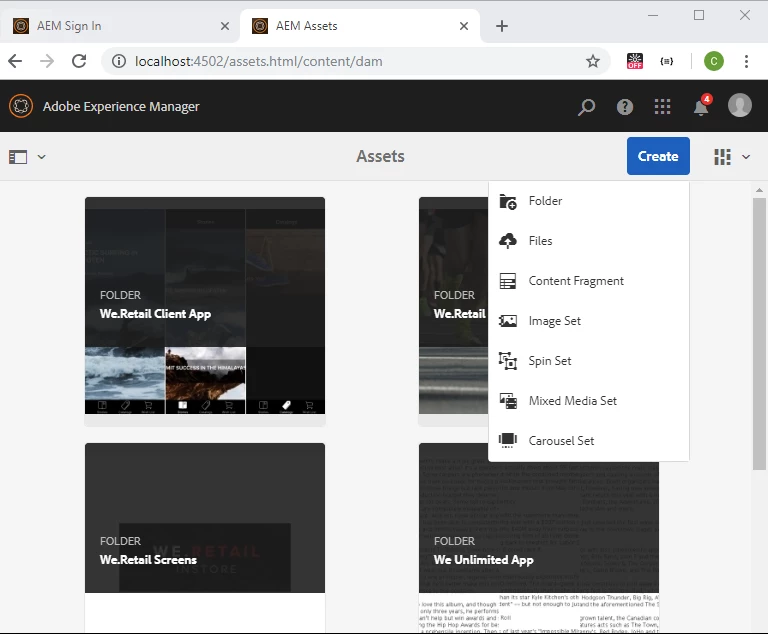
Step04 : Go to http://localhost:4502/assets.html/content/dam

Configuring Dynamic Media - Hybrid mode

https://helpx.adobe.com/ca/experience-manager/6-3/assets/using/config-dynamic.html

Configuring Dynamic Media - Scene7 mode

https://helpx.adobe.com/ca/experience-manager/6-3/assets/using/config-dms7.html

6 replies

Dec 12, 2018 11:42 PM UTC

if you follow the adobe documentation

I think the link below explains how to do it.

https://helpx.adobe.com/experience-manager/6-3/sites/deploying/user-guide.html

Translate
chung_yonge1684AuthorAccepted solution
Level 4
Dec 12, 2018 11:22 PM UTC

We don't need to install the feature pack  for Dynamic Media on AEM 6.3.3.0.

For Configuring Dynamic Media - Hybrid mode

Step01 : cd C:\Adobe\AEM\6.3\Author
Step02 : java -Xms8192m -Xmx8192m -Xss1024k -XX:MaxPermSize=1024m -XX:-UseGCOverheadLimit -Djava.awt.headless=true -Djava.io.tmpdir=C:\Adobe\AEM\cq-temp -jar aem-author-4502.jar -r dynamicmedia

For Configuring Dynamic Media - Scene7 mode

Step01 : cd C:\Adobe\AEM\6.3\Author

Step02 : java -Xms8192m -Xmx8192m -Xss1024k -XX:MaxPermSize=1024m -XX:-UseGCOverheadLimit -Djava.awt.headless=true -Djava.io.tmpdir=C:\Adobe\AEM\cq-temp -jar aem-author-4502.jar -gui -r author, dynamicmedia_scene7 -p 4502

Step03 : Go to http://localhost:4502/aem/start.html

Click [Tools] and click [Assets]

Step04 : Go to http://localhost:4502/assets.html/content/dam

Configuring Dynamic Media - Hybrid mode

https://helpx.adobe.com/ca/experience-manager/6-3/assets/using/config-dynamic.html

Configuring Dynamic Media - Scene7 mode

https://helpx.adobe.com/ca/experience-manager/6-3/assets/using/config-dms7.html

Translate
Level 4
Dec 12, 2018 1:05 PM UTC

Can you show me how to enable Dynamic Media on AEM 6.3.3.0 ?

Translate
smacdonald2008
Level 10
Dec 11, 2018 7:28 PM UTC

For Dynamic Media - accroding to this KB, you need to contact Adobe Support:

Please contact Adobe support to request access and complete setup of your account to enable the features in this feature pack.

I recommend contacting them for information about these service packs as suggested by the docs.

Translate
Level 4
Dec 11, 2018 7:06 PM UTC

I could not find that on package share.

Translate
smacdonald2008
Level 10
Dec 11, 2018 7:00 PM UTC

Most Feature Packages are located on Package Share.

Translate