Why is /foundation/jquery-ui.min.js loading on the Publish instance? | Community
Skip to main content
Level 2
Jul 16, 2020 6:41 PM UTC
Solved

Why is /foundation/jquery-ui.min.js loading on the Publish instance?

We are trying to cleanup some of the unnecessary dependencies we inherited from legacy CQ5.6.1. We noticed there was a list of jquery-ui.min.js/css loading on the public pages. We understand all /libs, /foundation client libraries serve mostly authoring; therefore we want to start removing some of these from publish instance. Primarily the jquery-ui.

Can you help us understand how are we bringing this into the Publish instance?

We checked the following categories:

cq.jquery, jquery, granite.jquery, cq.foundation-main, cq.foundation, jquery.jcarousel, cq.shared and is nowhere to be found neither as dependency nor embed.

Thanks in advance.

This post is no longer active and is closed to new replies. Need help? Start a new post to ask your question.
ChitraMadan
ChitraMadanAccepted solution
New Participant
Jul 16, 2020 10:07 PM UTC

Hi @oscar omar31292027ezxc ,


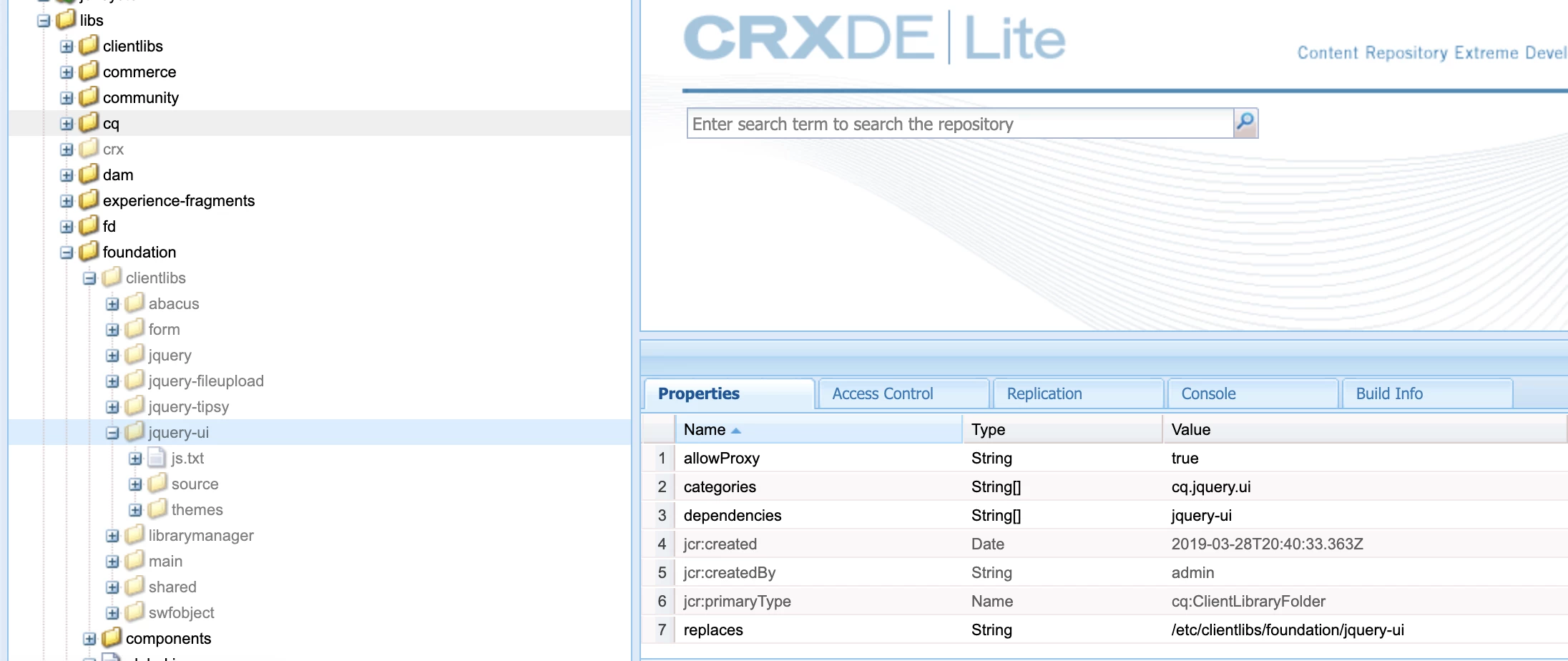
You can find jquery-ui in below location: /libs/foundation/clientlibs/jquery-ui


You must be including this category somewhere in your template.


If you just want to include this in edit mode then you can do something like this:

<sly data-sly-test="${wcmmode.edit}"
data-sly-call="${clientlib.all @ categories = [
'cq.shared',
'cq.foundation-main',
cq.jquery.ui
]
}"></sly>
 

7 replies

Level 2
Aug 14, 2020 3:04 AM UTC
Hey guys, I want to give you an update: So I found out how this cq.jquery-ui.js was brought into publish. Somehow /etc/clientlibs/foundation/personalization was included in one of our custom files, this folder directory carries a long list of libraries that were loading onto the page, one of then was legacy which has cq.jquery-ui as dependency. Also learned that the .accordion method used in our custom js file needs jquery-ui in order to function. I hope it helps someone else with a similar issue.
Translate
Vaibhavi_J
Level 7
Jul 17, 2020 4:33 AM UTC

 Hi @oscar omar31292027ezxc , 

cq.jquery.ui is the category of jquery ui.  You must have included this in your template/component as category or loaded in as embed/dependency. If you are not consuming jquery ui you can remove it. 

Few specific lib example widgets, or authoring ui you don't need it in publisher.As you need it only in author, you can do instance check to know author or publisher and load it accordingly. 

But be careful while removing other OOTB libraries, that can make functionality impact. You must do good analysis before you go ahead. 


Translate
Level 2
Jul 17, 2020 12:39 PM UTC

Thanks for the validation! @vaibhavi_j. It must have been added as dependency since it shows in the head. I was having a hard time finding the reference. I'll look into instance check to see if I can locate the component/element in which is called.

Translate
ChitraMadan
ChitraMadanAccepted solution
New Participant
Jul 16, 2020 10:07 PM UTC

Hi @oscar omar31292027ezxc ,


You can find jquery-ui in below location: /libs/foundation/clientlibs/jquery-ui


You must be including this category somewhere in your template.


If you just want to include this in edit mode then you can do something like this:

<sly data-sly-test="${wcmmode.edit}"
data-sly-call="${clientlib.all @ categories = [
'cq.shared',
'cq.foundation-main',
cq.jquery.ui
]
}"></sly>
 
Translate
Level 2
Jul 17, 2020 12:42 PM UTC

@chitramadan thanks for the tip on how to restrict the lib by mode. This would help if it's really a dependency in author. As mentioned earlier, this was legacy from a previous version.

Translate
sunjot16
Employee
Jul 16, 2020 7:54 PM UTC

There are many clientlibs that are not just specific to authoring. They are also related to how your content/components appear on the UI, lazy loading of assets, etc. If you remove any clientlibs that might be required, it would mess up your UI. You would have to replicate them from author and even rebuilt clientlibs, if needed.

Just do a thorough testing when you perform the cleanup, such that you don't miss anything that could lead to potential issues in the future.

Translate