Solved
WKND Sites Project getting connection refused for ui.apps
I am doing the tutorial link . So after cloning and checking all other stuffs I run
mvn clean install -PautoInstallPackagePublish
but I get
[ERROR] Failed to execute goal com.day.jcr.vault:content-package-maven-plugin:1.0.2:install (default-cli) on project aem-guides-wknd.ui.apps: Connection refused (Connection refused) -> [Help 1]
org.apache.maven.lifecycle.LifecycleExecutionException: Failed to execute goal com.day.jcr.vault:content-package-maven-plugin:1.0.2:install (default-cli) on project aem-guides-wknd.ui.apps: Connection refused (Connection refused)
    at org.apache.maven.lifecycle.internal.MojoExecutor.execute (MojoExecutor.java:215)
    at org.apache.maven.lifecycle.internal.MojoExecutor.execute (MojoExecutor.java:156)
    at org.apache.maven.lifecycle.internal.MojoExecutor.execute (MojoExecutor.java:148)
    at org.apache.maven.lifecycle.internal.LifecycleModuleBuilder.buildProject (LifecycleModuleBuilder.java:117)
    at org.apache.maven.lifecycle.internal.LifecycleModuleBuilder.buildProject (LifecycleModuleBuilder.java:81)
    at org.apache.maven.lifecycle.internal.builder.singlethreaded.SingleThreadedBuilder.build (SingleThreadedBuilder.java:56)
    at org.apache.maven.lifecycle.internal.LifecycleStarter.execute (LifecycleStarter.java:128)
    at org.apache.maven.DefaultMaven.doExecute (DefaultMaven.java:305)
    at org.apache.maven.DefaultMaven.doExecute (DefaultMaven.java:192)
    at org.apache.maven.DefaultMaven.execute (DefaultMaven.java:105)
    at org.apache.maven.cli.MavenCli.execute (MavenCli.java:956)
    at org.apache.maven.cli.MavenCli.doMain (MavenCli.java:288)
    at org.apache.maven.cli.MavenCli.main (MavenCli.java:192)
    at jdk.internal.reflect.NativeMethodAccessorImpl.invoke0 (Native Method)
    at jdk.internal.reflect.NativeMethodAccessorImpl.invoke (NativeMethodAccessorImpl.java:62)
    at jdk.internal.reflect.DelegatingMethodAccessorImpl.invoke (DelegatingMethodAccessorImpl.java:43)
    at java.lang.reflect.Method.invoke (Method.java:566)
    at org.codehaus.plexus.classworlds.launcher.Launcher.launchEnhanced (Launcher.java:289)
    at org.codehaus.plexus.classworlds.launcher.Launcher.launch (Launcher.java:229)
    at org.codehaus.plexus.classworlds.launcher.Launcher.mainWithExitCode (Launcher.java:415)
    at org.codehaus.plexus.classworlds.launcher.Launcher.main (Launcher.java:356)
Caused by: org.apache.maven.plugin.MojoExecutionException: Connection refused (Connection refused)
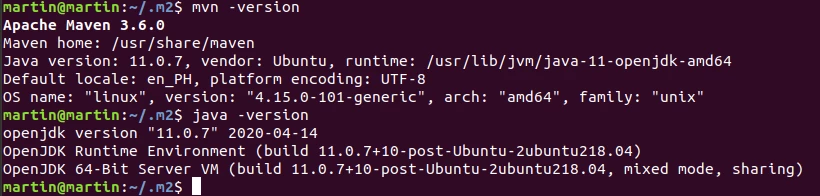
Maven and Java versions:
EDIT: pom.xml
<pre>
<properties>
<aem.host>localhost</aem.host>
<aem.port>4502</aem.port>
        <aem.publish.host>localhost</aem.publish.host>
        <aem.publish.port>4503</aem.publish.port>
        <sling.user>admin</sling.user>
        <sling.password>admin</sling.password>
<vault.user>admin</vault.user>
<vault.password>admin</vault.password>
<core.wcm.components.version>2.8.0</core.wcm.components.version>
<bnd.version>4.2.0</bnd.version>
<project.build.sourceEncoding>UTF-8</project.build.sourceEncoding>
<project.reporting.outputEncoding>UTF-8</project.reporting.outputEncoding>
</properties>
</pre>