Workflow request for Activation | Community
Skip to main content
robertol6836527
New Participant
November 23, 2023
Solved

Workflow request for Activation

  • November 23, 2023
  • 3 replies
  • 1158 views

Good morning,

on my Adobe Aem Cloud instance there is the page /content/portal/it/page where the "Editor" user does not have publishing rights.

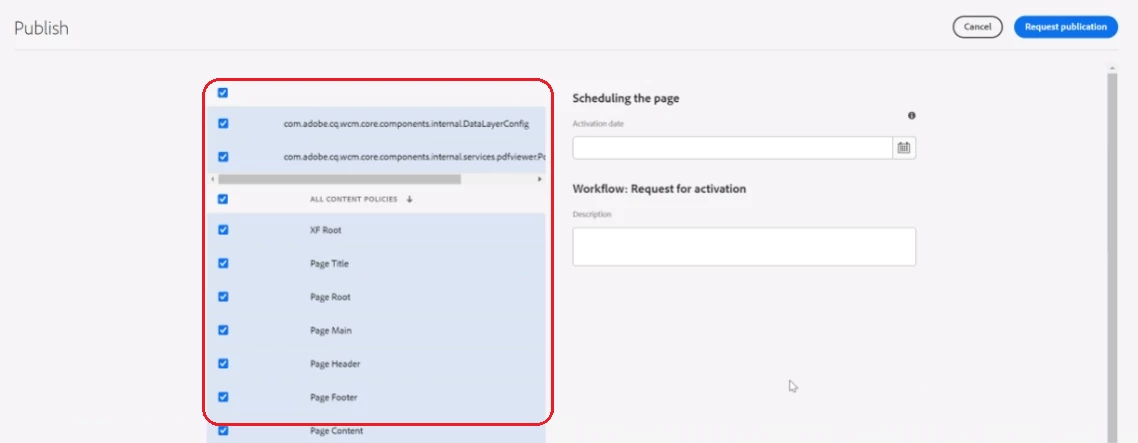
When the "Editor" user requests to publish the page, the following screen appears:


I would like to delete all the entries in the left column so that the CMS sends only one activation request notification, how can I do this?


Thank you.


This post is no longer active and is closed to new replies. Need help? Start a new post to ask your question.
Best answer by aanchal-sikka

@robertol6836527 


@shashi_mulugu  is suggesting that the entries that you are noticing have modification date > last publish. All of these resources are used by the page. Thus, when a page is published, all these updated references are also being requested for publish. This is essential, to assure that publish has the same view as author. Any missing reference may cause discrepancy.

One these referenced resources are published, they would no longer appear on the screen, if s page is requested again.

Also, please check if these referenced resources are deployed via Code. If yes, these are modified on each deployment, the you would notice these popping up in manage publication after each deployment.


Also, please remove following and similar properties checked-in for referenced resources:

jcr:lastModified="{Date}2023-11-21T10:31:02.472+05:30"
jcr:lastModifiedBy="admin"

Similarly for replication.

3 replies

kautuk_sahni
Employee
November 28, 2023

@robertol6836527 

Did you find the suggestions from users helpful? Please let us know if more information is required. Otherwise, please mark the answer as correct for posterity. If you have found out solution yourself, please share it with the community.

Kautuk Sahni
aanchal-sikka
aanchal-sikkaAccepted solution
New Participant
November 24, 2023

@robertol6836527 


@shashi_mulugu  is suggesting that the entries that you are noticing have modification date > last publish. All of these resources are used by the page. Thus, when a page is published, all these updated references are also being requested for publish. This is essential, to assure that publish has the same view as author. Any missing reference may cause discrepancy.

One these referenced resources are published, they would no longer appear on the screen, if s page is requested again.

Also, please check if these referenced resources are deployed via Code. If yes, these are modified on each deployment, the you would notice these popping up in manage publication after each deployment.


Also, please remove following and similar properties checked-in for referenced resources:

jcr:lastModified="{Date}2023-11-21T10:31:02.472+05:30"
jcr:lastModifiedBy="admin"

Similarly for replication.
Aanchal Sikka
Shashi_Mulugu
New Participant
November 23, 2023

@robertol6836527 it could be because when you check in code/configuration/content to your git repository you have checked in along with jcr:created/modified/replicated or sling:created/modified properties..


So when a user trying to publish page, aem is trying to see if all dependencies of page is already published latest, if not it would suggest to include them along with page requests.


Kindly recheck the files in your code base, and remove above said properties.

robertol6836527
New Participant
November 23, 2023

Hi,
Could you give me an example of the wrong configuration to change ?
Thank you
