XDP template - json data (6.4) | Community
Skip to main content
tys_seyffert
New Participant
August 22, 2018
Solved

XDP template - json data (6.4)

  • August 22, 2018
  • 4 replies
  • 2002 views

Hi,

I have been working on 6.2 for some years now. However I looked at 6.4 features and saw that some forms can use json as its form model. I wanted to know if this will also be possible with XDP form templates?

Thanks

Tys
This post is no longer active and is closed to new replies. Need help? Start a new post to ask your question.
Best answer by Mayank_Gandhi

Hi There,

The feature is available for Adaptive forms[1]. When you create an Adaptive form the form model can be from one of the below:

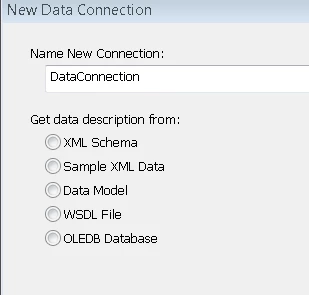
If you are using designer the data view can be created using:

[1]  https://helpx.adobe.com/experience-manager/6-3/forms/using/creating-adaptive-form.html

So, the answer to the question would be that if you are using AF you can use the JSON to create the data binding but form can have only one Form Model selected .

4 replies

tys_seyffert
New Participant
August 22, 2018

Thanks so much. We have a big footprint with Reader Extended PDF's so we always require our XDP as a departure point.

Mayank_Gandhi
Employee
August 22, 2018

Correct for designing XDP and creating the field binding you have to convert json to XML and use it further. But going forward you may explore the Functionality available on Adaptive forms side. Introduction of FDM(Form Data Model) in 6.3 peered with the Adaptive form gives you high designing and modelling capabilities. You can leverage fragments, scripting , styling and HTML rendering also with OOTB functions and yet create powerful forms easily.

tys_seyffert
New Participant
August 22, 2018

Thanks for the response. Just to be clear, we cannot yet merge XDP with json without a conversion to XML?

Mayank_Gandhi
Mayank_GandhiAccepted solution
Employee
August 22, 2018

Hi There,

The feature is available for Adaptive forms[1]. When you create an Adaptive form the form model can be from one of the below:

If you are using designer the data view can be created using:

[1]  https://helpx.adobe.com/experience-manager/6-3/forms/using/creating-adaptive-form.html

So, the answer to the question would be that if you are using AF you can use the JSON to create the data binding but form can have only one Form Model selected .