[xssprotection] How to allow "transform" style for inline CSS ? | Community
Skip to main content
New Participant
April 30, 2024
Solved

[xssprotection] How to allow "transform" style for inline CSS ?

  • April 30, 2024
  • 3 replies
  • 1446 views

Hi guys ,


I am allowing SVG graphic attributes and elements ( https://developer.mozilla.org/en-US/docs/Web/SVG )  in /apps/cq/xssprotection/config.xml .

But I am not able to allow transform property for CSS . 

I have tried adding the below code in embed component as HTML but still AEM is trimming that piece of code ( Please find code and screenshots below  ) . 

<svg viewbox="0 0 420 200" xmlns="http://www.w3.org/2000/svg"> <filter id="noise1" x="0" y="0" width="100%" height="100%"> <feturbulence basefrequency="0.025" /> </filter> <filter id="noise2" x="0" y="0" width="100%" height="100%"> <feturbulence basefrequency="0.05" /> </filter> <rect x="0" y="0" width="200" height="200" style="filter: url(#noise1);" ></rect> <rect x="0" y="0" width="200" height="200" style="filter: url(#noise2); transform: translateX(220px);" ></rect> </svg>


HTML Code in browser  -- 
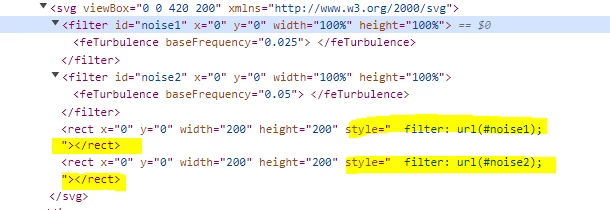


tried code under <css-rules> tag --> 


<property name="transform"> <literal-list> <literal value="translateX"/> </literal-list> <regexp-list> <regexp name="anything"/> </regexp-list> </property>


Can anyone please help regarding this issue ? 

Thank You


This post is no longer active and is closed to new replies. Need help? Start a new post to ask your question.
Best answer by newbie34

Hi @gkalyan , I can't modify server's headers and <meta> tag solution is also not resolving the issue .

So , what I understand is /libs/cq/xssprotection/config.xml ( overlayed by /apps/cq/xssprotection/config.xml ) provides XSS protection mechanism  which filters out all user-supplied content ( in my case , code is being added in embed component  as HTML ) . 

And by default there is no rule provided for "transform" property and that's why the same property is getting removed in browser .

3 replies

New Participant
May 15, 2024

Has anyone found a solution to this?

gkalyan
New Participant
April 30, 2024

HI @newbie34 

You can try Implementing a CSP header in your web server configuration or meta tags in your HTML. You can specify a policy that allows inline styles, including the transform property.


You can configure your web server to return the Content-Security-Policy HTTP header with the rules 

Content-Security-Policy: default-src 'self'; style-src 'self' 'unsafe-inline';


If you cannot modify your server’s headers, you can use a <meta> tag in your HTML document like below:

<meta http-equiv="Content-Security-Policy" content="default-src 'self'; style-src 'self' 'unsafe-inline';">


Reference: https://developer.mozilla.org/en-US/docs/Web/HTTP/CSP

gkalyan
New Participant
May 2, 2024

@newbie34 Did you try this option of setting the HTTP header and meta tags?


Interesting to see if it resolved or something else is still blocking it.

newbie34AuthorAccepted solution
New Participant
May 3, 2024

Hi @gkalyan , I can't modify server's headers and <meta> tag solution is also not resolving the issue .

So , what I understand is /libs/cq/xssprotection/config.xml ( overlayed by /apps/cq/xssprotection/config.xml ) provides XSS protection mechanism  which filters out all user-supplied content ( in my case , code is being added in embed component  as HTML ) . 

And by default there is no rule provided for "transform" property and that's why the same property is getting removed in browser .

sravs
New Participant
April 30, 2024

Hi @newbie34 , Can you please try by updating /apps/cq/xssprotection/config.xml as follows.


Add the regex pattern for transform property under <common-regexps> as below


<regexp name="CSStransform" value="translateX\((-|\+)?0|(-|\+)?([0-9]+(\.[0-9]+)?)(em|ex|px|in|cm|mm|pt|pc))"/>


and update <css-rules> tag  with 


<property name="transform"> <regexp-list> <regexp name="CSStransform"/> </regexp-list> </property>


newbie34Author
New Participant
May 2, 2024

Thank you @sravs  for suggestion , but still code is not reflecting in browser .

And I have also tried with translateX in CSStransform value .