YouTube Integration with AEM Dam for AEM Cloud | Community
Skip to main content
Level 2
January 30, 2025
Solved

YouTube Integration with AEM Dam for AEM Cloud

In AEM Cloud, I want to share AEM dam stored videos to YouTube using custom servlet which is using google API's
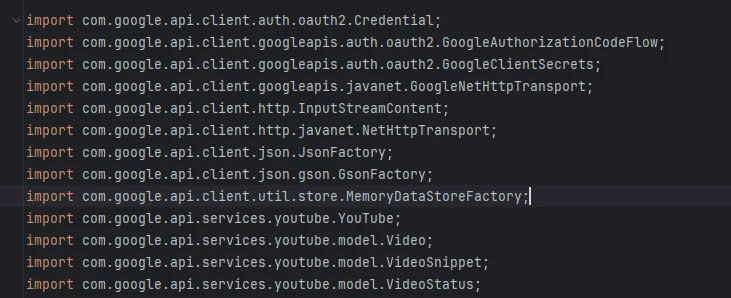
I have added all the required dependences in core pom.xml and also there no code issues 
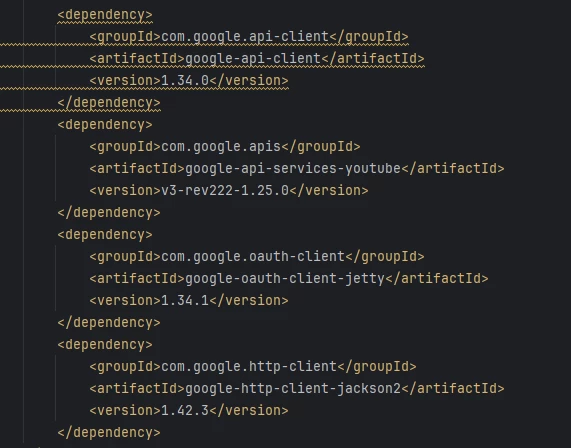
but i am facing issues with Bundle, my project bundle is not getting activated, its in installed state and showing following errors
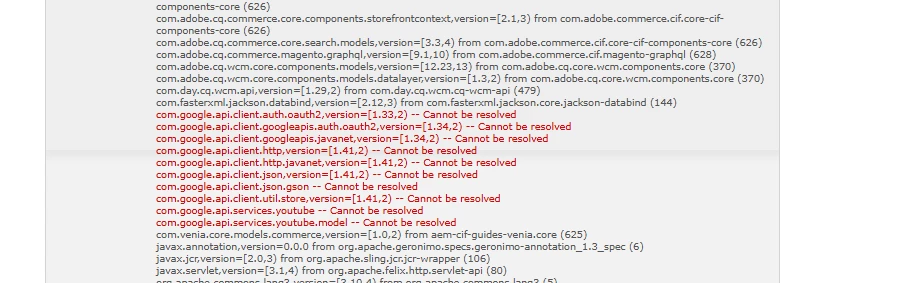
com.google.api.client.auth.oauth2,version=[1.33,2) -- Cannot be resolved
com.google.api.client.googleapis.auth.oauth2,version=[1.34,2) -- Cannot be resolved
com.google.api.client.googleapis.javanet,version=[1.34,2) -- Cannot be resolved
com.google.api.client.http,version=[1.41,2) -- Cannot be resolved
com.google.api.client.http.javanet,version=[1.41,2) -- Cannot be resolved
com.google.api.client.json,version=[1.41,2) -- Cannot be resolved
com.google.api.client.json.gson -- Cannot be resolved
com.google.api.client.util.store,version=[1.41,2) -- Cannot be resolved
com.google.api.services.youtube -- Cannot be resolved
com.google.api.services.youtube.model -- Cannot be resolved

i tried to download some of the google dependences as jar file and install in Web Console Bundles manually, but some google jar files are showing 500 error
HTTP ERROR 500 Server Error
URI: /system/console/bundles
STATUS: 500
MESSAGE: Server Error
SERVLET: org.apache.felix.http.base.internal.dispatch.DispatcherServlet-777d920c
CAUSED BY: java.io.IOException: Bundle-SymbolicName header missing, cannot install bundle

i'm using latest AEM cloud version Adobe Experience Manager 2025.1.19149.20250116T154450Z-241100

This post is no longer active and is closed to new replies. Need help? Start a new post to ask your question.
arunpatidar
arunpatidarAccepted solution
New Participant
January 31, 2025

Hi @san_11 

Make sure you installed those jar as bundle not plain jar.

https://experienceleague.adobe.com/en/docs/experience-cloud-kcs/kbarticles/ka-17475 

Arun Patidar

4 replies

chaudharynick
Level 4
February 3, 2025

Hi,


Can you try adding the scope as provided in the core pom.xml for this dependency and add all the other required dependencies in core pom as well with the provided scope


<dependency>
    <groupId>com.google.api-client</groupId>
    <artifactId>google-api-client</artifactId>
    <scope>provided</scope>
</dependency>

 
Translate
AmitVishwakarma
Level 1
February 1, 2025

To resolve the issue with your AEM Cloud integration with YouTube, follow these steps:

1. Convert JARs to OSGI Bundles: Ensure you are installing the dependencies as OSGI bundles, not plain JARs. AEM requires OSGI bundles for proper integration, and simply adding JARs will not work.

2. Check Missing Bundle-SymbolicName Header: The error indicates the missing Bundle-SymbolicName header. Ensure the Google API JARs are properly packaged as OSGI bundles with the necessary headers for AEM to recognize them.

3. Use Maven: Instead of manually installing the JARs, add the correct Maven dependencies to your project’s pom.xml file for Google API libraries. This way, Maven will handle packaging and versioning automatically, ensuring smooth integration.

You can follow this guide https://experienceleague.adobe.com/en/docs/experience-cloud-kcs/kbarticles/ka-17475 for further steps.

Translate
Harwinder-singh
New Participant
January 31, 2025

@san_11 You will have to convert the jars into an OSGI bundle. OSGI container needs bundles and not plain JARs.

Translate
arunpatidar
arunpatidarAccepted solution
New Participant
January 31, 2025

Hi @san_11 

Make sure you installed those jar as bundle not plain jar.

https://experienceleague.adobe.com/en/docs/experience-cloud-kcs/kbarticles/ka-17475 

Translate
Arun Patidar