Custom Action Authentication | Community
Skip to main content
New Participant
December 20, 2023
Solved

Custom Action Authentication

  • December 20, 2023
  • 4 replies
  • 4024 views

Hi All,


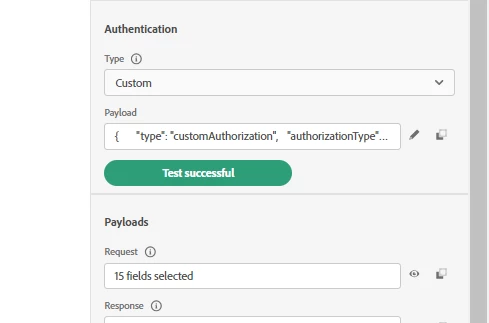
I am trying to make a third party API call via custom action. I added the required authentication details and the test authentication is successful as in the below screenshot. Below is the Authentication payload used

{
"type": "customAuthorization",
"authorizationType": "Bearer",
"endpoint": "//url//",
"method": "POST",
"headers": {},
"body": {
"bodyType": "form",
"bodyParams": {
"grant_type": "client_credentials",
"client_id": "//client_id//",
"client_secret": "//client_secret",
"scope": "//scope//"
}
},
"tokenInResponse": "response",
"cacheDuration": {
"duration": 1,
"timeUnit": "hours"
}
}
 

But once I add this custom action into a journey it is throwing me HTTP 500 error like below
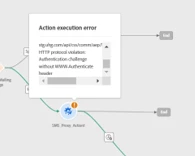
Error: HTTP 500

Message: can't call url <endpoint url> . HTTP protocol violation. Authentication challenge without WWW-Authenticate  Header.


Also observed that once I added the custom action to the very first journey, I see the same issue but it got resolved by itself after after a couple of days and started working fine without any error. Now I am trying to add the same custom action with no changes into a different journey, and I see this issue again.

Since we are using authenticationType - Bearer, this will add Authentication header to the api call, and is it needed to add it again in the api header ? 

Any help on the root cause of this issue ?

Best answer by IvanMi1

@d_g_n111 this seems like a possible bug. Can you file a ticket with support to check? 

4 replies

New Participant
January 21, 2025

Hi all,

This is not a bug. Since your authentication test is successful, it indicates that your authentication endpoint is returning a valid response.

However, the error suggests that the subsequent request requiring the bearer token is missing it.

You need to ensure that the tokenInResponse field correctly references the bearer token from your authentication response. The correct value should be:


"tokenInResponse": "json://<your bearer node>"


For example, if your authentication response looks like this:


{ "access_token": "f05b6a19-c104-6547-64654-618135b27deb", "scope": "openid", "id_token": "xxxxxxxxxxxxxxxxxxxxxxxxxxxxxxxxxxxxxxxxxxxx", "token_type": "Bearer", "expires_in": 6887 }


Then the correct value for tokenInResponse would be:


"tokenInResponse": "json://id_token"


This ensures that the system correctly extracts and uses the bearer token for authentication.


Regarding your question about adding the Authorization header manually:

  • If the authentication mechanism is already adding the Authorization header automatically, you typically do not need to add it again manually.
  • However, if the issue persists, you may want to inspect the outgoing request headers and verify if the Authorization header is indeed present.

Since you've observed this issue resolving itself after some time in a previous journey, it could also be related to caching or propagation delays. If the problem persists, checking the API logs or debugging the request headers would help pinpoint the exact cause.

I hope this helps! Let me know if you need further clarification. 😊


Cheers,
Ayat Sajedi
Merkle Netherlands


ReenaJohn
New Participant
January 23, 2024

HI @d_g_n111 ,


Were you able to overcome this error that you were encountering. We are also facing a similar error and your inputs if any would be of great help.

Employee
March 20, 2024

Same here . Is it fixed in your end ?

ReenaJohn
New Participant
March 20, 2024

@iamromioghosh - The custom action authentication didn't seem to work for us for Content Type as url encoded though the test was successful and so we had to resort to Adobe IO to do the API calls.

Mohan_Dugganab
Employee
December 20, 2023

@d_g_n111 

Can you update the cacheDuration as following in the custom authentication payload and see if that works ?

"cacheDuration":{
"expiryInResponse":"json://expires_in",
"timeUnit": "hours"
}

d_G_n111Author
New Participant
December 20, 2023

I dont think this is something related to caching, as I have completely removed caching and tested, but it is still the same. 

IvanMi1Accepted solution
Employee
December 20, 2023

@d_g_n111 this seems like a possible bug. Can you file a ticket with support to check?