Exercise 7, Part 3 Error When Previewing HTML | Community
Skip to main content
New Participant
May 27, 2014
Solved

Exercise 7, Part 3 Error When Previewing HTML

  • May 27, 2014
  • 13 replies
  • 8109 views

This refers to Exercise 7, Part 3 Composing Dynamic Content.

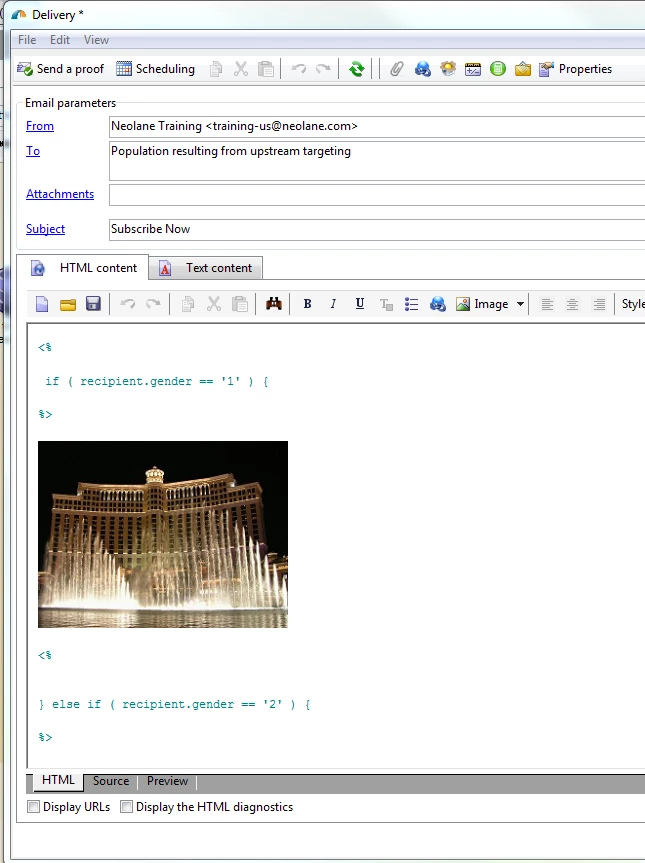
I keep receiving the error below when I try to complete Exercise 7, Part 3. This occurs when I insert an image from the library. Anyone else experiencing any issues with this lesson?

Delivery:

Error Message:

This post is no longer active and is closed to new replies. Need help? Start a new post to ask your question.
Best answer by Linda_Stinson

In fact, this is a known bug SD7451 that was fixed in build 8104.

The bug is that editing the HTML content introduces erroneous/extraneous <PRE></PRE> tags into the content. You can go to the Source tab (at the bottom of the delivery editor) and remove them, however if you  have already confirmed the delivery, you cannot change its content. At that point the delivery will fail each retry until it reaches the end of the validity period. So don't confirm if your preview is failing, unless the tags got inserted after you previewed the content? At the office hours, I can show you how to view/correct the sources, as well as an alternate way of creating dynamic content with the digital content editor or DCE available in 6.1.

Two bonus questions:

Who can tell me the Build number of our training environment? (Both the server and the client.)

Where is the validity period configured on the delivery?
13 replies

Linda_Stinson
Employee
May 30, 2014

Todd your error is due to the same bug!

Linda_Stinson
Employee
May 30, 2014

Hi Todd, I will look at this now. For anyone who is working through the conditional content exercise in the Dynamic Content lesson, I recommend that you instead watch and work through the DCE demo that comes after it as you might not be able to complete the conditional content exercise due to a bug in this build of the server.

May 30, 2014

...and upon trashing it and rebuilding, I get a new error, seemingly related to the inclusion of a library image (is this an image hosting issue?):

Error while evaluating document

Error while compiling script 'content htmlContent' line 17: syntax error (line='</PRE>document.writeraw(" \n<P></P>\n<P><IMG border=0 alt=\"Las Vegas - Bellagio\" \nsrc=\"http://training13.us.neolane.net/res/campaign/las_vegas.jpg\" width=250 \nheight=187></P>\n<P>"); ' token='</PRE>document.writeraw(" \n<P></P>\n<P><IMG border=0 alt=\"Las Vegas - Bellagio\" \nsrc=\"http://training13.us.neolane.net/res/campaign/las_vegas.jpg\" width=250 \nheight=187></P>\n<P>"); ').

JavaScript: error while compiling script 'content htmlContent'.

Unable to compile script (content htmlContent).

May 30, 2014

Looks like I've already missed the Thursday session, but I'm getting a different error anyway:

Error while evaluating document

The 'temp:deliveryEmail-all' temporary schema is not defined in the current context.

The link to individuals defined in the delivery mapping ('') is invalid. Please check the mapping configuration and make sure that the necessary fields have been added in the nms:broadLog schema (@customerId1...).

PostgreSQL error: ERROR: table "wkdlv_831795_19e11" does not exist

SQL statement 'DROP TABLE wkDlv_831795_19e11' could not be executed.

PostgreSQL error: ERROR: table "wkdlv_831795_19e11_excl" does not exist

SQL statement 'DROP TABLE wkDlv_831795_19e11_Excl' could not be executed.

If we can touch on this during the Friday live session, that would be great.

Linda_Stinson
Employee
May 29, 2014

No problem! I thought you figured out another way to view the client build.

jennifer_sulliv
New Participant
May 29, 2014

Ok - thank you... I was right there and I missed it. :-(  Now I know.  :-)

Linda_Stinson
Employee
May 29, 2014

You are partly right Jennifer, thanks for answering the question!

If you go to the Help menu on the Tool bar and select About... it will show both the client console build and the Application server build.

The campaign start and end dates default to today and today + validity period, but the validity period for the Delivery controls how many days retry is attempted when deliveries fail with a soft bounce. It is set as part of the delivery properties.

jennifer_sulliv
New Participant
May 29, 2014

In the Client console our version is 6.1.0 and the build is 8034.

I am not sure how to tell the server build number....

The validity period is the time between the start and end date.

Linda_Stinson
Linda_StinsonAccepted solution
Employee
May 28, 2014

In fact, this is a known bug SD7451 that was fixed in build 8104.

The bug is that editing the HTML content introduces erroneous/extraneous <PRE></PRE> tags into the content. You can go to the Source tab (at the bottom of the delivery editor) and remove them, however if you  have already confirmed the delivery, you cannot change its content. At that point the delivery will fail each retry until it reaches the end of the validity period. So don't confirm if your preview is failing, unless the tags got inserted after you previewed the content? At the office hours, I can show you how to view/correct the sources, as well as an alternate way of creating dynamic content with the digital content editor or DCE available in 6.1.

Two bonus questions:

Who can tell me the Build number of our training environment? (Both the server and the client.)

Where is the validity period configured on the delivery?

Linda_Stinson
Employee
May 28, 2014

Great, meet me on our weekly connect room and conference call number and we will work through this example. Anyone else who wants to join, feel free. This will be at 6 PM Eastern, 3 PM Pacific, if I am understanding my time zones correctly...