Sending report via workflow | Community
Skip to main content
priyal_b
New Participant
December 12, 2017
Solved

Sending report via workflow

  • December 12, 2017
  • 21 replies
  • 9059 views

Team,

Is there any way to send a report via workflow ?

I see there is a topic about this: Sending a report to a list

I am trying different way via normal delivery and few of recipients but trying to incorporate the java script from this topic within workflow but its giving an error.

----

js JST-310000 Error while compiling script 'SWKF9679/js' line 8: missing = in XML attribute (line='_context_"global"/> ' token='"global"/> ').

----

Is there any way to incorporate out of the box report within delivery as an (calculated) attachment?

Thanks!

This post is no longer active and is closed to new replies. Need help? Start a new post to ask your question.
Best answer by Jean-Serge_Biro

Hi Alistairk,


Everything can be done, but it is often tricky... fortunately there is the debug view to see the context elements/attributes (and so parameters/values available asURL GET parameters).

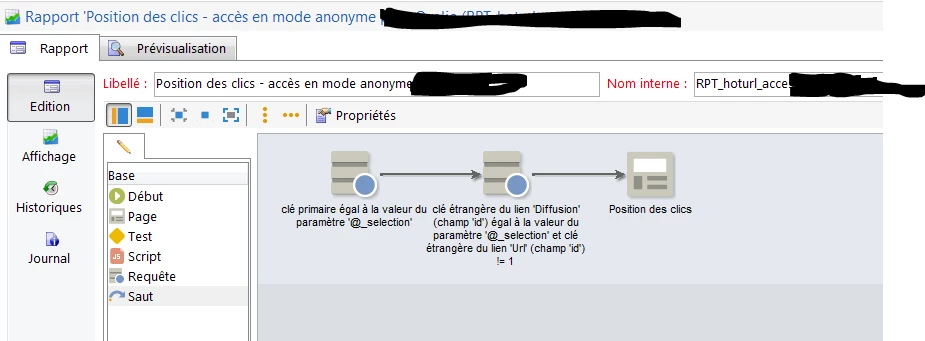
For instance, if you need a report specific to a delivery, but without having a Adobe Campaign operator (anonymous mode), you can achieve the query activity in the report with a deliveryId parameter (URL) and deal with it as is:

http://yourdomain/report/RPT_hoturl_anonymous_access?_selection=770392130

Regards

JS

21 replies

Jean-Serge_Biro
New Participant
February 2, 2018

Hi Priyal,


The behavior is normal, because you defined the _context parameter with "global" value.


To be able to restrict/select to a or some deliveries, you must firstly allow your report properties not be only global but contextual:

Then, the report workflow must deal accordingly to you delivery/several deliveries/global context.
See for instance the factory report statisticsPerDelivery (with Test activity) in case of both global or selected deliveries behavior).

If only one or several deliveries are allowed (not global case) then refer for example to the factory deliverySending report.
In all cases the first Query activity should have the Filter with context checkbox selected:

Of course, in some scenarios (for example doing code in Javascript activity), you can manage the defined records to select programmatically.

By the way, if you could mark our replies as helpful and mark it as correct when completed and satisfactory, it would be appreciated so we can see in the forum list that the ticket is not to be dealt with.
Many thanks in advance.


Regards
J-Serge

florentlb
New Participant
February 2, 2018

Hi Priyal,

Not sure if there's a parameter I don't know much about v6 reports. I'd have assumed that it was be specified in the "context".

Florent

priyal_b
priyal_bAuthor
New Participant
January 24, 2018

Hi florentlb,

Sorry for delayed response, yes now the script is working but for XLS with Adobe's resource help, we were able to fix the java script and run and email a report automatically.

Initially I thought this process would associate report only related to particular campaign/workflow its built into, but it captures the report for all the emails that went out from Adobe until that time. for example if I were to specify "deliveryfeedback" report, is there any way to specify the campaign name or delivery name based off which report will be calculated ?

If there is some parameter that can be passed in the java script to mention a campaign/delivery internal name or label to to restrict this automated report to a campaign/delivery?

Thanks in advance!

priyal_b
priyal_bAuthor
New Participant
January 24, 2018

Hi florentlb,

Sorry for delayed response, yes now the script is working but for XLS with Adobe's resource help, we were able to fix the java script and run and email a report automatically.

Initially I thought this process would associate report only related to particular campaign/workflow its built into, but it captures the report for all the emails that went out from Adobe until that time. for example if I were to specify "deliveryfeedback" report, is there any way to specify the campaign name or delivery name based off which report will be calculated ?

If there is some parameter that can be passed in the java script to mention a campaign/delivery internal name or label to to restrict this automated report to a campaign/delivery?

Thanks in advance!

florentlb
New Participant
January 15, 2018

Hi Priyal,

Were you able to get this to work?

Let us know,

Florent

florentlb
New Participant
January 2, 2018

Hi Priyal,

As Jean-Serge mentioned, given the error, it seems your Campaign application server is installed on Linux. So you'd want to use paths that can be accessed from the server. Please check that with your admin or with Adobe's support team if your instance is hosted by Adobe.

Florent

Jean-Serge_Biro
New Participant
December 13, 2017

Hi Priyal,

I don't understand, indeed. The path /usr/local/neolane/v6 is typical of a Linux installation.
Please check with your admin.

Regards

JS

priyal_b
priyal_bAuthor
New Participant
December 12, 2017

Actually, I am trying to include the out of box report from Adobe.

and I am using windows platform.

Any suggestions?

Jean-Serge_Biro
New Participant
December 12, 2017

Yes, the documentation example was given with a Windows server in mind, so the syntax such as D:\Temp folder (if you don't give a full path, it is written in the workflow process folder).

On linux, you would have a folder such as /tmp/blablabla/ (no C:\ drive letter); or let it in the wkf subfolder, as you prefer.
For my part, I prefer defining specific folders outside the Adobe Campaign path. Do what is convenient for you

Regards
JS

priyal_b
priyal_bAuthor
New Participant
December 12, 2017

Thanks Jean!

Now I am getting another error for export.

here is the javacode I am using:, not sure if the export error is because campaign cannot write to local c:\\?

Should it be a server url (adobe cloud may be?)

Thanks!